AWS credential bugs breaking setup scripts in automated environments
Rolling out cloud-dependent automation scripts across our team always brings a fresh wave of configuration friction, especially when dealing with environment provisioning. During a recent deployment phase utilizing the scripts/setup.sh utility, our group ran into persistent AWS CLI authentication hurdles that halted progress completely. Even though the terminal output flashed a reassuring "Setup completed successfully" message at the tail end of the execution, subsequent AWS-related commands immediately threw errors, proving the underlying environment was anything but ready.
If you are seeing identical authorization failures during your provisioning run, do not trust the success exit code of the wrapper script. You need to inspect your active session tokens and environment variable exports manually before attempting to run downstream tasks.
Diagnosing the Authentication Failures
The failure manifested as a trio of distinct error messages printed directly to the console during the execution of the AWS configuration blocks.
- Invalid or expired security token: The temporary credentials passed via the session had aged out or were rejected by the security token service.
- Malformed authorization headers: The signature calculation failed due to an unexpected character or incorrect formatting in the exported credential variables.
- Missing or incorrect AWS Access Key: The shell environment lacked the mandatory variables entirely, or fell back to an unconfigured default profile.
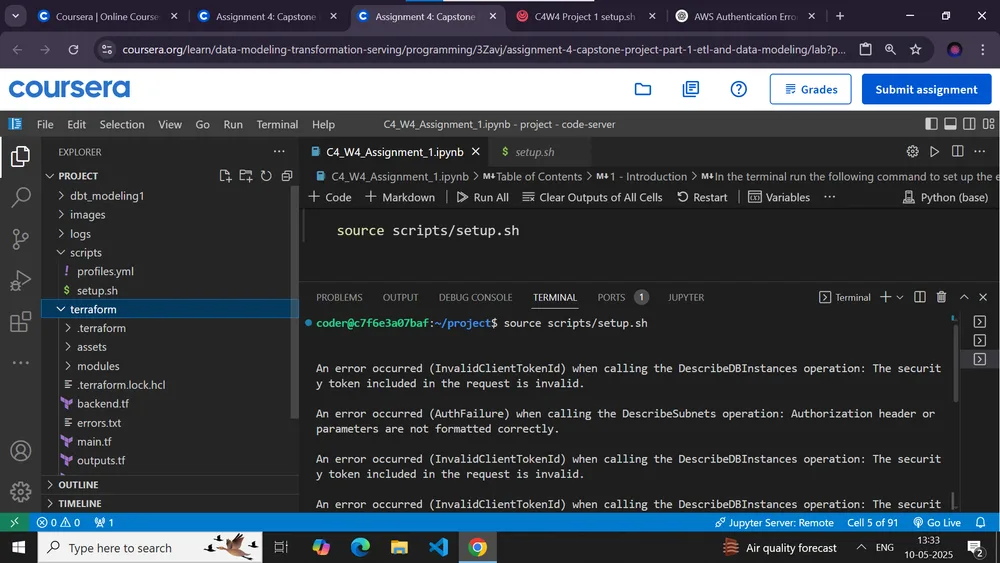
These symptoms point directly to a disconnect between how the local shell session stores authentication data and how the automation script attempts to consume it. When a provisioning script runs under elevated permissions or within an isolated container context, it frequently drops inherited environment variables unless they are explicitly passed down or bound to a persistent configuration file.
Resolving Credential Mismatches in Automated Environments
When an automation pipeline reports a successful finish while underlying cloud calls fail, the root cause usually traces back to silent failure handling within the script itself. Many setup scripts use generic error-catching wrappers that echo success banners even if non-critical tool initializations return a non-zero exit code.
To bypass this roadblock and get your local development or staging environment into a working state, follow these diagnostic steps:
- Verify your active identity by running
aws sts get-caller-identitydirectly in your terminal outside the context of the setup script. If this command fails with an explicit access denied or signature mismatch, your local credentials file located at~/.aws/credentialsor your exported session environment variables need immediate refreshment. - Check if your shell session relies on temporary security tokens generated by single sign-on or an internal enterprise portal. These tokens often expire within a narrow window, and if your setup script takes longer than expected to download dependencies or build containers, the token will invalidate mid-run.
- Export your keys explicitly in the current shell session using standard environment variables before executing the script again:
export AWS_ACCESS_KEY_ID="your_access_key"
export AWS_SECRET_ACCESS_KEY="your_secret_key"
export AWS_SESSION_TOKEN="your_session_token"
If your workflow requires managing multiple distinct communities or isolated client environments on self-hosted infrastructure, keeping track of separate cloud identities can become tedious. While some teams prefer managing raw infrastructure configuration files manually, others look toward dedicated community platforms that abstract away server management overhead entirely. For instance, teams deploying discussion spaces often evaluate self-hosted setups versus managed hosting providers to minimize environment provisioning headaches.
Preventing Silent Script Failures
The most frustrating part of this incident was the false positive generated by the script reporting success despite broken AWS connectivity. When writing or modifying deployment scripts, always ensure that critical prerequisite checks halt execution immediately rather than merely logging a warning. Adding explicit exit conditions after cloud CLI checks prevents developers from wasting time debugging downstream failures caused by missing environment variables.
All Replies (3)
Want a live back-and-forth? Join the global AI chat room — login to talk.
The
unsetcommands only clear the shell's env vars, but the~/.aws/credentialsfile can still hold stale tokens. Check for leftoverAWS_ACCESS_KEY_IDexports in your.bashrcfirst.