AI Studio showed $3.52 in tokens — does Google Pro pay it?
Short version: the $3.52 is a usage meter, not a line item on the Pro invoice, and whether it ever becomes a real charge depends entirely on whether a paid billing account is attached to that AI Studio workspace. Three video generations pushed the session past the included allowance, so the counter is live — but "live meter" and "added to your monthly subscription" are two different things, and conflating them is how people get surprised.
This is exactly the kind of question that surfaces during a workplace AI rollout, so it's worth settling before anyone generates anything else.
What the number actually means
- $3.52: running total for token consumption, displayed in AI Studio's usage panel
- 3 videos: the work that pushed the session over the free-tier limit
- Google Pro: a flat subscription fee; token-based spend is tracked on its own meter
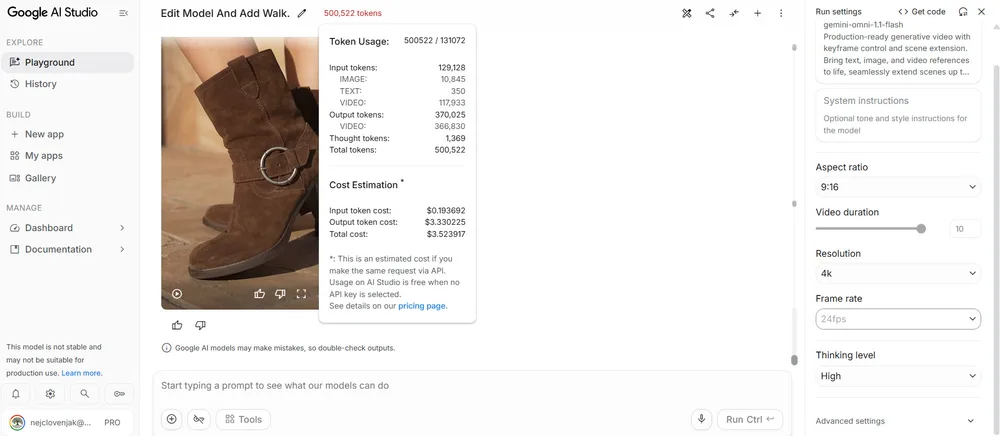
The free tier caps how much you can generate, and once you cross that cap the meter starts counting. Nothing about that panel suggests "unlimited" — if generation were uncosted, it wouldn't show a dollar figure at all. So the answer to "can I make unlimited videos and photos with no charge" is no, not on whatever setup produced that reading.
Where the charge actually lands
That's the part the original question never resolved, and it's the only part that matters. AI Studio can run two ways: on the consumer free tier, where exceeding limits throttles you back instead of billing you, or on a Cloud project with a payment method attached, where token usage is invoiced separately from any consumer subscription. Which mode applies shows up on the billing screen — not in the usage counter, and not on the Pro subscription page.
Before the next generation run:
- Open the billing/usage page in AI Studio and check whether a Cloud project with a payment method is linked.
- If one is linked, treat the $3.52-style total as spend on that account and set a budget alert so the next batch of videos doesn't add dollars silently.
- If nothing is linked, the overage most likely just clamps you back to free limits — confirm on that same screen instead of assuming either way.
Why this matters for a team rollout
The meter itself is the easy part. The hard part is deciding who pays for it. Mixing per-user free tiers and shared Cloud billing in one workspace makes expense reports unreadable, because lines like $3.52 appear with no owner and no project attached. Pick one mode per workspace, write the decision down, and put the budget alert on day one — then per-request token counts become a planning tool instead of a mystery.
One more thing worth checking: if the same workspace generates both videos and photos, the token cost per output differs a lot between the two, so a single dollar total hides which feature is actually eating the budget. Break the usage down by generation type before drawing conclusions about what's "expensive."
The screenshot proves the meter works. Whether it ever reaches a credit card is a configuration question, and the answer lives one click away on the billing screen.
I once saw a similar discrepancy in my own AI Studio workspace, and it took me a while to realize it was just a usage meter too.