0.159.1 CLI blocks GitHub reviews – which usage page is real
At 6:13 PM Central on 2026‑09‑29 the @codex review command stopped working for me, showing “You have reached your Codex usage limits for code reviews.” while the weekly meter on the analytics page still claimed 50 % remaining. The same moment the general usage page (/settings/usage?tab=overview) reported 50 % left, but the Codex analytics dashboard (/settings/analytics#usage) flashed “You’re out of Codex and Work usage for now” with a red “Usage limit reached” badge. The discrepancy isn’t intermittent – every request since 6:04 PM has been refused, and the CLI (codex exec) still works fine, so the limit appears specific to the GitHub code‑review connector.
The error message that appears in the pull‑request comment is exact:
"You have reached your Codex usage limits for code reviews. You can see your limits in the Codex usage dashboard. To continue using code reviews, add credits to your account and enable them for code reviews in your settings."Both the analytics page and the overview page can be opened in Chrome and refreshed; they may show opposite states in the same browser tab. The weekly usage chart on analytics lists “GitHub code review” and “Exec” together near 100 % on Sep 26, and the credit balance is zero even though the “Enable credits use” toggle is present.
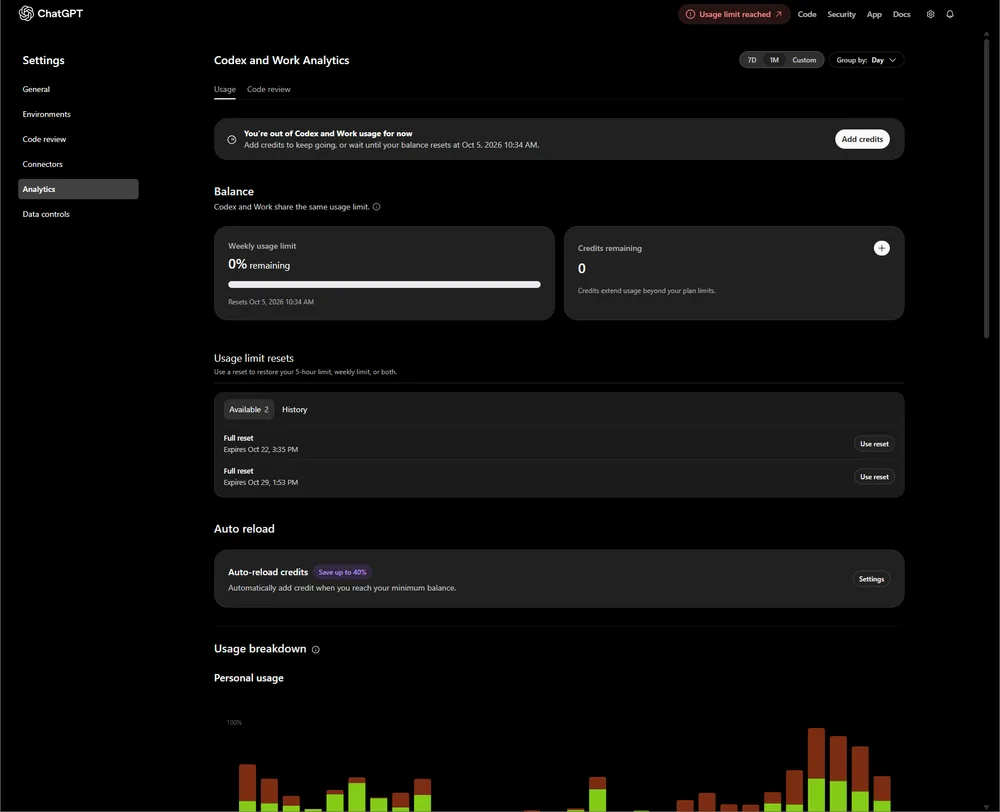
Which meter is trustworthy?
The overview page (/settings/usage?tab=overview) is the one that drives the GitHub connector’s quota check. The analytics dashboard (/settings/analytics#usage) is a read‑only view that can lag or duplicate older data, so when you see a red badge there you can assume the connector will block you next.
What to do next
- Confirm the current limit – open
https://chatgpt.com/settings/usage?tab=overviewand note the remaining weekly percentage and reset timer. If it shows 0 % while analytics still claim 50 %, the connector is using the former. - Check the credit status – go to
https://chatgpt.com/settings/analytics#usageand verify the credit balance. Adding credits (even a small amount) will temporarily lift the review quota regardless of the weekly meter. - Reset the weekly bucket – if the “Full reset” buttons (two are listed) are still available, click the one labeled “Codex – weekly”. This restores the 50 % window; the other “Full reset” is for daily usage and won’t help reviews.
- Force a sync – after adding credits or resetting, wait a minute and then run a fresh
@codex reviewcomment. The connector should now accept the request instead of the limit error. - Document the discrepancy – take screenshots of both pages at the moment of failure. The side‑by‑side view is useful if you need to open a support ticket or if the limit behavior changes later.
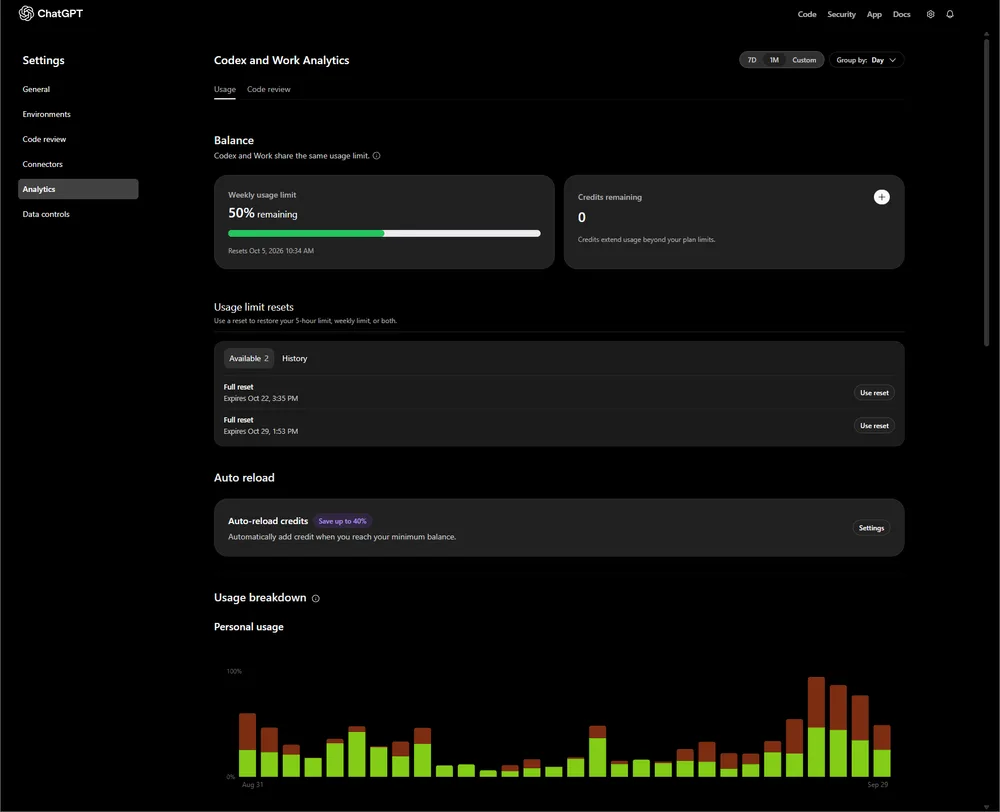
If the “Full reset” items are already consumed, the only way to resume reviews is to add credits and enable code‑review usage in the settings. The CLI (codex exec) remains unaffected because it uses a separate meter, so you can keep running automation while you sort out the GitHub quota.
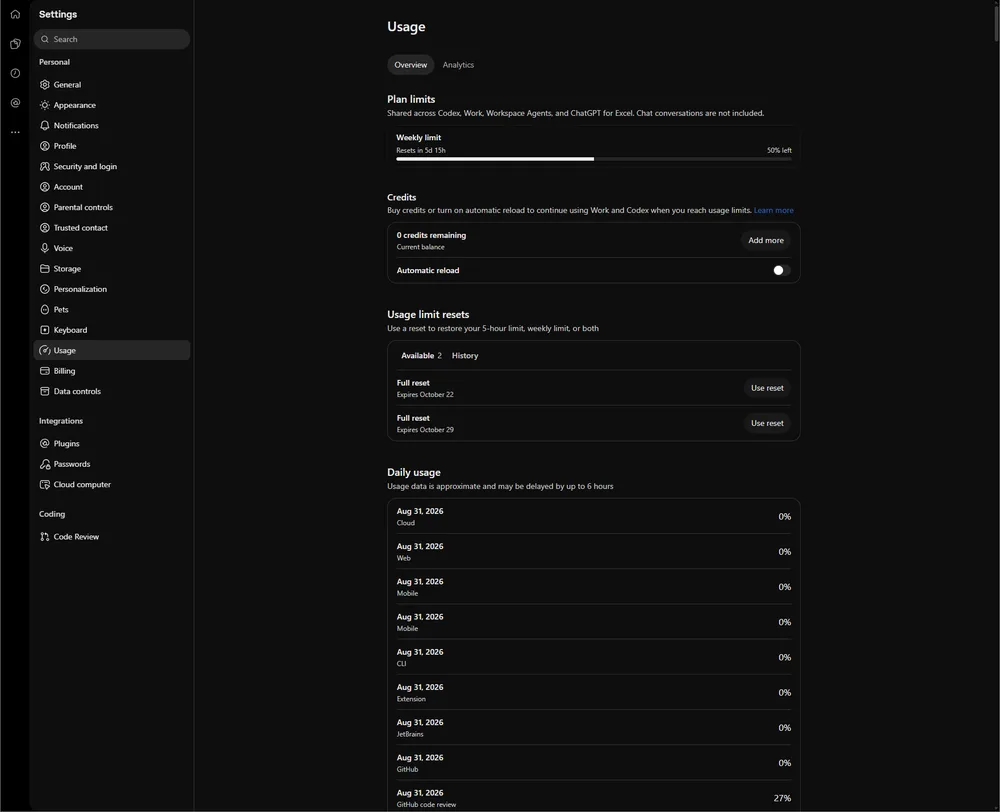
The bug is isolated to the GitHub code‑review connector; the CLI works fine in the same account, confirming that the limit isn’t a global account cap. Monitoring the overview page for the next 24 hours after a reset will show whether the weekly bucket refills as expected. If the limit reappears shortly after a reset, there may be a hidden per‑hour cap not displayed on either dashboard – in that case you’ll need to space out review requests or request a manual quota increase from OpenAI support.
https://github.com/openai/codex/issues
Did the
/settings/analytics#usagepage actually show the exact same quota breakdown as/settings/usage?tab=overviewbefore the block? Or did the split between "Codex" and "Work" usage suddenly vanish?