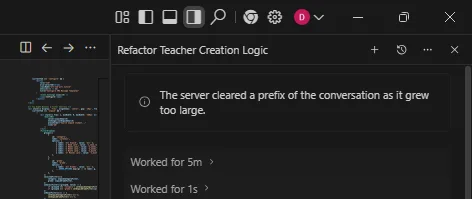
Google Antigravity will wipe your chat history if the logs get too large
Leaving a complex project sitting in Google Antigravity overnight is a gamble because the system triggers an automatic history clear once the conversation size exceeds a specific threshold. This isn't a graceful archive process; it's a freeze that can lock you out of your previous context. If you are mid-way through a massive code refactor or documenting hundreds of errors, you risk losing the entire thread with no way to roll back to a previous state.
How to prevent data loss when history freezes
Since there is no manual "save point" or version control within the Antigravity interface, the only way to protect your work is to move the context out of the chat as soon as a milestone is reached. When the system flags the history as too large, you lose the ability to undo changes or reference earlier prompts.
To avoid this, follow these steps:
- Periodically copy your current state or the most recent successful code block into a local Markdown file.
- Start a fresh conversation thread once you feel the latency increasing or the context window getting crowded.
- Summarize the key constraints and the current progress in the new thread to maintain continuity without bloating the history.
Why this happens during large updates
The issue typically surfaces during "large updates"—scenarios where you are pasting long logs or requesting changes across multiple files. When the conversation history reaches the limit, Antigravity doesn't just stop recording; it freezes the history. For someone dealing with a high volume of errors, this is a nightmare because the very logs you need to debug are the ones causing the overflow.
If you hit the size limit, you cannot simply "delete a few messages" to make room. The system's behavior suggests a hard cap on the stored session data. Once that ceiling is hit, the risk of a total wipeout increases.
Comparing this to other LLM memory management
Most high-end models handle context windows by "sliding" or summarizing older tokens, but a hard freeze that prevents undoing previous points is a significant friction point. In a standard development workflow, being able to revert to a prompt from an hour ago is essential. Antigravity's current approach to large histories creates a volatile environment for long-term project work.
The lack of a "snapshot" feature means you are essentially working in a volatile cache. If you are using Antigravity for heavy lifting, you have to treat it as a stateless tool rather than a persistent workspace.
Managing the risk of context overflow
If you notice the model starting to forget earlier instructions or if the response time lags, you are likely approaching the limit where the history might be cleared. The most reliable way to handle this is to maintain a "Project State" document externally.
Whenever you reach a stable version of your code, copy the entire block and a summary of the logic into a separate file. If Antigravity freezes your history, you can simply paste that state into a new chat and continue. Without this manual backup, you are relying on a system that prioritizes memory clearing over data persistence.
Antigravity is brand new, so versions vary by region. I'm on macOS with the latest update and hit the limit during a refactor.