Claude Opus 5 and GPT 5.5 are surprisingly cheap for document parsing, but Extend is the only one that didn't hallucinate.
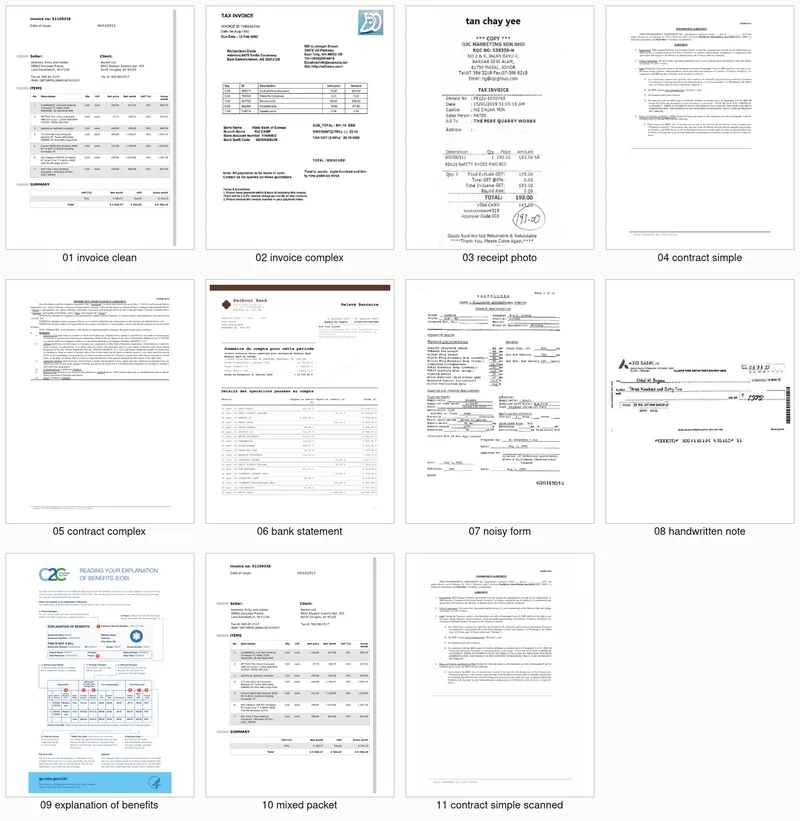
Most "best of" lists for document parsing are just people reciting pricing pages. To see what actually happens when you hit the API, I ran 119 calls across seven different providers using 11 real-world documents—everything from French bank statements and handwritten cheques to medical EOBs and photographed receipts. I used specific JSON schemas for each document type to see who could actually extract data without making things up.
Which API actually handles raw data and tables best?
I looked at raw field accuracy and row F1 scores to see who missed the most data.
- Raw field accuracy: Claude direct won at 0.991. GPT direct and Reducto followed at 0.982.
- Hallucinations: Extend had 0 hallucinations across 11 docs. Claude, GPT, and Reducto also hit 0. However, Textract failed twice, while Mistral and LlamaExtract both hallucinated 3 times.
- Table row recall: Extend was the only provider with a perfect 1.00 row F1 score. Everyone else sat at 0.99.

If you're piping this data into another piece of software, a 0.99 accuracy score is a liability. A single hallucinated value can break a downstream process. In that sense, Extend is the safest bet for automated systems, even if Claude is slightly more accurate on raw fields.
How do the costs and speeds actually compare?
The price gap is wider than the marketing makes it seem.
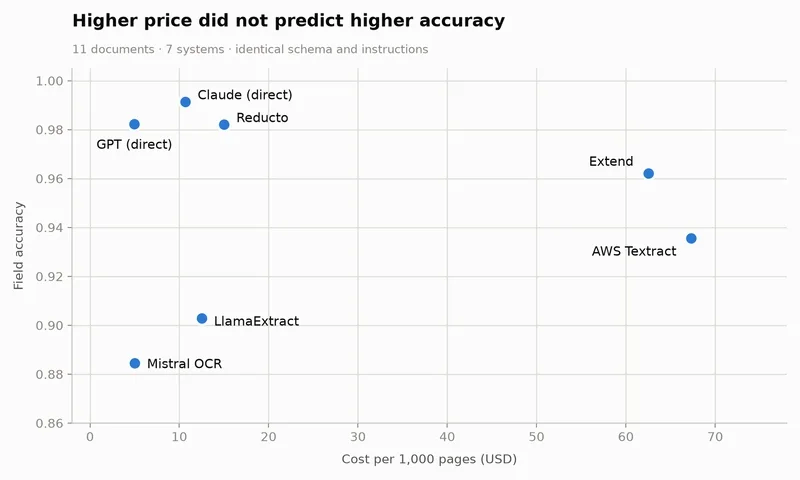
- Cost per correct field: GPT direct was the cheapest at $0.00047, with Mistral OCR close behind at $0.00049. AWS Textract was an order of magnitude more expensive—about 14x the cost of GPT.
- Speed: Mistral OCR was the fastest with a median of 4.2s. Claude direct took 6.4s.
Which one is the biggest headache to implement?
Developer experience varies wildly depending on whether the tool has a native schema.
- Fastest setup: Claude and GPT took about 10 minutes to get running.
- Middle ground: Extend took about 25 minutes.
- Slowest: AWS Textract took 45 minutes and required an additional LLM step to normalize the data.
The technical setup for the test
I used the following endpoints and versions for this run:
- Extend:
POST /extract(API2026-02-09,extend-ai1.19.0) - Reducto:
POST /extract(standard mode,deep_extractoff) - LlamaExtract:
extract_stateless()usingBALANCEDmode - AWS Textract:
AnalyzeDocument(FORMS + TABLES) in us-east-1, paired with an LLM normalizer - Mistral OCR:
/v1/ocrwithdocument_annotation_formatusingmistral-ocr-latest - Claude direct:
/v1/messageswith forced tool usingclaude-opus-5 - GPT direct:
/v1/responseswithjson_schemausinggpt-5.5(strict: false)
So glad someone finally tested this. I got roasted by Opus on 40 PDFs last week. Does Extend handle OCR?