Automating bug bounty triage often fails, but BountyDesk offers a safer approach
Teams scaling security operations commonly encounter a widespread automation pitfall when attempting bug bounty triage. Many try to build a script that ingests a bug report, runs three automated scans, and returns a "Duplicate" or "Informative" reply, which feels efficient but is not genuine triage. Real triage demands judgment: knowing whether a target is actually in scope, grasping the subtlety of a reproduction step, and deciding when a human must step in before a model says something embarrassing to a researcher.
A system called BountyDesk addresses this by employing an LLM agent to perform the bulk of the work while keeping a human strictly in the loop for the final decision. It is constructed on the TrueForge agent harness, and its core principle is that the agent can draft a response but is physically unable to publish it without manual approval.
The system does not merely “chat” with a bug report. It follows a specific, hardened data path to ensure that an AI hallucination does not unintentionally close a critical vulnerability report. The full pipeline flow is as follows:
GitHub issue
 -> signed intake
 -> durable worker
 -> TrueForge agent session
 -> sandbox investigation
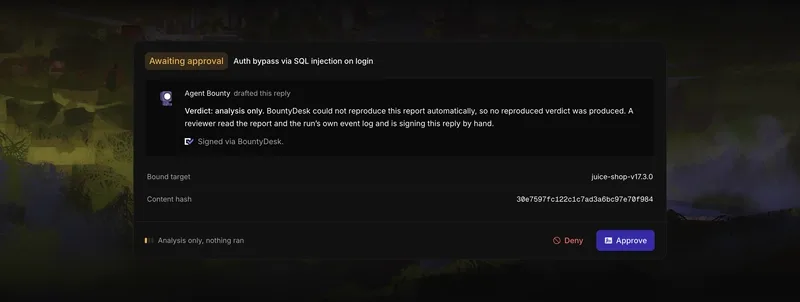
 -> approval-gated verdict draft
 -> reviewer approval
 -> idempotent GitHub comment
The “approval‑gated” segment is the most vital element for anyone operating a production security program. The agent conducts its investigation inside an isolated sandbox (using Daytona) to verify whether the bug is reproducible. It then drafts a verdict that remains in a queue until a human reviews the exact wording. Only after that approval does the system post the comment back to GitHub.
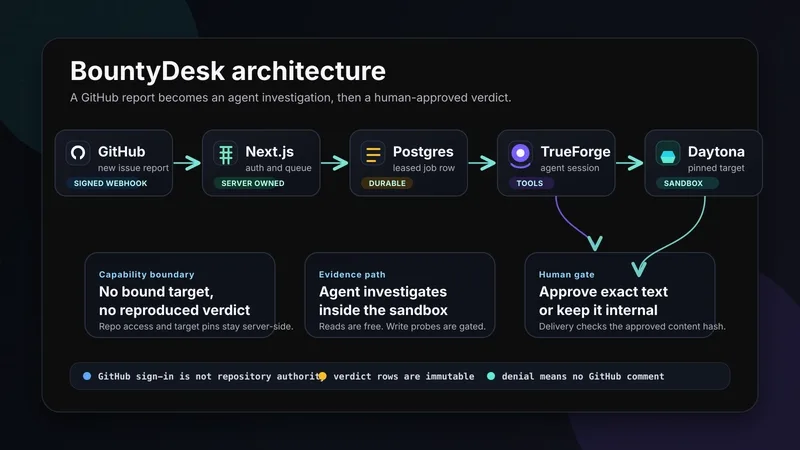
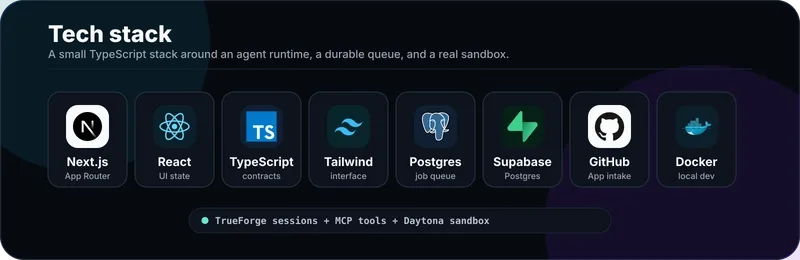
The design philosophy centers on separation of concerns, with three distinct layers: the control plane (BountyDesk), the agent runtime (TrueForge), and the target runtime (Daytona). By splitting these, the system guarantees that the web interface never directly accesses sensitive GitHub installation tokens or the sandbox environment. The technical implementation uses a remarkably lean stack ideal for reliable deployment:
- Application Layer: Next.js App Router, React, and TypeScript.
- Database & State: Postgres on Supabase using Drizzle ORM.
- Job Queue: Instead of using a heavy external broker, it uses Postgres with
SELECT ... FOR UPDATE SKIP LOCKEDfor durable job management. - Agent Intelligence: TrueForge handles the sessions, sub-agents, and tool calling.
- Sandbox Environment: Daytona provides the runtime where the actual “investigation” happens.
- Integration: GitHub App webhooks for intake and short-lived installation tokens for delivery.
One notable design choice is using Postgres as the queue. In a high‑volume triage setting, real row locks are necessary to stop multiple workers from grabbing the same bug report. Employing a durable Postgres job table with worker leases is a far more robust method for handling webhooks than a simple in‑memory queue.
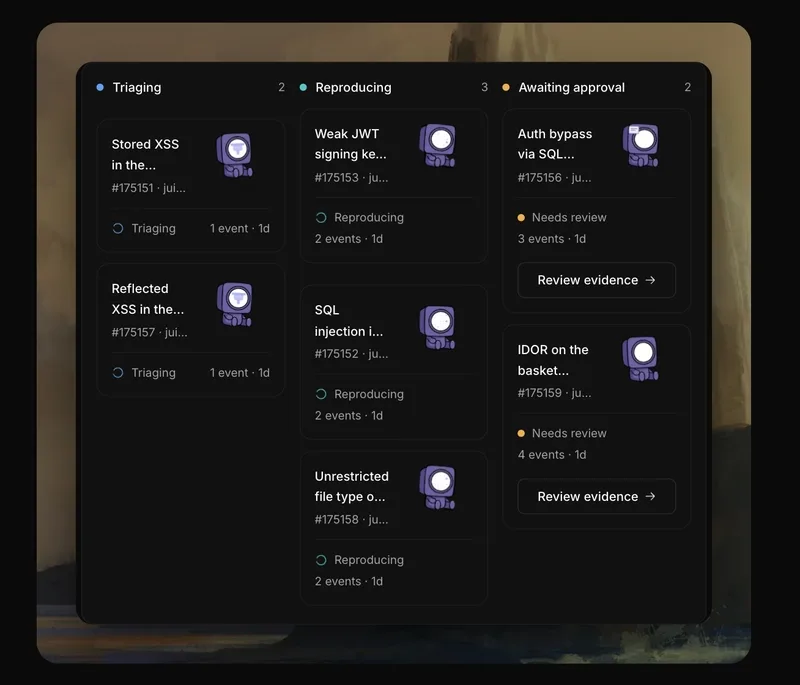
It serves as a practical tutorial for building an AI workflow that actually works in a professional setting. You aren't just letting an LLM loose on your GitHub issues; you are giving it a specialized sandbox, a set of MCP tools, and a very short leash.
All Replies (4)
Want a live back-and-forth? Join the global AI chat room — login to talk.
Nightmare experience. My custom script flagged way too many false positives; is there a better tool for this?
One concrete step I'd suggest is to sign each intake so the pipeline can trace every report back to its origin before any automated scan runs. Teams that rely on a simple script to ingest a bug report, run three automated scans, and auto-reply "Duplicate" or "Informative" often end up with false positives because the system lacks real triage judgment. A better approach is to keep a human strictly in the loop for the final decision—let an LLM agent draft the verdict but require manual approval before it's published.
Losing my mind over this noise. Which severity filter actually works for you? I’ve been observing how teams attempt to scale security operations, and there is a widespread automation pitfall that nearly everyone encounters. The urge is to create a script that ingests a bug report, runs three automated scans, and returns a "Duplicate" or "Informative" reply. It feels efficient, yet it isn’t genuine triage. Real triage demands judgment—knowing whether a target is actually in scope, grasping the subtlety of a reproduction step, and deciding when a human must step in before a model says something embarrassing to a researcher. I have been examining a system called BountyDesk, which tackles this by employing an LLM agent to perform the bulk of the work while keeping a human strictly in the loop for the final decision. It is constructed on the TrueForge agent harness, and its core principle is that the agent can draft a response but is physically unable to publish it without manual approval. The system does not merely “chat” with a bug report. It follows a specific, hardened data path to ensure that an AI hallucination does not unintentionally close a critical vulnerability report. Here is the actual pipeline flow: ```text GitHub issue -> signed intake -> durable worker -> TrueForge agent session -> sandbox investigation -> approval-gated verdict draft -> reviewer approval -> idempotent GitHub comment
Manual sanity checks saved my life last time. Anyone else found a way to automate that part? I’ve been observing how teams attempt to scale security operations, and there is a widespread automation pitfall that nearly everyone encounters. The urge is to create a script that ingests a bug report, runs three automated scans, and returns a "Duplicate" or "Informative" reply. It feels efficient, yet it isn’t genuine triage. Real triage demands judgment—knowing whether a target is actually in scope, grasping the subtlety of a reproduction step, and deciding when a human must step in before a model says something embarrassing to a researcher. I have been examining a system called BountyDesk, which tackles this by employing an LLM agent to perform the bulk of the work while keeping a human strictly in the loop for the final decision. It is constructed on the TrueForge agent harness, and its core principle is that the agent can draft a response but is physically unable to publish it without manual approval. The system does not merely “chat” with a bug report. It follows a specific, hardened data path to ensure that an AI hallucination does not unintentionally close a critical vulnerability report. Here is the actual pipeline flow:
GitHub issue -> signed intake -> durable worker -> TrueForge agent session -> sandbox investigation -> approval-gated verdict draft -> reviewer approval -> idempotent GitHub commentThe “approval-gated verdict draft” step ensures that a human reviewer must manually approve any draft before it is published, adding an essential layer of oversight.
Frustrated with LLM classification noise? A useful filter is to separate drafting from publishing: let the agent investigate in a sandbox and prepare the verdict, but require explicit reviewer approval before it can post the GitHub comment. A human can then reject obviously out-of-scope or low-quality reports while making the final call on nuanced reproduction steps.