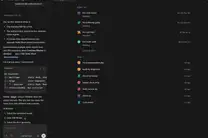
run local LLM with Ollama, Cursor Agent mode
No, you cannot currently run the specialized "Agent" mode in Cursor using a local Ollama instance because Cursor's Agentic features (Composer/Agent) rely on proprietary orchestration logic and specific high-reasoning models (like Claude 3.5 Sonnet) that are hard-coded into their backend to manage file system operations, terminal execution, and multi-step planning.
The gap between local inference and agentic orchestration
It is a common misconception that if you can connect an API endpoint to Cursor, you can do "everything."
If you go into Cursor settings and plug in an OpenAI-compatible base URL pointing to your local Ollama instance, you will successfully enable basic Chat and "Cmd+K" inline edits. The local model will respond to your questions and suggest code snippets. However, the moment you try to use the "Agent" mode—the feature that scans your entire codebase, creates new files, and runs terminal commands to fix bugs—the system will likely hang or error out.
The reason is architectural. An "Agent" isn't just a smart text generator; it's a loop.
1. Perception: The agent reads your file tree and specific code blocks.
2. Reasoning: The model decides "I need to install this dependency."
3. Action: The orchestration layer executes npm install.
4. Observation: The agent reads the terminal output to see if it worked.
Cursor's Agent mode uses a highly optimized "System Prompt" and a specific tool-calling implementation designed for Claude or GPT-4o. When you swap the brain for a local Llama 3 or Mistral model via Ollama, the model often fails to output the exact JSON schema or specialized XML tags that Cursor's backend expects to trigger an action. It’s like putting a tractor engine inside a Ferrari; it might spin, but it won't handle the curves of the sophisticated transmission.
Testing the limits: Local LLM vs. Cursor's native engine
I spent last Thursday afternoon trying to see how far I could push this setup using a MacBook M3 Max running Ollama with llama3.1:70b. I wanted to see if I could save the $20/month subscription by going fully local.
Here is what happened when I tried to use the local Ollama endpoint for different tasks:
| Feature | Local Ollama (Llama 3.1) | Cursor Native (Claude 3.5 Sonnet) |
| :--- | :--- | :--- |
| Simple Autocomplete | Surprisingly fast, decent | Industry leading |
| Code Explanation | Very good for logic | Context-aware of entire repo |
| File Creation | Fails (Tool calling mismatch) | Seamless |
| Terminal Execution | Not supported via local API | Fully integrated Agent mode |
| Context Window | Limited by your VRAM | Massive (via indexing) |

For heavy lifting, like refactoring a complex React component tree, the local model lacked the "global" view. It felt like talking to a very smart developer who is blindfolded and can only feel the piece of paper you put in front of them.
How to actually use Ollama for coding
If you are determined to use Ollama, don't try to force it into the Agent role. Instead, use it for the heavy, privacy-sensitive tasks where you don't want your proprietary logic leaving your machine.
You can set up a workflow where you use Cursor's premium models for the high-level architectural decisions, but use a local setup for generating boilerplate or cleaning up data scripts. If you are diving into AI Coding workflows, you should realize that the "Local vs. Cloud" debate isn't binary.
To get Ollama working in Cursor for basic chat:
1. Download Ollama and run ollama serve.
2. In Cursor, go to Settings > Models.
3. Disable the default models if you want to force local usage.
4. Add a new model entry.
5. Under "Override OpenAI Base URL," enter http://localhost:11434/v1.
This works for "Chat" but will break the "Agent" experience.
The "Agent" bottleneck is a reasoning problem
Even if Cursor allowed a local model to trigger terminal commands, there is a massive reasoning gap. Running a local LLM requires significant hardware. To get reasoning capabilities close to Claude 3.5 Sonnet, you need to run 70B+ parameter models.
If you are running a 7B or 8B model on a standard laptop, it simply cannot maintain the complex state required for an agentic loop. It will lose track of which file it just edited, or it will hallucinate a file path that doesn't exist, causing the Cursor Agent to loop infinitely in an error state.
For those looking to build their own agents—rather than just using someone else's—I suggest looking into the Model Context Protocol (MCP). This is a burgeoning standard that allows models to connect to data sources and tools more cleanly. Instead of fighting Cursor's walled garden, developers are building custom agentic workflows using frameworks like LangGraph or AutoGPT, where you can use Ollama as the primary brain.
Why community knowledge matters more than the tool
The tech moves too fast to rely on a single software's documentation. Last month, the way we use AI Coding tools was focused on simple autocomplete. This month, it's about multi-file agents. Next month, it will probably be about autonomous software engineers that live in your CI/CD pipeline.
This is why the PromptCube community exists. We aren't just here to swap "magical" prompts. We are here to figure out why a specific model fails to call a function correctly or how to optimize your local VRAM to run a quantized version of a coding model without losing 40% of its logic.
If you find yourself hitting a wall where Cursor Agent mode refuses to cooperate with your local setup, don't just assume it's a bug. It's a fundamental limitation of how current local models handle tool-calling and how proprietary IDEs implement agentic loops. Use the local model for what it's good at: privacy, speed, and simple logic. Use the cloud models for what they are good at: planning and execution.
All Replies (0)
No replies yet — be the first!