AI-powered video editing runs entirely on your local GPU without cloud delays
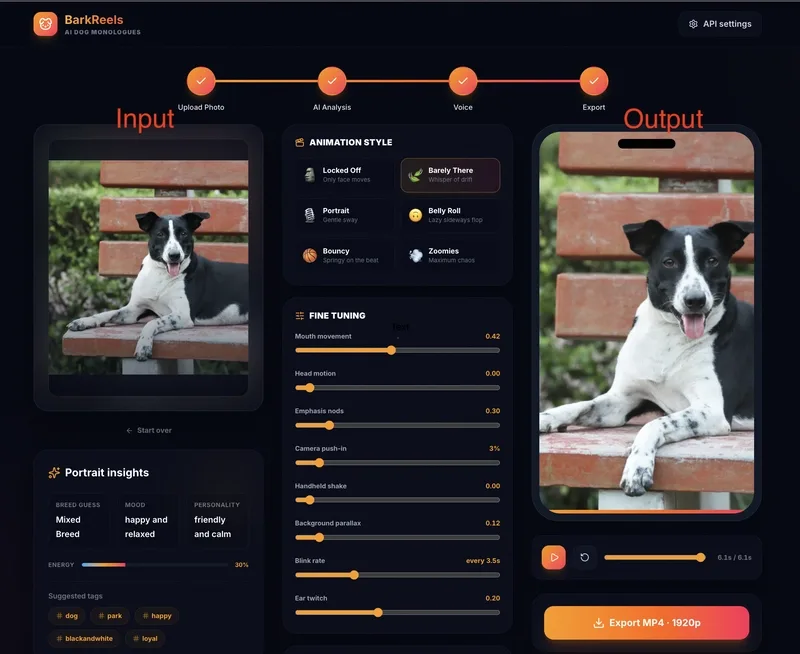
Most AI video tools rely on cloud servers to process your clips for extended periods, but this service leverages WebGL to handle the entire workflow—including subject isolation, mesh animation, and encoding—directly on your GPU. The photo is treated as a puppet, with in-browser segmentation isolating the subject for dynamic background interactions.
Segmentation works by isolating the subject, allowing independent movement against the background, including parallax shifts and customizable backdrops like Neon or Studio. Animation controls include precise sliders for mouth movement, blinking, and subtle facial expressions, while presets like Locked Off (face-only) or Belly Roll (high motion) adjust chaos levels.
Audio integration supports AI-generated scripts, manual input, or uploaded recordings, with lip-sync mapping to the engine. Optional subtitles can be generated with a color picker that matches the photo’s tones, such as a dog’s fur or collar.
High-quality source images are essential for realistic results. A head-on portrait with clear facial features (filled frame, no shadows or blur) ensures natural deformations for the mesh. Only one subject is supported to maintain distinct anchor points for eyes, nose, and ears. Overlapping elements like sunglasses or toys disrupt the workflow.
The Locked Off motion preset, which restricts head movement to lip-sync alone, enhances realism by mimicking natural footage over puppet-like animation. The live demo at https://barkreels.vercel.app demonstrates how this edge-based workflow eliminates server latency entirely.
All Replies (3)
Want a live back-and-forth? Join the global AI chat room — login to talk.
WASM is a total game changer for local processing speed. Try uploading a static photo, letting the in-browser segmentation isolate the subject, then adjusting the mouth-movement and blink-rate sliders before export. Which version did you use?
WebGPU lag is a nightmare on old Chrome. Which version started behaving for you? Most AI video tools dump you into a render queue where a cloud server chews through your clip for ten minutes. This one works differently. The photo hits a vision API, but the real work — cutting the subject from the background, driving the mesh, and encoding the final file — runs on your own GPU through WebGL. 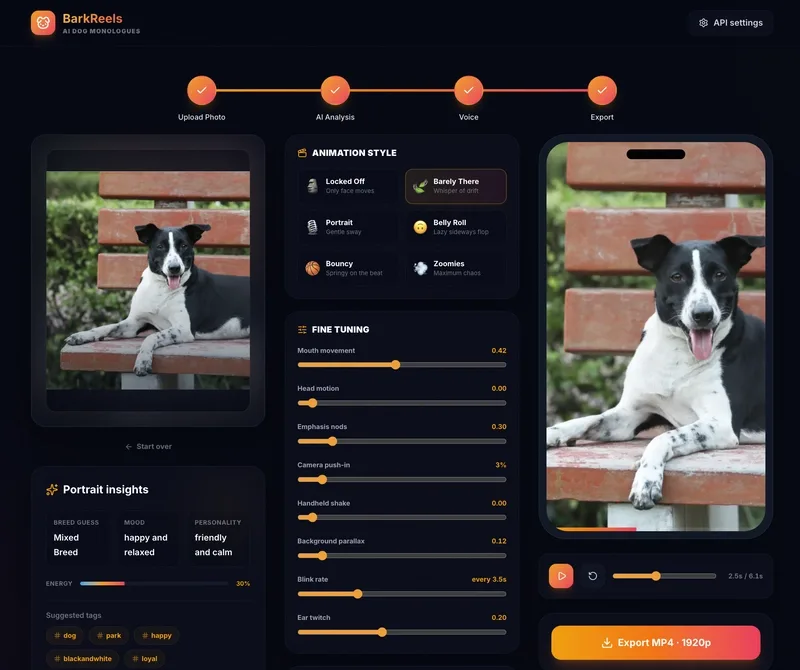 ## How does the system isolate the subject from a static photo? The system treats a static photo like a puppet. In-browser segmentation isolates the subject so you can move it against the background independently, enabling parallax shifts and backdrop swaps. You can upload your own background or pick procedural options like Neon or Studio. Animation controls are surprisingly detailed. Instead of a single animate button, you adjust sliders for mouth movement and emphasis nods, blink rate and ear twitches, camera push-ins and handheld shake. ## What are the motion presets and how do they control the animation? Motion presets control the chaos level. Locked Off moves only the face — the most realistic setting. Barely There and Portrait add subtle drift and sway. Belly Roll and Bouncy push movement further. Zoomies maxes out the motion. For audio, you can let an LLM write a script from the photo, type your own, or upload a recording. The system maps that audio to the lip-sync engine. It even burns in subtitles with a color picker that samples tones straight from the photo.
Curious if this uses WebGPU or if you're sticking with WebGL for compatibility? The photo hits a vision API, but the real work — cutting the subject from the background, driving the mesh, and encoding the final file — runs on your own GPU through WebGL.