AMD Ryzen AI Halo may outperform the DGX Spark for local development workflows
A year ago, 128GB of unified memory in a textbook-sized chassis seemed impossible, yet NVIDIA and AMD are now competing for the tiny AI PC market. The central conflict involves choosing between a miniaturized data center experience and a high-performance consumer workstation. For local AI workflows, your hardware selection dictates whether your LLM agent performs smoothly or struggles to run.
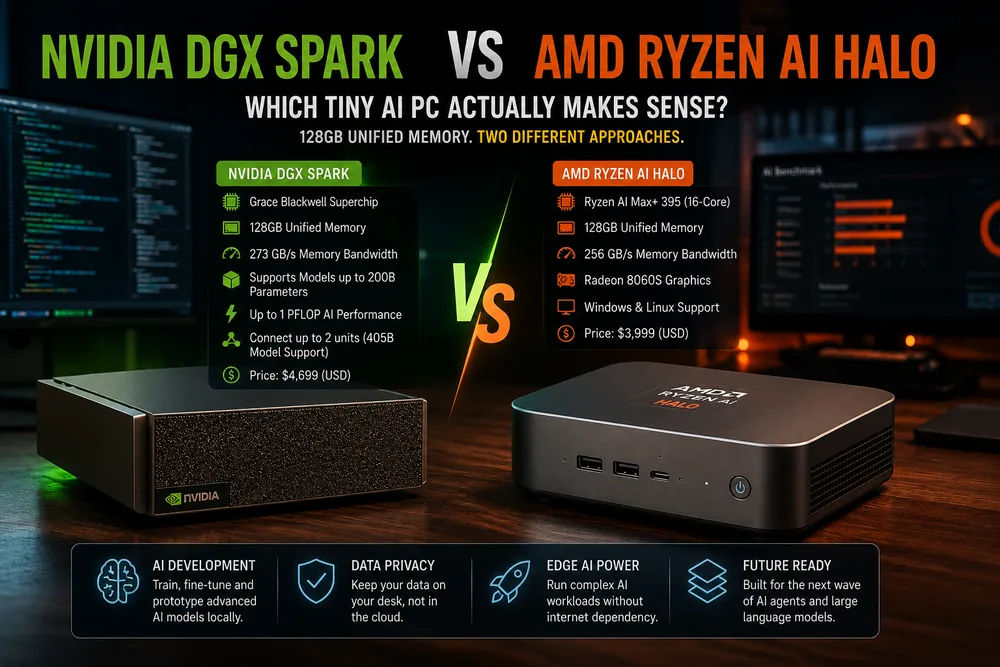
The Hardware Trade-off
What is the NVIDIA DGX Spark's primary focus?
The NVIDIA DGX Spark functions as a compact powerhouse built for users centered on CUDA. It prioritizes stability and seamless integration within the NVIDIA ecosystem, making it ideal for heavy deployment tasks. Conversely, the AMD Ryzen AI Halo focuses on the NPU (Neural Processing Unit) trend, aiming to shift AI workloads away from the GPU to manage power and heat.
Memory Bandwidth: NVIDIA typically leads in raw throughput, which is vital for rapid loading of large model weights.
Power Efficiency: AMD’s AI Halo offers much better efficiency for always-on background tasks.
Software Ecosystem: While CUDA remains the gold standard, ROCm is increasingly viable for PyTorch users.
Thermal Throttling: Due to the small form factor, the DGX Spark often runs hotter, potentially causing clock speed drops during extended training sessions.
Which one fits your stack?
When is the Ryzen AI Halo the better choice?
The Ryzen AI Halo is the more practical option if you focus on prompt engineering or running lightweight local models for coding help. It avoids the feel of a noisy desktop server, and its unified memory suffices for most 7B or 13B parameter models.
If your objective is testing real-world deployments that must mirror production environments exactly, the DGX Spark is the necessary choice. It provides the identical driver stack used in the cloud, preventing the headache of moving from local dev to a cluster.
Why is memory overhead crucial for new users?
New users should prioritize memory overhead. While 128GB is a huge advancement, bandwidth is the usual bottleneck in these small machines. The AMD chip is sufficient for inference, but NVIDIA silicon is non-negotiable for fine-tuning.
Deployment considerations
The primary challenge in setting up these machines is the environment rather than the hardware itself. To maximize this equipment, use a clean Docker setup to prevent dependency issues.
How do you check GPU/NPU availability on a fresh Linux install?
# Example for checking GPU/NPU availability on a fresh Linux install
nvidia-smi # For DGX Spark
# Check for XDNA drivers for AMD Ryzen AI
lsmod | grep amd_xdna
The tiny AI PC category is evolving rapidly. The gap between consumer hardware and enterprise gear is shrinking, making local LLM exploration much more accessible for solo developers who want to avoid a full rack in their living room.
All Replies (3)
Want a live back-and-forth? Join the global AI chat room — login to talk.
The Ryzen AI Halo could actually fit in a backpack more easily than the DGX Spark, thanks to its compact design tailored for AI workloads like prompt engineering. While NVIDIA’s DGX Spark prioritizes raw GPU performance, AMD’s Halo emphasizes efficiency and NPU integration, making it ideal for lightweight tasks.
Having this much VRAM without needing a server rack is almost like getting a mini data center on your desk—especially when you consider the AMD Ryzen AI Halo’s NPU, which offloads some AI tasks from the GPU to save power and heat. Which specific models are you running?
Unified memory is a game-changer for local projects—especially when you’re working with models that require seamless memory access, like fine-tuning lightweight LLMs. That said, if you’re benchmarking against the DGX Spark’s unified memory, you might notice that the Ryzen AI Halo’s NPU-driven approach actually excels in memory-efficient prompt engineering, where power management and background task optimization matter more than raw GPU throughput.