Google AI Studio Build Project Fails to Initialize: CineLX9 Project Recovery Guide
Experiencing a critical failure with your existing CineLX9 project in Google AI Studio Build? You're not alone. Many developers have encountered this frustrating issue where their project suddenly becomes unresponsive, with the code editor still accessible but both preview functionality and Gemini prompts completely broken. This guide will help you understand the problem and explore potential recovery options.
The symptoms are consistent across affected projects: while your source files remain visible in the code editor, any attempt to preview the application results in error messages like "Failed to initialize applet" or "Failed to load app." Simultaneously, Gemini prompts fail with a generic "An internal error occurred" message, effectively cutting off AI assistance when you need it most. Standard troubleshooting steps like refreshing the page or signing out and back in have proven ineffective in resolving these issues.
What makes this particularly concerning is that the project backup functionality appears to be working correctly - users have successfully downloaded and verified ZIP backups of their affected projects. This suggests the data integrity remains intact, but something in the execution environment or applet initialization process has failed. The "Start new chat" option remains available, indicating that the core AI Studio functionality isn't completely broken, just the specific project context.
Several potential causes could be behind this initialization failure:
- Sandbox Environment Corruption: The development sandbox associated with your project may have become corrupted or incompatible with recent updates to the AI Studio Build environment.
- Project Configuration Issues: Changes in how AI Studio handles project initialization might have introduced incompatibilities with existing project configurations or dependencies.
- Resource Allocation Problems: The backend resources allocated to your project may have been misconfigured or exceeded their limits, preventing proper initialization.
- Authentication/Permission Issues: Changes in authentication or permission systems might be preventing the project from accessing necessary resources or services.
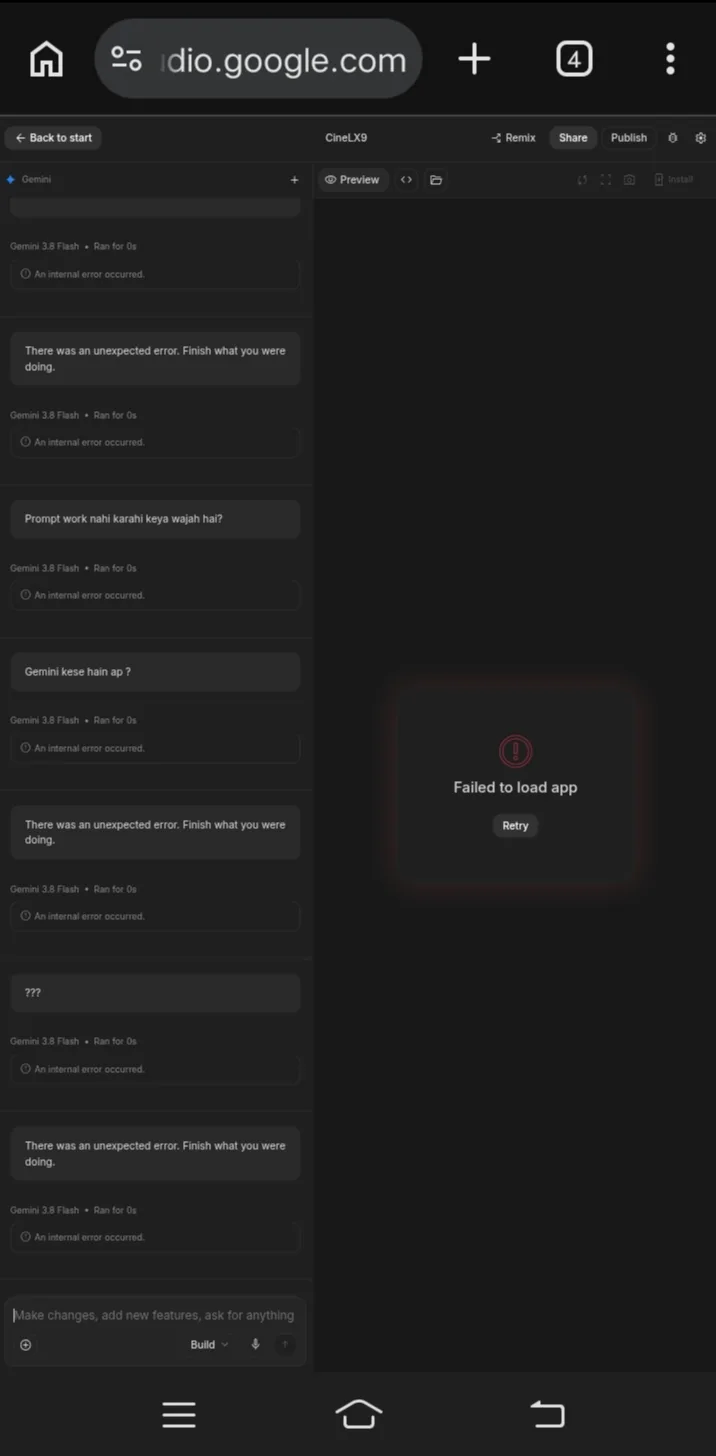
To begin addressing this issue, Google AI Studio team recommends investigating whether the existing project's applet or development sandbox is failing to initialize. Users should provide their Project/App ID (like the example: 74e30e46-13bb-478b-a780-67b4f368432d) along with specific error messages and browser/device information (Google Chrome/vivo1940 in the reported case) to help diagnose the problem.
For those experiencing this issue with their CineLX9 project, consider these immediate steps:
- Verify Project Backup: Confirm that your downloaded ZIP backup contains all necessary files and is not corrupted.
- Document Everything: Take screenshots of the exact error messages in both preview and prompt sections to provide detailed information to the support team.
- Check for Recent Changes: Review any recent changes you may have made to the project code or configuration that might have triggered this issue.
- Try Alternative Access Methods: Attempt to access the project from different browsers or devices to determine if the issue is environment-specific.
- Create a New Project: As a temporary workaround, consider creating a new project and migrating your code to regain functionality while waiting for a resolution.
The long-term solution will likely require Google's engineering team to either fix the initialization process or provide a migration path for affected projects. Until then, maintaining regular backups and staying updated on AI Studio status notifications can help mitigate the impact of such failures.
Remember that while this is certainly a frustrating experience, the preservation of your project data in the ZIP backup offers a solid foundation for recovery once the underlying technical issue is addressed.
The recovery steps you outlined for CineLX9 projects sound thorough, but did you encounter any specific issues with the
AiProjectTemplate.jsonfile during your testing? That file is crucial as it's the one specifying project path and parameters for Google AI Studio Build, and a