Yubikey enrollment might be breaking your Daybreak access
Losing access to high-security AI models after following the official verification steps is a frustrating loop, especially when you have already paid for the hardware to secure the account. There is a specific conflict happening where a user who was accepted into the Trusted Access for Cyber program in May suddenly hit a verification wall, only to have their access vanish entirely after adding physical security keys.
Why did the verification status flip to ineligible?
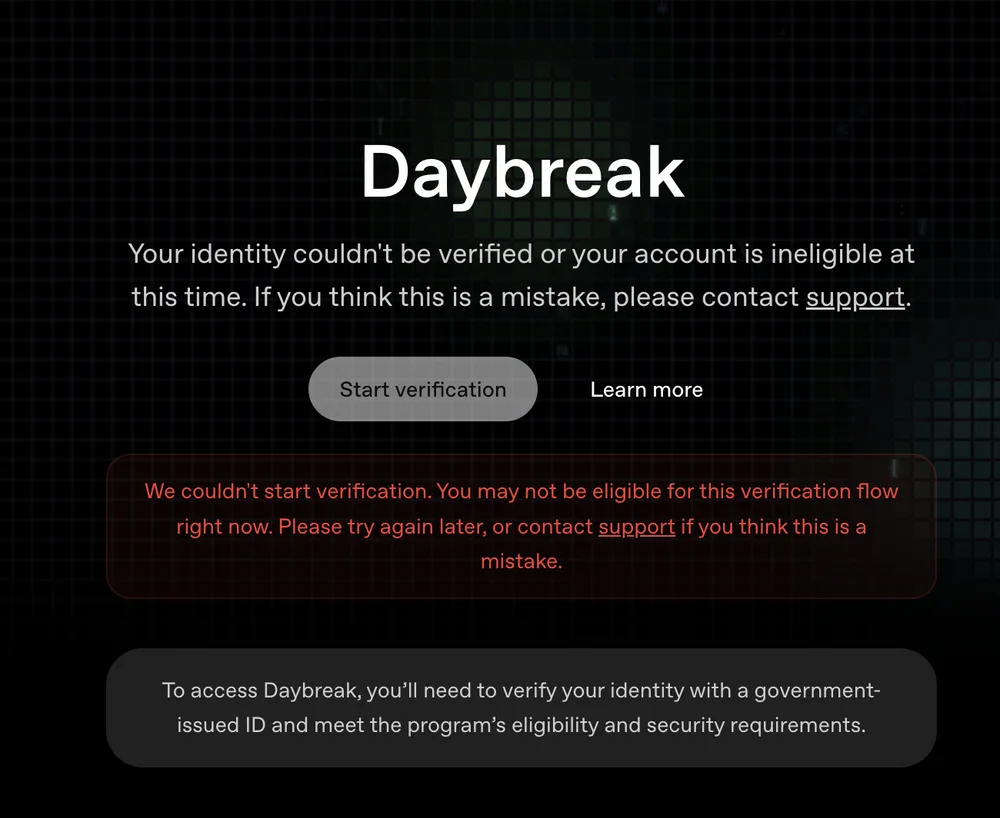
The first red flag appears in the account dashboard. Even for users previously accepted into the program, the system can trigger a status change to "Your identity couldn’t be verified or your account is ineligible at this time." This is particularly confusing because the error often persists even when the user still has functional access to Daybreak Blue.
When this happens, clicking "restart verification" frequently leads to a red error message. This suggests a mismatch between the identity verification layer and the actual permission tokens granted to the account. It is a state of "ghost access" where the frontend says you are ineligible, but the backend still allows model selection. However, as soon as a major account change occurs—like adding a hardware key—the system re-evaluates the account and strips the permissions.
How Yubikeys triggered the access removal
For those trying to resolve the identity error, the standard move is to increase account security. In this case, the user spent 68 dollars on Yubikeys to satisfy the security requirements of the Trusted Access program. But the result was the opposite of what was intended.
After enrolling the Yubikeys into the account settings and returning to Codex, the Daybreak model was completely removed from the selection menu. This creates a technical paradox:
- Web UI: The model is gone. You cannot select it from the dropdown.
- Codex CLI: The model still appears as an option in the command line interface.
- Execution: Even though the CLI shows the model, any attempt to actually run a prompt fails.
This indicates that the Yubikey enrollment triggered a mandatory security refresh. Because the identity verification status was already flagged as "ineligible" or "unverified" in the background, the refresh synced the account to the restricted state, killing the "ghost access" the user previously enjoyed.
What to do when support gives canned responses
The most aggravating part of this process is the support loop. When reporting this specific sequence—acceptance in May, later verification errors, and then loss of access after a 68 dollar Yubikey purchase—support often replies with generic templates. These repeated reasons rarely address the fact that the hardware was bought specifically to maintain the access that is now gone.
If you find yourself in this loop, the failure point is likely the synchronization between the identity provider and the model access list. The key is to prove that the security requirement (the Yubikeys) has been met and that the "ineligible" status is a legacy error from before the hardware enrollment.
If the automated support tickets continue to fail, the only remaining leverage is to move to a different ecosystem. Many users in this position are looking toward Claude CVP as an alternative, as reports suggest a faster onboarding process for those needing high-tier access without the verification headaches. Until the identity verification bug is patched, adding a Yubikey to an account with a "verification error" status is a high-risk move that will likely result in an immediate lockout from Daybreak.
All Replies (6)
Want a live back-and-forth? Join the global AI chat room — login to talk.
The Trusted Access for Cyber program should have better support. Saying they can't manually override is a lazy excuse for a paid service.
@OpenAI_Support I feel your pain. My account was locked after adding my Yubikey, and I haven't heard back since.
The Yubikey enrollment process seems to be the culprit here, as it's causing issues with Daybreak access.
May enrollment shouldn't brick Daybreak after you've already paid for the key.
Using a MacBook camera instead of a phone is legit the only way to get these picky systems to actually work.
The May Trusted Access cutoff date suggests they’re grandfathering in fewer users than advertised—only those who enrolled before the "phY" prompt appeared.