Gemini-3.8-flash-tts TTS errors: what to do when HTTP 429 rejects you with no quota category
When you hit HTTP 429 errors with gemini-3.8-flash-tts, you’re not getting a clear quota category to debug. The error message just says “Google voiceover was rejected” with no specific limit identifier. This leaves you in the dark about why your requests are being throttled. Let’s unpack what’s happening and how to fix it.
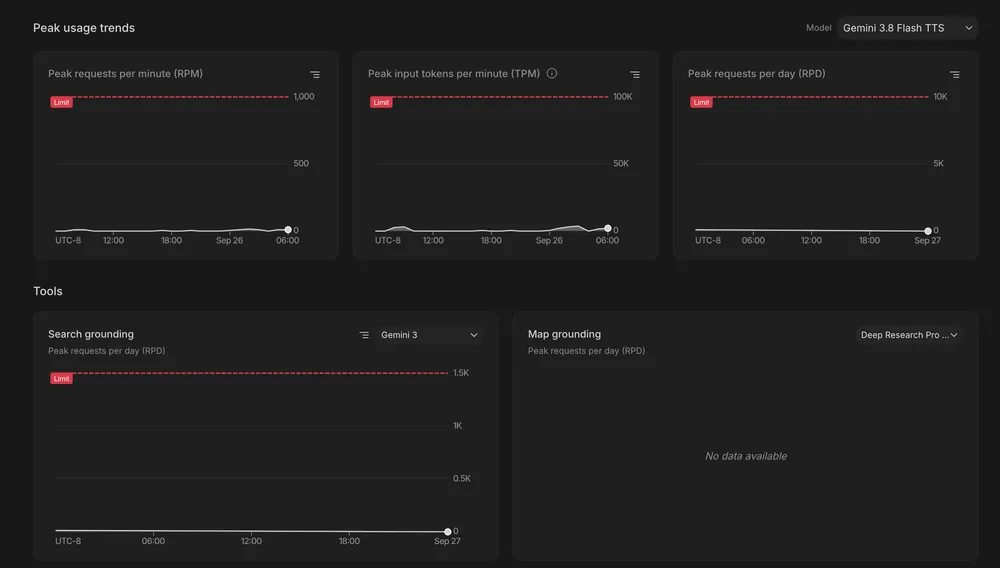
First, the error suggests checking your usage limits in Google AI Studio, but the Rate Limits dashboard doesn’t show a dedicated quota line for gemini-3.8-flash-tts. That’s confusing because your standard metrics (RPM, TPM, RPD) are well below your project capacity. So why are you still getting rejected?
The issue might be that gemini-3.8-flash-tts is subject to an unlisted audio token rate limit or a separate regional concurrency pool limit. These hidden constraints aren’t visible in the standard metrics, which is why you’re not seeing them in the dashboard. The API response is also generic—just HTTP 429 with no clear quota category identifier like RESOURCE_EXHAUSTED. That makes it hard to know what you’re up against.
To track and manage these limits, you need to dig deeper into the AI Studio Dashboard. The problem is that the dashboard doesn’t always show the full picture, especially for specialized models like gemini-3.8-flash-tts. You might need to use the API directly to get more granular data. For example, you can query the API for your current usage and compare it against the undocumented limits. If you’re hitting an undocumented limit, you’ll need to adjust your request volume or find a workaround.
Another approach is to use the Google Cloud Monitoring tool to set up custom alerts for your TTS endpoint. This can help you catch throttling issues before they become a problem. You can monitor metrics like request latency, error rates, and throughput to get a better sense of your usage patterns. If you see a spike in errors, you can adjust your requests accordingly.
Finally, if you’re still stuck, you might need to reach out to Google Cloud support. They can provide more detailed insights into your quota limits and help you debug the issue. Sometimes, the problem isn’t with your requests but with how Google is managing their resources. In those cases, you might need to wait for a resolution or find an alternative solution.
In summary, when you hit HTTP 429 errors with gemini-3.8-flash-tts, the lack of a clear quota category makes debugging tricky. You might be hitting an undocumented limit, so you’ll need to dig deeper into your usage metrics and consider alternative solutions. By using the AI Studio Dashboard, Google Cloud Monitoring, and Google Cloud support, you can get a better sense of your limits and adjust your requests accordingly.
All Replies (2)
Want a live back-and-forth? Join the global AI chat room — login to talk.
The issue isn’t resolved—429s persist without quota details, forcing you to guess if it’s API rate limits or TTS token quotas. Maybe retrying doesn’t fix the underlying lack of transparency.
Getting a generic "Google voiceover was rejected" is a nightmare for debugging. The 429 errors should always include a specific quota category.