Google AI Pro plan gets ignored by Antigravity
If you pay for the Google AI Pro tier, you expect the Antigravity IDE to respect that billing status. Instead, the app often defaults to the "Starter Quota," locking out the newer model weights even though your subscription is active. This happens on Windows installations where the IDE fails to sync the plan metadata from one.google.com despite valid credentials.
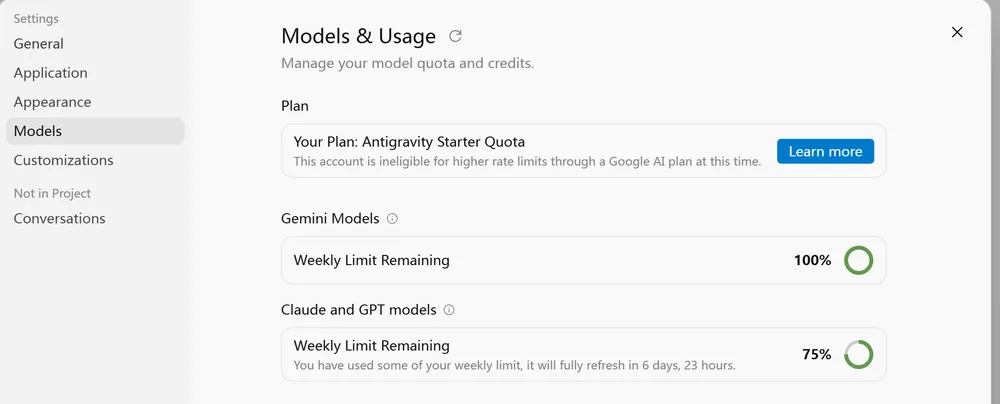
The symptoms of the sync break
The issue presents itself in two distinct ways inside the settings panel. When you open the "Models & Usage" view, the interface reports "Antigravity Starter Quota" rather than "Google AI Pro." A secondary message explicitly states: “This account is ineligible for higher rate limits through a Google AI plan at this time.”
More critically, a banner appears warning of upcoming changes. It notes that third-party model access is shifting. Specifically, Opus 5.5 and Sonnet 5.5 are moving exclusively to paid Pro and Ultra plans. The banner sets a hard deadline: access for the current plan cuts off on November 2, 2026. Until the plan registers correctly, you are stuck using older variants like Claude Opus 4.6 in thinking mode, missing the latest model capabilities entirely.
Verifying the account link
Before assuming the IDE is broken, confirm the billing source. Log into one.google.com and verify the Google AI Pro subscription is active. In recent cases, the price sits at HK$40/month during a promotional window. Ensure the email address logged into Antigravity matches the subscription account exactly.
If the accounts match, the IDE is simply failing to fetch the entitlement token. Standard troubleshooting involves signing out of the IDE completely and signing back in. This forces a fresh API handshake. If the UI still shows "Starter Quota," the sync process is hung.
What to do next
When the sign-out/sign-in loop fails, check the network handshake. Antigravity likely caches the plan level locally after the first successful login. If you started on a free tier and upgraded, the cache might not refresh automatically.
Clear the local application data for Antigravity. On Windows, this usually means uninstalling and reinstalling the IDE to force a clean configuration file generation. Upon restart, sign in again. The IDE should poll the Google backend, receive the Pro token, and display the correct rate limits.
If the plan still does not register, wait until closer to the November 2 cutoff. The system may be running on stale inventory data while the backend updates the model routing logic for the Opus 5.5 and Sonnet 5.5 releases. Keep an eye on the model selector; if Opus 5.5 remains grayed out despite the Pro label appearing, the feature flag has not propagated yet.
The Windows plan sync from
one.google.comis clearly the weak link, and I bet most Pro users don't realize how easily it breaks. Worth filing a bug report with those exact steps.