Temporary Chat Save Option Missing from ChatGPT Web — Regression
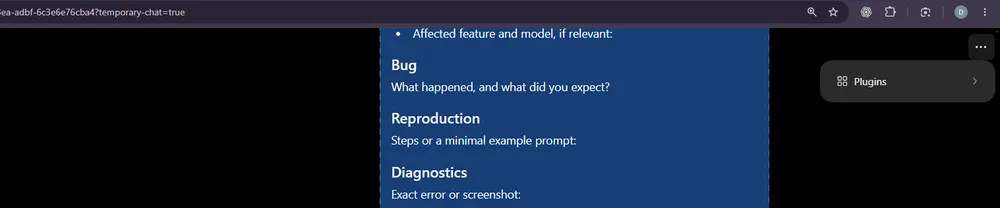
This bug eliminates the ability to persist Temporary Chats into your regular conversation history through the ChatGPT web interface. Once a temporary chat session begins, users were previously able to select a "Save Temporary Chat" option from the three-dot menu, converting the fleeting conversation into a permanent thread. Currently, opening that menu reveals only a "Plugins" entry, with no save functionality accessible anywhere.
What the Feature Was and Its Value
The temporary chat feature was designed as a short-term discussion space that automatically expires after a set duration. According to the official documentation, users could initiate a focused exchange and then choose to save it before the timer ran out. The saved version became part of their ongoing history, enabling follow-up discussions or team collaboration without losing context. This capability created a seamless workflow where rapid brainstorming could transition smoothly into long-form projects or shared records.
When the Regression Appeared
The issue became apparent on October 1, 2026, around 7:30 AM Eastern Daylight Time. During testing, a Chrome 154.0.0.0 browser connecting to the ChatGPT web interface showed that the save pathway had vanished. The URL of the active temporary chat clearly contained the query string ?temporary-chat=true, confirming it was functioning as intended. Yet when the three-dot menu appeared in the upper-right corner, only the "Plugins" label was visible—there was absolutely no mention of saving options among the available choices.
What to Do When the Feature Is Missing
If this situation recurs or persists across different browsers, several steps can help diagnose and potentially resolve the problem. First, refreshing the page after creating a fresh temporary chat session often resolves transient display issues caused by caching or incomplete rendering. Second, verifying the browser version ensures compatibility with known UI changes in newer Chromium releases. Third, reviewing the latest ChatGPT web documentation helps determine whether the feature was officially removed or simply hidden beneath additional filters. Because the saved conversation serves as a persistent record, users should treat this regression as a workflow interruption—either replicate the saved topic through manual transcription or seek alternative methods like exporting chat transcripts to a local file if available.
Understanding the root cause requires looking at both client-side configurations and server-side logic. Changes to the underlying API endpoint that handles temporary chat serialization could inadvertently remove the save route from the frontend. Similarly, resource allocation limits on the hosted infrastructure might force deletions earlier than intended, making the save function appear non-functional even though the data technically existed. Monitoring these factors and reporting feedback to OpenAI through official channels increases the likelihood of a timely resolution.
By treating the missing option as a legitimate regression rather than a cosmetic change, users can advocate effectively while working around the constraint until the feature returns to its expected state. The combination of the temporary-chat flag in the URL and the empty save menu creates a confusing user experience that goes beyond simple UI decoration—it fundamentally alters how productive users interact with the platform.
That's bizarre, given my friend's free account has it, yet it's missing from my paid Plus account. I'm guessing it's a tiered feature limitation.