ChatGPT’s recent web redesign broke basic keyboard navigation and Print to PDF for logged-in users
After OpenAI rolled out its latest UI refresh, a lot of us logging into ChatGPT on the web started noticing the same thing: normal keyboard navigation just… stopped working. I’m sharing what I’ve gathered from community reports, since the behavior is consistent enough to be a real regression rather than a fluke on my end.
What broke and why it matters
When you’re signed into ChatGPT, hitting Page Up, Page Down, Space, Shift+Space, Home, End, or the arrow keys no longer scrolls the conversation. On top of that, built-in shortcuts like the one for opening a new conversation are acting up. The kicker is that this only happens while authenticated — the same browser, the same machine behaves completely differently depending on whether you’re logged in or out.
That’s not a browser setting or an extension. That’s the page layout swallowing key events before they reach the document, which is a classic regression when a redesign adds an always-present input wrapper or intercepts event listeners globally.
How to confirm it yourself
People have been reproducing this in clean environments:
- Open a ChatGPT conversation while signed out (Firefox Private Browsing works fine for this).
- Try Page Up / Page Down, Space, arrows, Home/End. Everything scrolls normally.
- Sign in, open another conversation, and test the same keys. Navigation locks up.
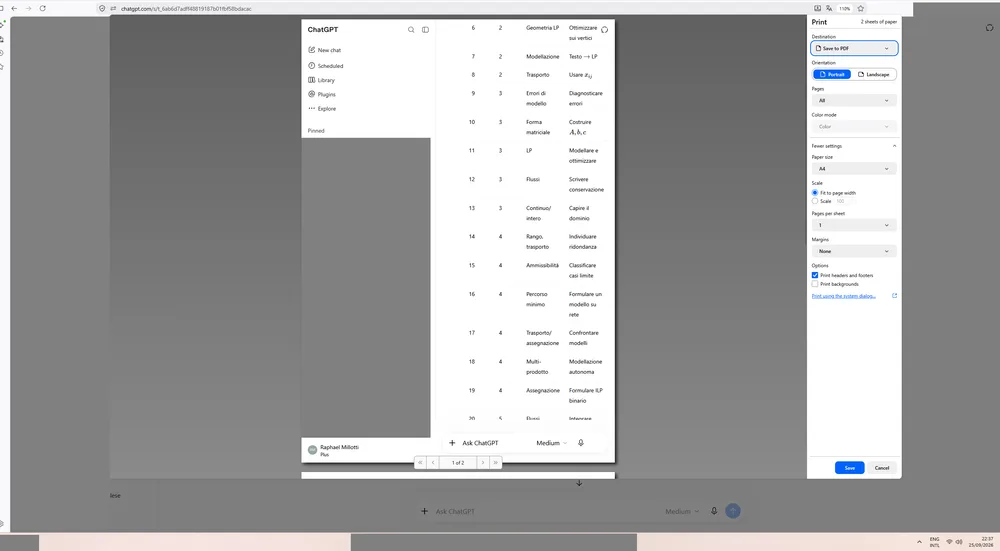
Reports say this also shows up in Microsoft Edge, so it isn’t isolated to one browser engine.
The Print to PDF problem
Separately, printing conversations has gone sideways. Around late September, users noticed that Ctrl+P no longer paginates longer conversations correctly. A thread that should span four or five pages is showing up as a single page in print preview. That effectively makes saving conversations as PDFs unusable for anything lengthy.
This one’s been reproduced across the browsers people are actually using — Firefox and Edge — which means it isn’t a Chromium quirk. Reports point to the page not exposing the full scrollable height to the browser’s pagination model, so the print engine thinks the conversation fits on one sheet.
What you can do for now
There’s no confirmed fix from OpenAI yet, but people are working around it:
- For reading/navigation: rely on the mouse or scrollbar for now, or read conversations in a signed-out session if you don’t need history sync.
- For saving conversations: export the chat via ChatGPT’s native share/export options if available, or copy the text into a document where pagination is under your control.
Why this smells like a UI regression
The authentication dependency is the strongest signal. If it were a browser bug or an OS-level shortcut conflict, logging out wouldn’t restore normal behavior. The fact that the layout changes between signed-in and signed-out states — and that’s exactly when these features break — lines up with the timeline of the redesign.
This isn’t the kind of thing that slips through lightly. When a redesign captures global keydown events and doesn’t release them properly, or when the scrollable container stops reporting its true height to the print media, you get exactly the symptoms people are seeing.
Bottom line
If ChatGPT’s web team wants this sorted, the test cases are straightforward: keyboard navigation and print pagination need to behave the same whether a user is authenticated or not. Until then, signed-in users are stuck with broken shortcuts and PDFs that cut off mid-conversation.
I’ll keep an eye on this — if you’re seeing different behavior or found a workaround, drop it below.
All Replies (4)
Want a live back-and-forth? Join the global AI chat room — login to talk.
The trackpad two-finger scroll trick works, but until arrow keys and Print to PDF are fixed for logged-in users, this workaround is only half a fix.
Print to PDF breaks for logged in users too, confirming this is a real regression.
The Pa shortcut glitch suggests they replaced keyboard shortcuts with keyboard events—so Tab now triggers "next input" but ignores Shift+Tab.
Disabling Print to PDF for logged-in users is a serious regression; restoring it should be top priority.