Is the Microsoft 365 Agents SDK actually better than the Bot
My team was recently tasked with upgrading our internal status bots. We've spent years building on the Bot Framework, which is essentially a giant exercise in writing if/else statements and managing complex dialog trees. When the push came to move toward "Agents," I was skeptical. On paper, it looks like a simple framework swap, but in practice, it's a complete shift in where the logic lives. In the old world, we owned the control flow; in the agent world, we're basically just giving a LLM a toolbox and hoping it doesn't hallucinate the sequence.
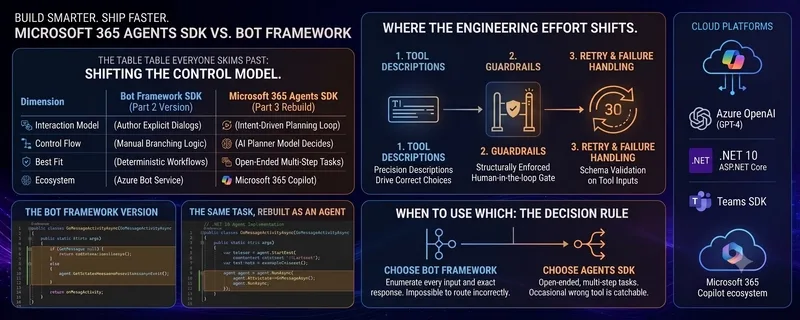
To see if this actually worked, I rebuilt one of our simplest status bots using both methods. The Bot Framework version is predictable. It's a hard-coded response: if the user says "status," they get a "systems operational" message. There is zero ambiguity, which is why my QA team loves it.
protected override async Task OnMessageActivityAsync(
 ITurnContext turnContext,
 CancellationToken cancellationToken)
{
 var text = turnContext.Activity.Text?.Trim();

 if (string.Equals(text, "status", StringComparison.OrdinalIgnoreCase))
 {
 await turnContext.SendActivityAsync(
 MessageFactory.Text("All systems operational."), cancellationToken);
 return;
 }

 await turnContext.SendActivityAsync(
 MessageFactory.Text($"Received: {text}"), cancellationToken);
}
The problem hits as soon as the requirements get "real." Management wanted the bot to not only check status but to trigger a rollback if a deployment failed. In the Bot Framework, that means nesting more conditional logic and manually managing the state of the conversation. You end up essentially hand-coding a planner, which is a nightmare to maintain.
Switching to the Microsoft 365 Agents SDK changes the AI workflow entirely. You stop writing the branching logic and start defining tools. You give the agent a set of capabilities and a goal, and the LLM decides which tool to call and in what order.
var agent = new AgentBuilder()
 .WithModel("azure-openai-gpt")
 .WithInstructions(
 "You help engineers check deployment status and roll back failed releases. " +
 "Always confirm with the user before rolling back.")
 .WithTool(new AgentTool
 {
 Name = "get_deployment_status",
 Description = "Returns the current status of the latest deployment.",
 Handler = async (args) => await _deployService.GetStatusAsync()
 })
 .WithTool(new AgentTool
 {
 Name = "rollback_release",
 Description = "Rolls back to the previous stable release. Requires explicit confirmation.",
 Handler = async (args) => await _deployService.RollbackAsync()
 })
 .Build();

protected override async Task OnMessageActivityAsync(
 ITurnContext turnContext,
 CancellationToken cancellationToken)
{
 var result = await agent.RunAsync(turnContext.Activity.Text, cancellationToken);
 await turnContext.SendActivityAsync(MessageFactory.Text(result.Response), cancellationToken);
}
From a deployment perspective, this is much faster to iterate on. We aren't mapping out every single possible user utterance. However, the trade-off is that our bugs have moved. We no longer deal with "unhandled input" errors; now we deal with "the agent decided to roll back the server without asking" errors. It requires a much more rigorous approach to prompt engineering in the instructions to keep the agent on the rails. For deterministic, simple tasks, the old way is fine, but for multi-step operational tasks, the agent model is the only way to stay sane.
All Replies (3)
Want a live back-and-forth? Join the global AI chat room — login to talk.
Frustrating experience. I spent months fighting Bot Framework logic for a simple menu. Is the SDK actually easier?
Wow, did the SDK actually fix the context window issues for your specific flows?
The latency on that SDK is a disaster. Did anyone actually get the timeouts under control?