Stop overwriting your data when comparing inventory reports if
The real goal of a reconciliation workflow isn't just to fix the numbers, but to build a discrepancy registry. You need a system that preserves both versions of a row until a human manually verifies the source of the error.
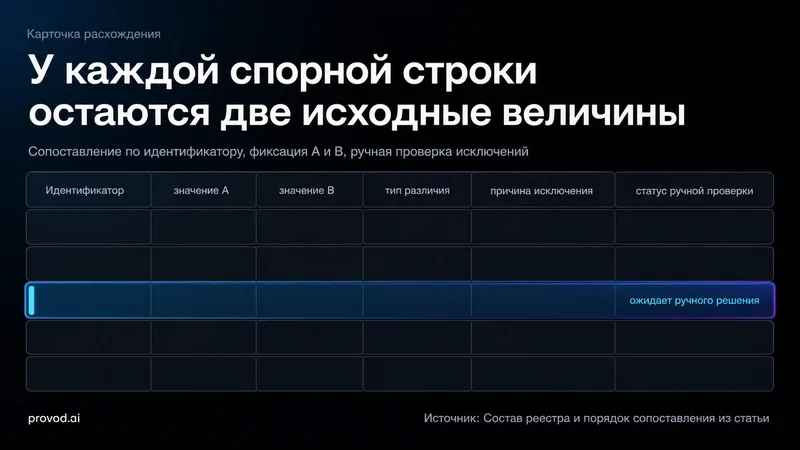
The logic of a robust AI workflow for reconciliation
When using an LLM agent to handle these tasks, the sequence of operations is everything. You cannot jump straight to comparing quantities.
1. Identifier Mapping: First, the AI must match rows based on a stable ID (like a SKU or Serial Number). If the ID doesn't match, the row is an automatic exception.
2. Value Comparison: Only after the IDs are locked does the AI compare the actual stock levels or statuses.
3. Registry Creation: Instead of a "Corrected" column, the AI generates a report showing: ID, Value A, Value B, Difference Type, and a Manual Review flag.
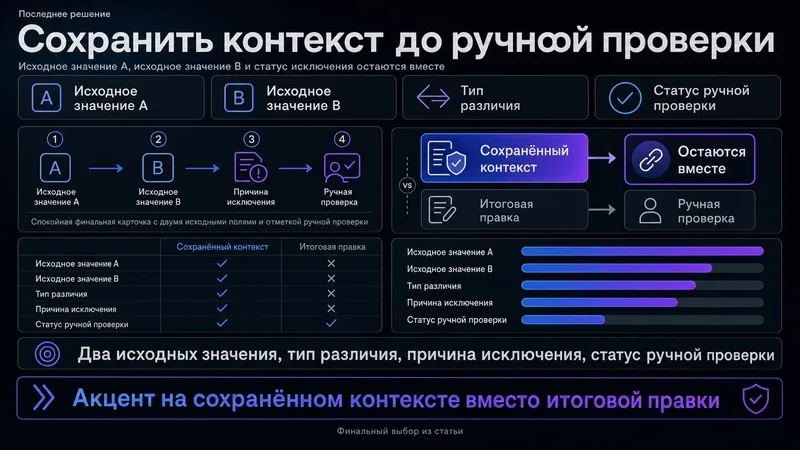
Implementing this with prompt engineering
To get an LLM to handle this without "hallucinating" a fix or simplifying the data too much, you need to constrain it to act as a data auditor rather than a data cleaner. Here is a prompt I've been using to turn raw CSV exports into a professional discrepancy registry.
Act as a Data Reconciliation Expert. I will provide you with two datasets (Dataset A and Dataset B).

Your goal is to identify discrepancies without deleting the original source data. Follow these strict logic steps:

1. Match rows exclusively by the [Unique ID] column.
2. If a [Unique ID] exists in A but not in B (or vice versa), mark it as "Missing Record" and list it in the exceptions.
3. If the [Unique ID] matches but the [Quantity/Status] differs, do NOT pick a winner. Instead, create a registry entry with the following format:
   - ID: [The Unique ID]
   - Value_A: [Exact value from Dataset A]
   - Value_B: [Exact value from Dataset B]
   - Diff_Type: [e.g., Quantity Mismatch]
   - Review_Status: "Pending Manual Check"

4. Output the results as a list of discrepancies. Do not summarize; provide every single row that fails the match.

Dataset A:
{{Dataset_A}}

Dataset B:
{{Dataset_B}}
Why this approach beats a simple VLOOKUP
A standard spreadsheet formula tells you that something is different, but an LLM agent can help categorize why it might be different based on surrounding context (like timestamps or location codes).
The most critical part of this deep dive is the "Review Status." By forcing the AI to label a row as "Pending Manual Check," you create a clear boundary between automated detection and human decision-making. If you just create a "Final Value" column, you're gambling that the AI (or the formula) chose the correct source. In high-stakes inventory management, that's a risk you can't afford.
Keep the raw values, track the difference, and only close the loop after a human eyes the physical stock.
All Replies (3)
Want a live back-and-forth? Join the global AI chat room — login to talk.
Nightmare fuel. I lost a month of logs doing this. Do you use versioned snapshots now?