AI Video Needs a Blender of Its Own
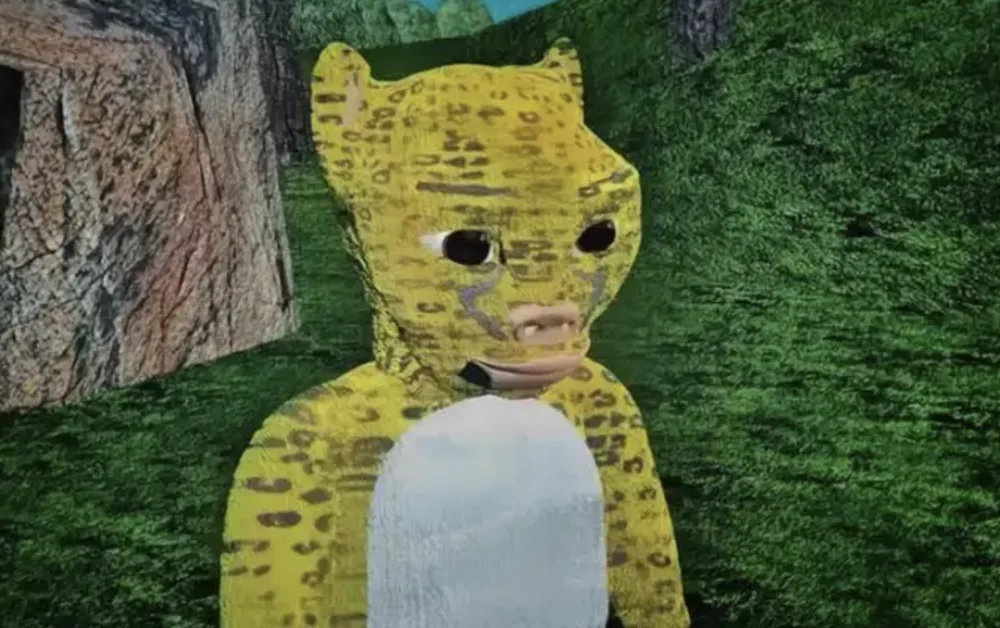
The viral success of the movie "Niu Lai" exposed an odd paradox in modern cinema. Viewers mocked its visuals for resembling "early 3D animation student homework," yet that rough aesthetic actually helped drive engagement. Today’s AI video is different: cinematic lighting, photorealistic characters, and massive scales can be generated in minutes. Even with all that visual polish, the "director’s" side remains difficult—camera angles, blocking, and the exact timing of a reveal.
Why Prompts Cannot Replace Camera Control?
A prompt is not a camera. Asking an LLM to "pan slightly left and tilt up exactly as the character turns" does not provide precise control without a lot of random "gacha" luck. That is why creators are returning to a decades-old industry standard: pre-visualization (Previs).
I have been testing the Previs stage in Updream, which essentially works like a Blender for AI video creators. Rather than repeatedly fighting prompts to produce a particular shot, you build a low-fidelity 3D "white model" scene, establish the camera path, and use it as a spatial guide for the AI model.
From Reference Images to 3D Space
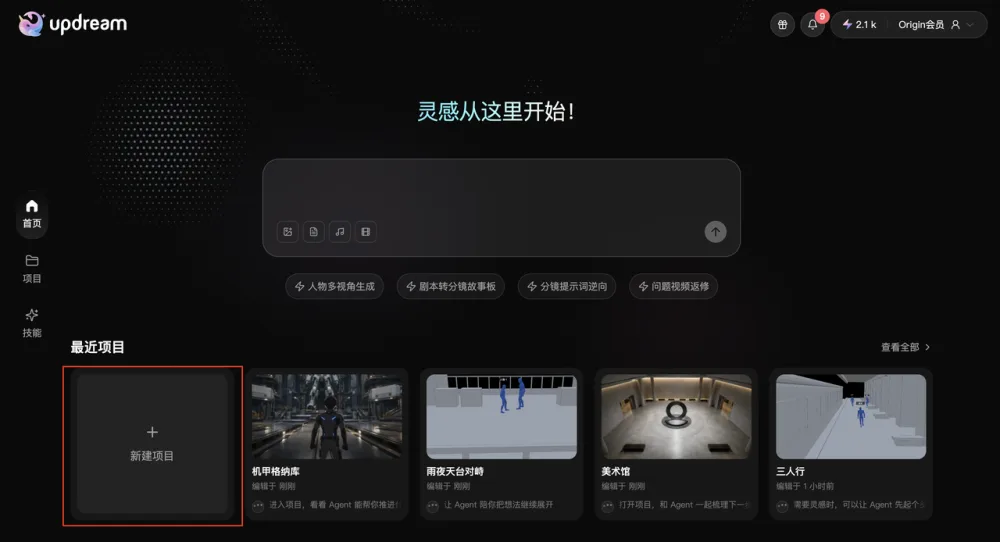
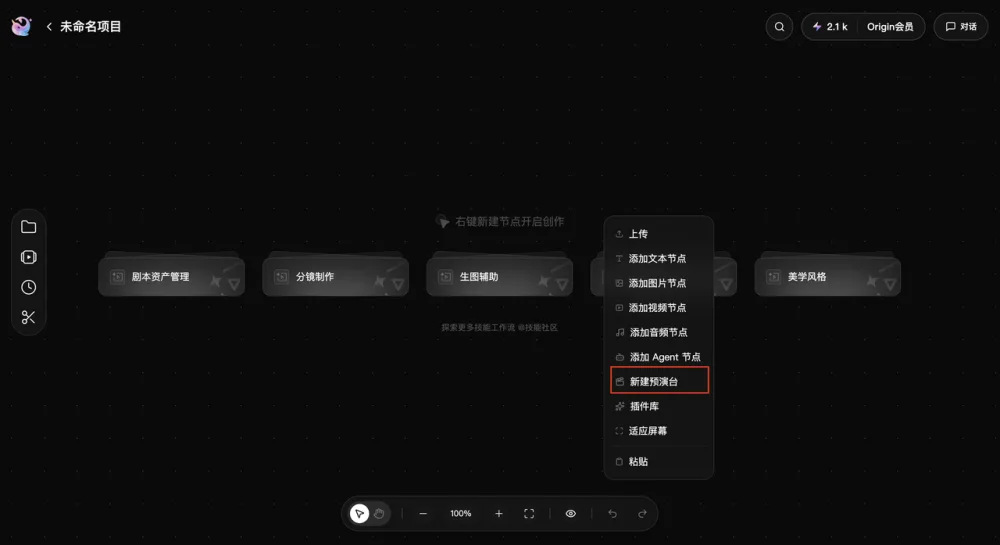
The biggest obstacle to traditional Previs is the learning curve involved with software such as Blender. Updream avoids that barrier by allowing creators to upload reference images, ideally wide shots or bird's-eye views, and automatically generate a 3D white model of the environment. The process takes about 4 to 7 minutes. After the scene is live, the workflow becomes visual: place characters, set camera keyframes, and define movement trajectories.
Does the White Model Improve Final Output?
I tested this approach across several scenarios to determine whether the "white model" genuinely improves the final output.
- The Mecha Hangar: I created a shot in which a pilot walks toward a giant robot. The camera was positioned behind the character using a "follow" logic, with a keyframe at the end to tilt upward and reveal the mecha's scale.
- The Space Hub: I tested a complex orbiting shot in which the camera circles a character to reveal a massive cosmic city.
In both cases, "Prompt only" and "Previs + Prompt" produced sharply different results. Without the white model, the AI frequently initiated the camera lift too early or mishandled the distance, destroying the sense of scale. The Previs guide locked the timing and composition in place. Textures and lighting were handled by the AI, while the white model determined "how it's shot."
Handling Complex Blocking and Multi-Character Scenes
Can Spatial Guides Handle Complex Blocking?
The value of a spatial guide becomes much clearer when multiple elements are moving. I tested a subway station scene involving three people passing one another. Explaining who enters from where and when they intersect through natural language is a nightmare. In a 3D space, the characters can simply be dragged along a timeline.
For more intense action, such as a rainy rooftop confrontation, the Previs stage manages macro-movements, meaning who is where, while the prompt manages micro-actions such as the punch and the dodge. This division of labor is far more efficient than compressing every spatial detail into a single paragraph of text.
Will Previs Reduce High-Budget AI Costs?
For high-budget AI workflows, this can save significant costs. If one complex generation costs several dollars in compute, reducing "failed" shots caused by poor camera placement provides a major advantage.
This shift reflects a "technical democratization" similar to the moment when the Kodak Brownie camera made photography accessible. By removing the friction of 3D modeling, creators can focus once again on cinematography—composition, timing, and observation—instead of simply memorizing which keywords to use.
All Replies (3)
Want a live back-and-forth? Join the global AI chat room — login to talk.
Prompting for camera movement is frustrating. I wasted 3 hours on one shot. A dedicated Blender-like tool for AI video editing would be a game changer right? For instance, using a low-fidelity 3D "white model" scene to establish the camera path before generating the final shot could save a lot of time and effort. The viral success of the movie "Niu Lai" exposed an odd paradox in modern cinema. Viewers mocked its visuals for resembling "early 3D animation student homework," yet that rough aesthetic actually helped drive engagement. Today’s AI video is different: cinematic lighting, photorealistic characters, and massive scales can be generated in minutes. Even with all that visual polish, the "director’s" side remains difficult—camera angles, blocking, and the exact timing of a reveal. 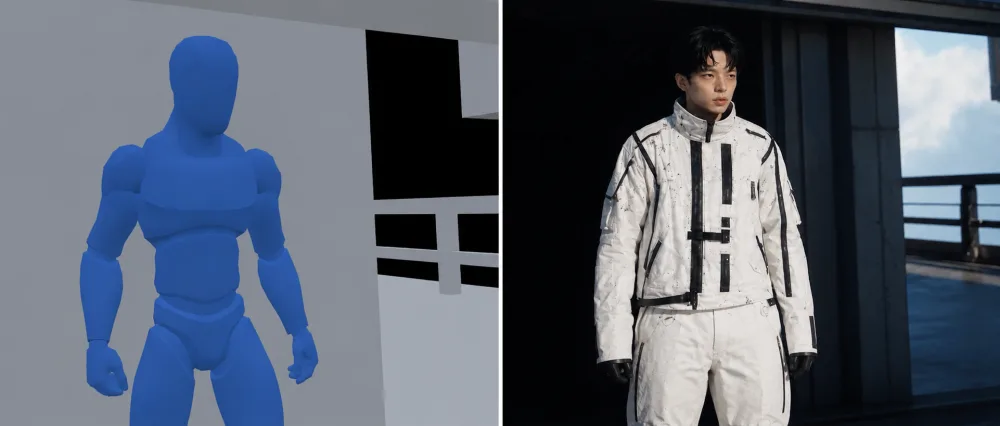 ## Why Prompts Cannot Replace Camera Control? A prompt is not a camera. Asking an LLM to "pan slightly left and tilt up exactly as the character turns" does not provide precise control without a lot of random "gacha" luck. That is why creators are returning to a decades-old industry standard: pre-visualization (Previs). I have been testing the Previs stage in Updream, which essentially works like a Blender for AI video creators. Rather than repeatedly fighting prompts to produce a particular shot, you build a low-fidelity 3D "white model" scene, establish the camera path, and use it as a spatial guide for the AI model. From Reference Images to 3D Space The biggest obstacle to traditional Previs is the learning curve involved with software such as Blender. Updream avoids that barrier by allowing creators to upload reference images, ideally wide shots or bird's-eye views, and automatically generate a 3D white model of the environment. The process ta
Masking in After Effects is such a nightmare for fixing glitches. Is there a faster tool? I've been exploring Updream's Previs stage, which essentially works like a Blender for AI video creators. Rather than repeatedly fighting prompts to produce a particular shot, you build a low-fidelity 3D "white model" scene, establish the camera path, and use it as a spatial guide for the AI model.
Node-based systems sound promising, but would they just create a total mess for AI video? The viral success of the movie "Niu Lai" exposed an odd paradox in modern cinema. Viewers mocked its visuals for resembling "early 3D animation student homework," yet that rough aesthetic actually helped drive engagement. Today’s AI video is different: cinematic lighting, photorealistic characters, and massive scales can be generated in minutes. Even with all that visual polish, the "director’s" side remains difficult—camera angles, blocking, and the exact timing of a reveal. ## Why Prompts Cannot Replace Camera Control? A prompt is not a camera. Asking an LLM to "pan slightly left and tilt up exactly as the character turns" does not provide precise control without a lot of random "gacha" luck. That is why creators are returning to a decades-old industry standard: pre-visualization (Previs). I have been testing the Previs stage in Updream, which essentially works like a Blender for AI video creators. Rather than repeatedly fighting prompts to produce a particular shot, you build a low-fidelity 3D "white model" scene, establish the camera path, and use it as a spatial guide for the AI model. From Reference Images to 3D Space
  The biggest obstacle to traditional Previs is the learning curve involved with software such as Blender. Updream avoids that barrier by allowing creators to upload reference images, ideally wide shots or bird's-eye views, and automatically generate a 3D white model of the environment. The process takes only a few minutes, making it accessible for creators of all skill levels.