ChatGPT Pro keeps pausing Code Interpreter analysis
Repeated “Analysis paused” messages do not, by themselves, confirm a Python sandbox timeout. In the reported ChatGPT Pro case, the status returns across consecutive turns during document inspection, page rendering, formatting checks, and script execution, without a traceback or completed result. The useful next step is to isolate the last successful stage in a smaller diagnostic run and determine whether execution stops before Python starts, after producing output, or during file delivery.
What the report actually establishes
The affected setup is the ChatGPT Pro web interface in Google Chrome, using the “Latest Pro” selector and the Code Interpreter/Data Analysis feature with its Python container. The first reported occurrence was around 12:00 PM Pacific Time, while the attached screenshot filename carries the date 2026-09-30 and the time 2.27.49 PM.
The problem appears during multi-step work rather than producing a conventional Python exception. “Analysis paused” is shown repeatedly, but there is no traceback, exit code, or runtime message identifying a timeout.
Chrome is simply the recorded platform; the report does not provide a browser version or evidence that Chrome caused the interruption. Likewise, “Latest Pro” is a selector label, not enough information to connect the incident to a specific underlying model release.
Locate the stage that is actually failing
Use the final successful line in the execution log to narrow down the interruption point:
- If nothing from Python appears, the workflow is stopping before or during execution startup. That alone does not prove a container timeout.
- If Python output appears and then the status changes to “Analysis paused,” the computation may already have completed while the surrounding task is being interrupted.
- If output exists but the requested file never appears, the failure boundary is after computation, during file generation or delivery.
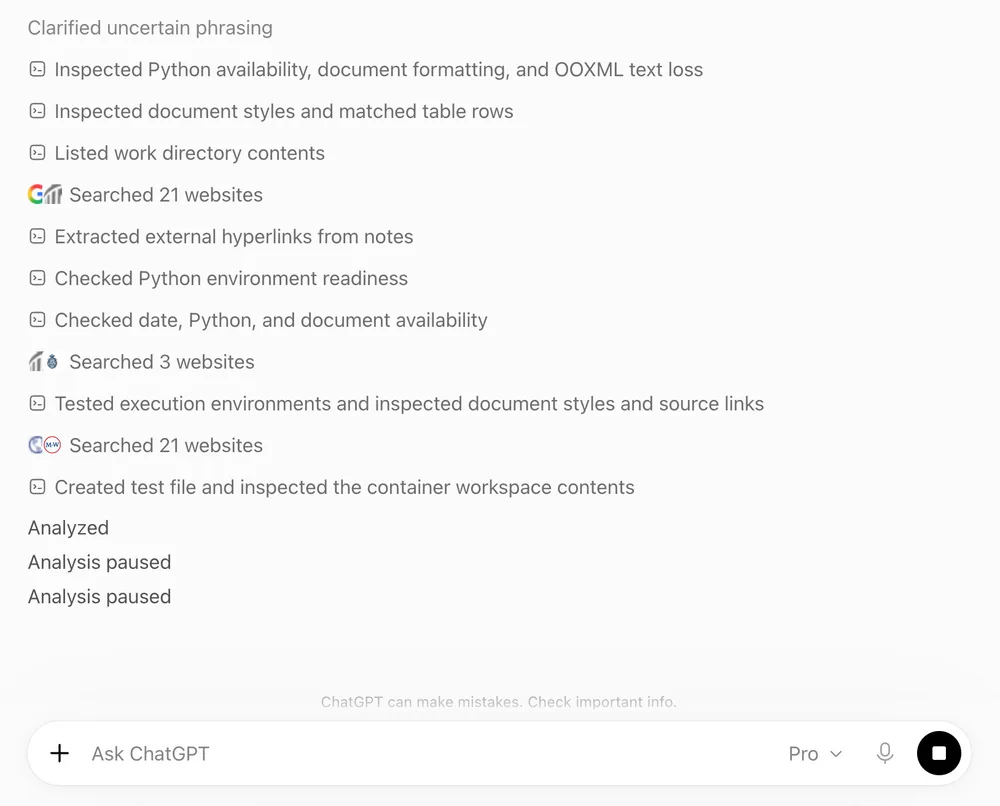
This distinction matters because “sandbox timeout,” “container runtime failure,” and “task orchestration pause” require different evidence. The supplied report establishes the repeated status, not the underlying cause.
Run the document inspection, page rendering, formatting check, and Python execution as separate actions rather than placing all four into one workflow. Keep the input and selected feature unchanged. If the isolated steps finish but the combined workflow pauses, the problem is more likely connected to task sequencing or thread state than to every Python operation.
Use retries as diagnostics, not random clicking
Reloading the Chrome tab and resending only the smallest paused step can test whether the browser session is holding a bad interactive state. That is a diagnostic move, not a confirmed fix.
A separate diagnostic thread can also isolate the issue without discarding the original report. Enter one short operation, such as inspecting the document or running the script, rather than copying the entire multi-step request. Preserve the original thread because its execution history may show where the combined task first stopped.
Repeatedly selecting a continuation control is useful only when the next attempt produces a new log boundary. If every attempt returns the same “Analysis paused” line with no additional output, the retries are not narrowing the fault.
What a useful escalation should contain
A report should include the exact status text, the sequence of attempted actions, timestamps, the Chrome environment, the ChatGPT Pro plan, the Latest Pro selector, and the last visible execution-log line. It should also state whether Python produced any output and whether a downloadable file was generated.
Avoid labeling the incident a sandbox timeout or container-runtime bug unless a traceback or diagnostic message supports that claim. Until then, the defensible description is narrower: ChatGPT Pro’s Code Interpreter workflow repeatedly enters an “Analysis paused” state, and the next useful evidence is the exact stage where execution stops.
All Replies (3)
Want a live back-and-forth? Join the global AI chat room — login to talk.
The "Analysis paused" spam during document inspection suggests a rendering bottleneck, not a timeout—try forcing raw text input first.
That’s absolutely a red flag—two hours of idle time with no traceback suggests either a persistent sandbox leak or a deeper misconfiguration. Maybe try isolating just the script execution part in a minimal test case first.
That "status returns across consecutive turns" part is the real red flag—sounds like a silent loop in the interpreter's rendering pipeline, not just a timeout.