Midjourney architecture looks flat until you start treating
Most AI-generated interiors feel like cardboard cutouts because the model tends to render a room as a single, static plane. If you want to break that "dollhouse" effect and actually create immersive environments, you have to stop thinking about a doorway as a piece of furniture or a structural object and start treating it as a tool for manipulating spatial depth.
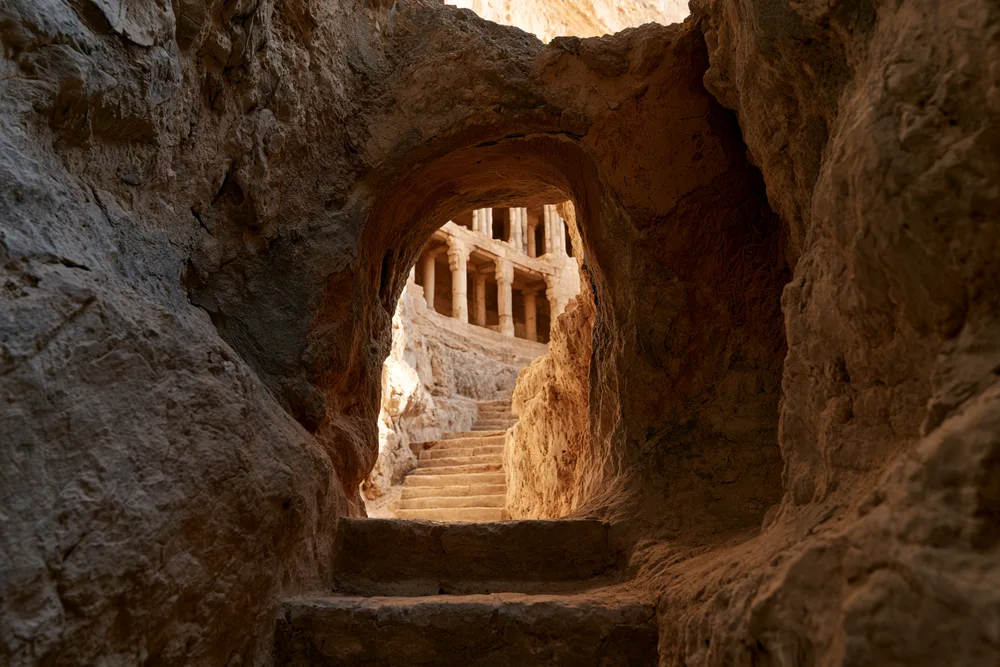
The secret to real-world immersion isn't more detail—it's partial visibility. In actual architecture, we perceive depth through "thresholds." When you see a sliver of another room through a cracked door, or a hallway that disappears into a shadow, your brain automatically calculates the distance and volume of the space. Midjourney can do this, but you have to force it to prioritize the transition over the object.
Mastering the Threshold Effect
To get this right, you need to move away from generic prompts like "modern living room" and start describing the relationship between two different light sources and two different depths. The goal is to create a visual "sandwich" where the foreground is a frame, the middle ground is the threshold, and the background is a separate, distinct space.
If you're building an AI workflow for architectural visualization, try incorporating these three specific elements into your prompt engineering:
1. Partial Occlusion: Instead of a "wide open door," use phrases like "view through a partially open heavy oak door" or "glimpse of a sunlit courtyard through a narrow gap." This forces the LLM to render an edge, which creates an immediate sense of 3D layering.
2. Light Contrast (The Transition): Depth is felt most strongly when there is a shift in luminosity. Prompt for a "dimly lit foreground" leading into a "brightly lit distant room." This creates a silhouette effect at the threshold that pushes the background further away.
3. Atmospheric Perspective: Adding a hint of haze, dust motes, or a slight blur to the area beyond the doorway mimics how a camera lens handles depth of field, making the transition feel physical rather than digital.
Practical Implementation
When I'm trying to generate these immersive spaces, I find that focusing on the "frame" is the most effective way to guide the model. Here is a basic logic you can adapt for your own prompts:
[Foreground element: dark interior, silhouette of a door frame] -> [The Threshold: sharp edge of the door, contrasting light] -> [The Background: distant room, soft focus, different color temperature]For example, instead of prompting for a "library with a door," try something like:A POV shot from a dark corridor, looking through a sliver of an open door into a massive gold-lit library, volumetric lighting, deep spatial depth, architectural photography --ar 16:9
By shifting the focus from the "object" (the door) to the "experience" (the transition), you move from flat images to a real-world sense of place. It transforms the image from a picture of a room into a window into a world.
All Replies (3)
Want a live back-and-forth? Join the global AI chat room — login to talk.
I'm struggling with the flatness! Does adding a specific f-stop actually improve the depth of field?
Finally! Do specific foreground objects work better than others for depth?
This is a lifesaver! Which focal lengths work best for interiors?