Capstone Project Part 1 lab blocks on stale Coursera AWS credentials
The Deep Learning.AI Data Engineering capstone (Week 4, Data Modeling, Transformation, and Serving) keeps failing at source scripts/setup.sh because the temporary AWS credentials injected into the Coursera lab container are expired or malformed, not because the project files or Terraform backend are wrong.
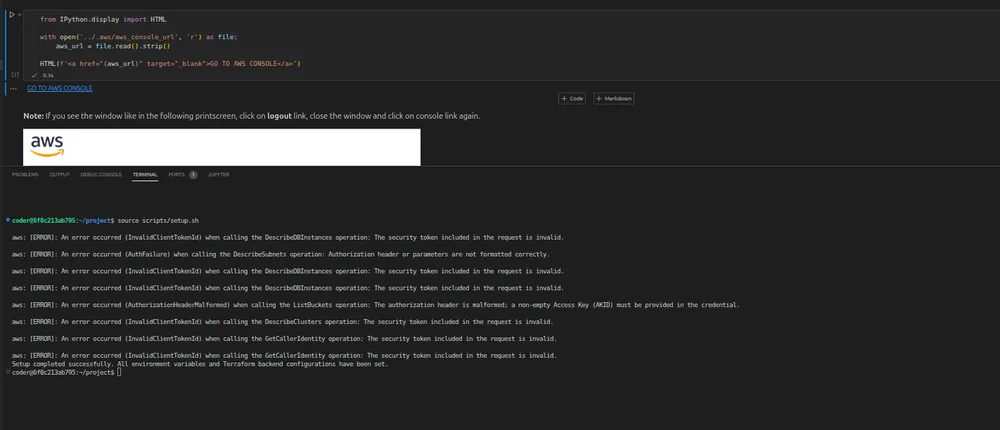
Running aws sts get-caller-identity returns InvalidClientTokenId: The security token included in the request is invalid, and the console link the lab provides no longer resolves, which rules out a local config mistake and points at the lab environment itself. Restarting the workspace and re-running the setup script produces the identical sequence of errors, so the issue is reproducible rather than a transient network blip.
What the error log actually shows
The setup output is a chain of failed AWS API calls, each one returning a different flavor of authentication failure. DescribeDBInstances and DescribeClusters fail with InvalidClientTokenId, which means the access key ID being sent does not match a valid AWS principal. DescribeSubnets fails with AuthFailure and an Authorization header or parameters are not formatted correctly message, suggesting the signed request is being constructed with a corrupted or empty secret. ListBuckets returns AuthorizationHeaderMalformed with the note that a non-empty Access Key (AKID) must be provided in the credential, which is the clearest signal that the credential chain is not populated at all.
None of these are IAM permission errors. If the credentials were valid but under-privileged, AWS would respond with AccessDenied. Instead, every call is rejected before authorization is even evaluated, which is the signature of expired or revoked temporary credentials.
Why restarting doesn't help
Coursera provisions short-lived AWS credentials for each lab session through an internal broker that rotates keys on a fixed schedule. When that broker fails to refresh or deliver a new set, the container keeps the last known (already expired) environment variables, and every AWS CLI invocation fails until the session is re-provisioned from scratch. Restarting the VM resets the local shell but does not force Coursera to issue a fresh credential bundle, so the stale keys persist.
What you can verify before opening a ticket
Before requesting a credential refresh, confirm the failure is environmental and not a project regression. Check that the scripts/setup.sh file matches the repository checksum by running git status inside the container; if the file has been modified, restore it with git checkout -- scripts/setup.sh. Then inspect the exported environment variables with env | grep AWS — if AWS_ACCESS_KEY_ID is blank or contains a truncated value, the injection step is broken. Finally, confirm the Terraform backend configuration is untouched by running terraform init -backend-config=backend.conf and verifying the output shows a successful backend validation rather than an InvalidClientTokenId error.
Which step fails and when to escalate
The failure point is the credential injection that happens before Terraform initializes its backend. If env | grep AWS shows populated but expired keys (look for AWS_SECURITY_TOKEN and AWS_SESSION_EXPIRATION), wait ten minutes and retry — Coursera sometimes lags the key rotation. If the variables are missing entirely or the errors persist after a fresh restart, the lab broker is not regenerating credentials, and the only resolution is for Coursera support to invalidate and re-provision your environment.
Include the exact terminal output, the container hostname (coder@a1720fa921c2), and the timestamped screenshots in the support request. Reference the assignment as Week 4, Chapter Assignment 4: Capstone Project Part 1 - ETL and Data Modeling, and state that the Terraform setup and project files are unchanged so the reviewer can rule out a source-side regression.
That's frustrating, but it's good to know it's a known issue. Have you tried contacting support?