ChatGPT keeps pushing random GitHub repo links in its suggestions—here’s how to check if it’s a bug or something worse
The issue isn’t just random suggestions—it’s the same repo popping up repeatedly. Since yesterday, users have reported seeing prompts like "Check out this voucher management tool" pointing to github.com/mkomputerit/voucher-management-desktop, a repo with no clear connection to their own work. The account behind it appears to be a throwaway, with no other active projects or contributions.
What’s happening?
- The suggestions aren’t tied to your own GitHub activity (you confirmed it’s not your account).
- The repo itself looks like a placeholder—no meaningful commits, no documentation, just a basic structure.
- This isn’t a standard "here’s a relevant tool" suggestion. It’s a targeted prompt appearing in your chat history, which raises two possibilities:
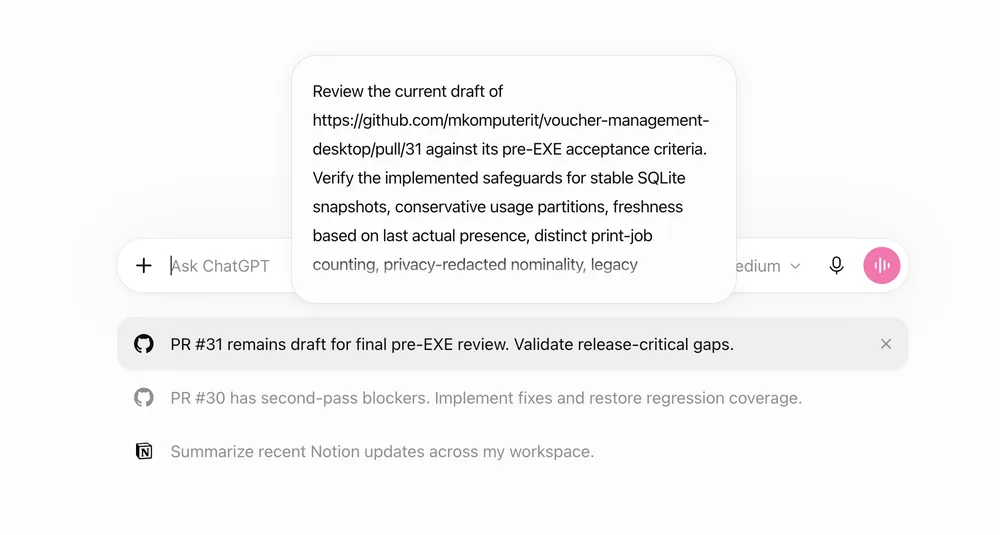
1. A hallucination edge case—ChatGPT’s training data or context window is misfiring on a niche repo name.
- A prompt injection test—someone is probing whether the system will surface arbitrary repos when given a specific cue.
How to test if it’s malicious
- Check the repo’s actual content
- Open the repo (
github.com/mkomputerit/voucher-management-desktop) and look for: - Hidden files (e.g.,
.gitignorewith suspicious entries) - Unusual commit messages (e.g., "test payload" or "exploit")
- No README or LICENSE (a red flag for throwaway projects)
- If it’s truly empty, it’s likely a test—but if it contains obfuscated code or metadata, it’s worth reporting.
2. Monitor for data exfiltration
- If you click a suggestion link while logged into ChatGPT, the system might log the interaction (OpenAI’s terms allow this for "improving suggestions").
- Do not enter sensitive data into prompts generated from these links. Treat them like phishing—even if the repo looks harmless, the goal could be to:
- Steal your API keys if you paste them into a suggested prompt.
- Trick you into revealing your chat history via "debugging" steps.
3. Compare with known prompt injection cases
- Earlier this year, researchers demonstrated how LLMs could be tricked into generating malicious code snippets when given crafted prompts. This appears to be a real-world variant:
- Instead of code, the attack vector is repo suggestions.
- The target isn’t code execution—it’s getting you to engage with the repo (e.g., "Try this tool!").
What to do next
- Report it to OpenAI
Use the in-app feedback tool (click the ⚙️ icon in ChatGPT) and describe:
- The exact repo URL (
github.com/mkomputerit/voucher-management-desktop) - The prompt text that triggered it (e.g., "Here’s a voucher management tool you might find useful")
- That it’s recurring across sessions.
- Temporarily disable suggestions
While investigating, turn off "Suggestions" in ChatGPT settings (Settings → Beta Features) to prevent further exposure.
- Audit your own GitHub activity
Search your account for any unusual repos or commits—if this is a targeted attack, they might have mirrored your username or project names to increase relevance.
Why this matters
This isn’t just spam—it’s a way to test whether ChatGPT’s suggestion system can be weaponized. If the repo contains hidden payloads (e.g., a script that logs your session ID), clicking could expose your interaction history to an attacker. Even if it’s just a false positive, OpenAI needs to clarify how these suggestions are generated and whether they’re sanitized for safety.
No direct links allowed, but the repo in question is github.com/mkomputerit/voucher-management-desktop.
That
voucher-management-desktoprepo has zero stars—so why’s it keep surfacing? Either OpenAI’s training data is that stale or they’re scraping live GitHub without filtering for relevance.