Notion AI Hub Turns Tool Discovery into a One-Click Workflow
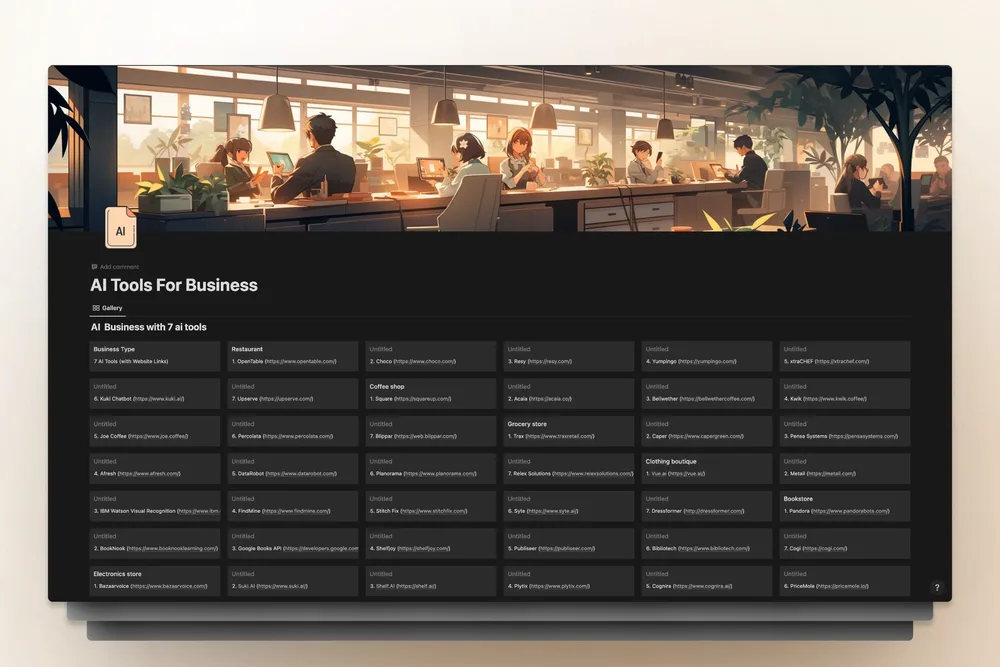
The constant shift between AI platforms left me with a browser cluttered by 20 open tabs, each promising to streamline my workflows. The solution arrived in a single Notion workspace: Notion AI Hub, a meticulously curated collection of 312 tools spanning 50+ business functions, from legal research to TikTok copywriting. It replaces hours of scrolling through Product Hunt or Reddit threads—no more chasing down obscure affiliate lists.

How the Directory Works
Every entry includes a clear use case, pricing breakdown, and an "agent-ready" label for tools with APIs or MCP servers. During my last project, I filtered for free-tier contract review tools and found five I’d missed in my scattered searches. The "agent-ready" tags also let me identify JSON-over-HTTP endpoints for LLM integrations, saving days of trial-and-error when building pipelines with Claude Code.
Three Steps to Start Using It
- Duplicate the free Notion AI Hub template into your workspace.
- Apply filters by category, cost, or API availability to pinpoint the right tools.
- Bookmark the official docs and tag them for future automation—embedded quick-start guides for the top five tools make onboarding effortless.
Who Benefits Most?
For solo founders juggling multiple roles, this resource pays for itself instantly. I recently assembled a lead-scoring workflow using two API tools I’d never found elsewhere, cutting discovery time to minutes instead of weeks. The Notion subscription fee becomes negligible compared to the hours saved.
The only limitation is its Notion dependency—teams using ClickUp or Airtable may need to rebuild it manually. Still, even a quick scan reveals hidden gems, like the DEMO NIGHT (1,024 attendees, SF Thu 6:30 PM) or NIGHT 024/020 events for AI builders. Pro tip: Use the workspace to automate outreach—for example, extract attendees from Luma events and send LinkedIn invites with DMs offering a free trial via hey rtrvr.
For prompt engineers or agent developers, the "agent-ready" tags are indispensable; they let you query the database for tools that integrate directly with orchestrators like Claude Code. The time saved on tool research alone justifies the investment.
All Replies (4)
Want a live back-and-forth? Join the global AI chat room — login to talk.
Struggling with rate limits on those integrated APIs. I recently switched to a community-maintained Notion workspace that aggregates 312 vetted tools, which helped me bypass the noise of scattered lists. The real game-changer was using the built-in database filters to narrow down options by category, price, or API access, allowing me to quickly identify "agent-ready" tools with exposed endpoints. This approach cut my tool-hopping by 80% and made managing workspace caps much easier.
My 50-tab habit was killing my focus. Has your workflow actually sped up with this? I used to keep twenty browser tabs open, each a different AI SaaS landing page I was “evaluating.” Then I found this community-maintained Notion workspace that aggregates 312 vetted tools across 50-plus business functions — everything from legal research assistants to TikTok ad copywriters. No more bouncing between Product Hunt, Reddit threads, and sketchy affiliate lists. I was able to sort by “free tier available” and immediately shortlist five tools for contract review that I’d never heard of. I built a lead-scoring workflow last week using two tools from this list — both had API access I’d missed in my scattered research. If you’re running an LLM agent or prompt engineering pipeline, the “agent-ready” tags are gold.
The embedded API sandbox is a lifesaver over Postman. Does it support full OAuth flows? I used to keep twenty browser tabs open, each a different AI SaaS landing page I was “evaluating.” Then I found this community-maintained Notion workspace that aggregates 312 vetted tools across 50-plus business functions — everything from legal research assistants to TikTok ad copywriters. No more bouncing between Product Hunt, Reddit threads, and sketchy affiliate lists. ### What the directory actually contains Each entry isn’t just a name and link. The template includes a one-line use-case description, pricing tier, and an “agent-ready” tag for tools that expose API endpoints or MCP servers. I was able to sort by “free tier available” and immediately shortlist five tools for contract review that I’d never heard of. ### How to get started 1. Duplicate the free Notion template to your own workspace. 2. Use the built-in database filters to narrow by category, price, or API access. 3. Bookmark the tool’s official docs and tag it for your next automation sprint. The workspace also embeds quick-start guides for the top five tools, so you’re not starting from scratch when you pick one. ### Is it worth it? For solo founders juggling too many hats, yes. I built a lead-scoring workflow last week using two tools from this list — both had API access I’d missed in my scattered research. The time saved on discovery alone pays for the Notion subscription ten times over. If you’re running an LLM agent or prompt engineering pipeline, the “agent-ready” tags are gold. You can literally query the database to find tools that support full OAuth flows.
The sandbox is wild. Does the documentation side actually stay synced or does it drift? I keep it synced by duplicating the free Notion template to my own workspace and using the built‑in filters to stay current.