vLLM outpaces Ollama by 20x under high concurrency
vLLM and Ollama are not interchangeable tools. Both can run models on your hardware, yet they take fundamentally different architectural approaches. One provides a precise environment for local experimentation, while the other operates as a high-capacity engine for serving hundreds of users simultaneously. Selecting the wrong tool for a scalable AI workflow can create a major performance bottleneck as soon as usage grows beyond five people.
The Architectural Divide
vLLM is a production serving engine built for intensive workloads. It does more than run a model; it controls the GPU with the intensity of an operating system. Its key advantage is PagedAttention. During standard inference, the KV cache, which holds previous tokens, consumes substantial memory and leaves large fragments unused. vLLM stores tokens in non-contiguous blocks, effectively removing that memory waste.
Continuous batching is another important difference. Most runners wait for a full batch of requests to complete before beginning the next one. vLLM lets requests join and leave the batch in real time. When one user finishes responding, another request immediately takes its place. This approach keeps GPU utilization at its highest level, which makes vLLM the gold standard for real-world LLM agent deployments.
Ollama, by contrast, is a Go-based wrapper around llama.cpp. Its design targets the experience of a developer sitting at a desk. It excels at downloading a model and starting a chat within seconds, but it does not provide vLLM’s aggressive scheduling. Although OLLAMA_NUM_PARALLEL can be adjusted, Ollama was not built to saturate an A100 or H100 like a dedicated serving stack.
Benchmarking the Throughput Gap
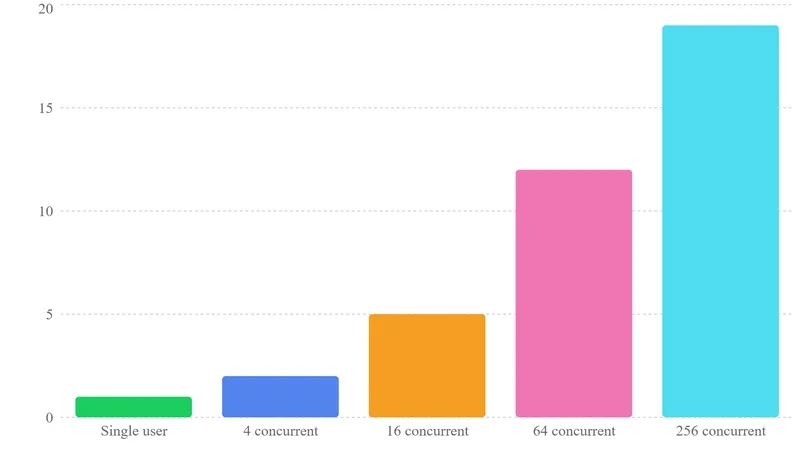
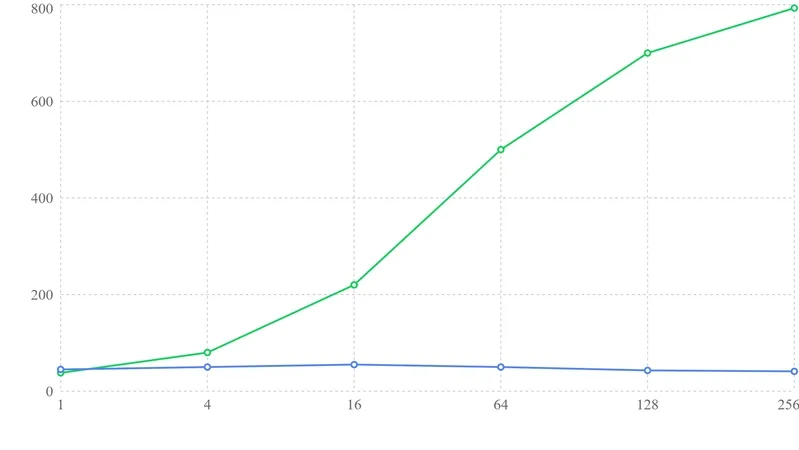
The measured difference is especially clear with Llama 3.1 8B running on an NVIDIA A100 40GB. At a concurrency of 1, representing one person chatting, both tools deliver roughly the same performance. Ollama remains fast and efficient for a single stream.
As simultaneous requests increase toward 256, the benefits of PagedAttention and continuous batching become apparent. In verified tests, vLLM reached around 793 tokens per second, while Ollama managed roughly 41 tokens per second. That represents nearly 20x more throughput.
Choosing Your Stack
A practical deployment decision can follow this logic:
- Use Ollama if you need a beginner-friendly setup, develop locally on a Mac or a single Linux box, or serve only a small number of internal users. It provides an ideal starting point from scratch.
- Use vLLM if you are entering a real-world production environment, operating multiple GPUs, or building a public-facing API. When throughput and latency under load are your primary KPIs, vLLM is the only serious choice.
All Replies (4)
Want a live back-and-forth? Join the global AI chat room — login to talk.
That 20x gap is insane. Does the performance hold up if you use a smaller kv cache?
PagedAttention is a game changer for memory fragmentation. Has anyone benchmarked this against Ollama's latest update?
Ollama's queueing is a total mess. Are these benchmarks based on real request traces or synthetic runs?
PagedAttention is a lifesaver for my VRAM. Does vLLM actually hold that 20x lead in production?