Why I switched to Harvester for my self-service PostgreSQL
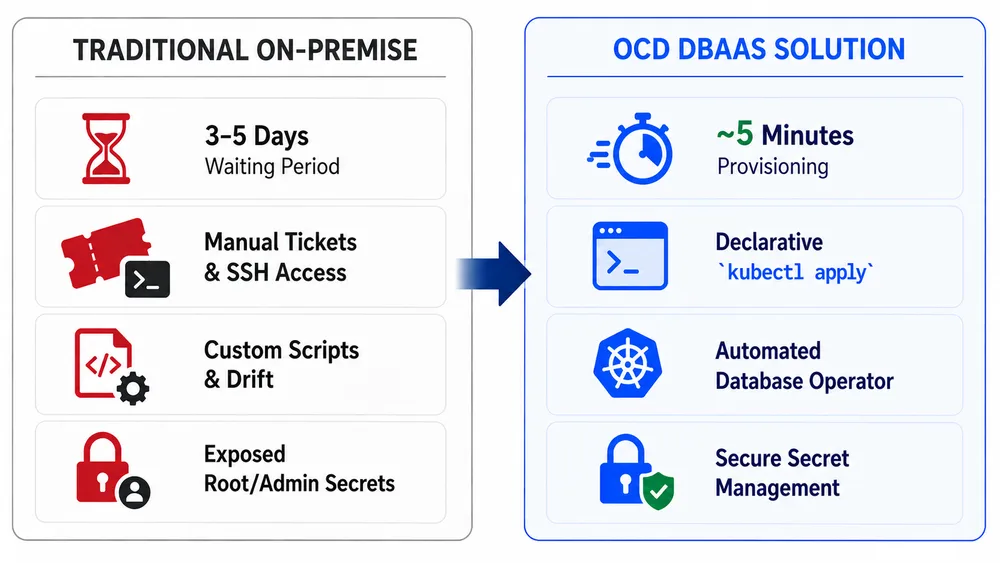
Running stateful workloads in a cloud-native environment usually feels like a tug-of-war between flexibility and stability. The Open Cloud Datacenter (OCD) approach attempts to solve this by layering a self-service PostgreSQL framework on top of Harvester, effectively treating database instances as disposable yet durable infrastructure. The core problem here is the "DBA bottleneck"—the agonizing wait for a database admin to provision a cluster, tune the storage, and handle the lifecycle management. By automating this, you shift from manual ticketing to an actual AI workflow where the infrastructure responds to the application's needs.
The Technical Architecture
The setup leverages Harvester's HCI (Hyper-Converged Infrastructure) capabilities to manage the underlying compute and storage, while the PostgreSQL lifecycle management handles the operational overhead. Instead of fighting with complex Kubernetes operators that sometimes struggle with persistent volume claims in hybrid environments, this stack treats the VM-based deployment as a first-class citizen.
For those looking for a practical tutorial on how to structure the deployment, the logic follows a specific lifecycle flow:
1. Resource Provisioning: Harvester allocates the necessary CPU and RAM via API, ensuring the VM is pinned to the correct storage pool for IOPS performance.
2. Bootstrap Phase: An automated script handles the initial initdb and configures the postgresql.conf for the specific workload (tuning shared buffers and work memory).
3. Lifecycle Hook: The system implements health checks that monitor the WAL (Write Ahead Log) and disk pressure, triggering automated alerts before the DB hits a hard crash.
Getting Started from Scratch
If you want to replicate this deployment, you need a running Harvester cluster and a way to trigger the VM lifecycle. While you can do this manually, the real power comes from using a controller to manage the PostgreSQL state.
Here is a conceptual example of how the configuration for a basic instance might look in a YAML-based definition for the deployment agent:
database_instance:
  name: pg-prod-01
  version: "15.4"
  resources:
    cpu: 4
    memory: 16Gi
    storage: 100Gi
  backup_policy:
    interval: "6h"
    retention: "7d"
  network:
    vpc_id: "vpc-12345"
    port: 5432
Is it actually worth it?
The trade-off is complexity versus autonomy. If you are running a single small app, this is overkill. But for a real-world scenario where you have dozens of microservices each needing their own isolated database, the self-service model is a lifesaver.
- Deployment Speed: Goes from hours (manual) to minutes (automated).
- Reliability: Harvester's distributed storage prevents the "single point of failure" typical of basic VM setups.
- Overhead: You still need someone who understands PostgreSQL tuning, as the automation handles the existence of the DB, but not necessarily the optimization of your queries.
All Replies (4)
Want a live back-and-forth? Join the global AI chat room — login to talk.
Long-term disk latency is a huge bottleneck here. Which storage tuning settings are you using?
Which specific kernel tweaks actually lowered your IO wait? I'm struggling to find the right balance.