OpenSearch: Shards, Segments & the Cluster Manager
So you want to understand what happens between curl -X PUT and actually getting search results back? Good. Most people treat OpenSearch like a magic box — you throw documents in, query strings come out, and nobody asks why. That ends today.
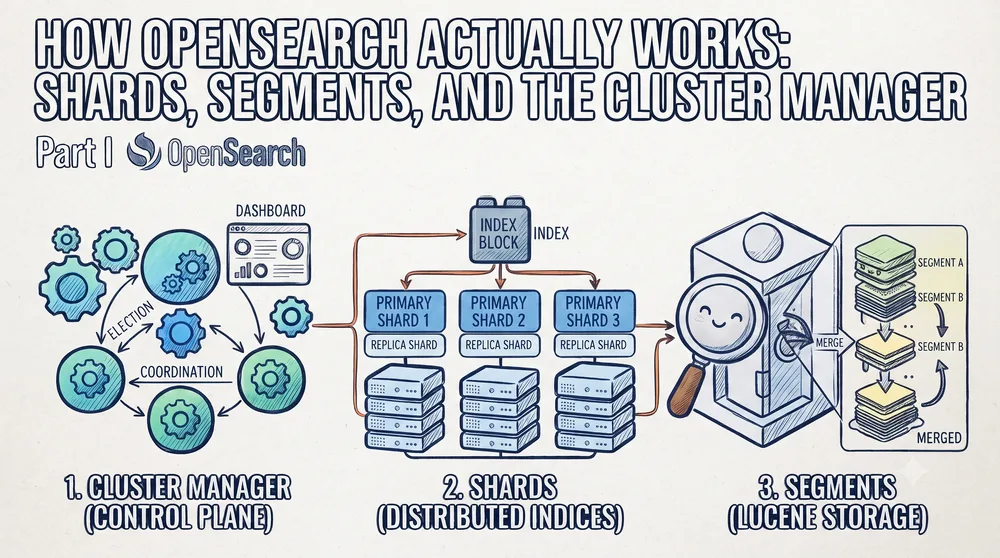
Let's talk about what's actually happening under the hood, because the mental model most people have is "it's Elasticsearch, but open-source, whatever" and that's doing you a massive disservice when things go sideways at scale.
Shards: the unit of parallelism (and pain)
Every index you create gets sliced into shards. Primary shards handle write traffic; replica shards are read-only copies sitting on other nodes. The number you pick at creation time is permanent — you can add replicas later, but you can't change primary shard count without reindexing. People always forget this. They pick 1 shard for a 500GB index and then wonder why their single node's disk is screaming.
The practical takeaway: shard sizing matters. Aim for shards in the 10-50GB range. Too small and overhead eats you alive; too large and recovery times make you want to quit software engineering entirely.
Segments: Lucene's dirty little secret
Here's where it gets interesting. Every time you index a document, it doesn't rewrite the whole file. OpenSearch (built on Lucene) writes a new immutable segment. Your document lives in that segment. Over time you accumulate segments — small ones, overlapping ones — and searches have to check all of them. That's segment proliferation, and it's why your "simple" search suddenly takes 400ms after a bulk insert.
The merge process is what keeps this manageable. Background threads consolidate small segments into larger ones, discarding deleted documents along the way. You can tune merge policies, but honestly, the defaults handle 90% of workloads fine. The other 10% — the ones with millions of tiny segments — are where the real debugging begins.
The Cluster Manager: the one node that actually matters
Not every node is equal. One node gets elected cluster manager — it's responsible for index creation, shard allocation, and knowing which nodes exist. The others are data nodes or coordinating nodes doing the actual heavy lifting. If your cluster manager goes down, things don't instantly break (there's a failover), but during that window nobody's making decisions about where shards should live.
I've seen people run clusters where every node also holds the cluster manager role, which works for three nodes but becomes a liability at scale. The cluster manager shouldn't be doing data-node work. Keep it simple: dedicated master-eligible nodes, data nodes that just store and serve.
Why this matters for real-world deployments
When you're designing an AI workflow around vector retrieval or log analytics, shard layout directly impacts query latency and indexing throughput. A deep dive into these internals isn't academic trivia — it's the difference between a deployment that scales and one that collapses under moderate load.
If you're building from scratch, spend an afternoon with a local single-node cluster, poke at _cat/shards, watch segments merge in real time, and deliberately break things (kill the cluster manager node and see what happens). The hands-on guide you need is right there in the behavior itself.
This was Part I — the foundation. Next time we'll get into how search actually executes across those segments and shards, including the query phase and fetch phase that most tutorials skip entirely.
All Replies (3)
Want a live back-and-forth? Join the global AI chat room — login to talk.
These optimizations sound great, but where are the benchmarks? Most of this fails under actual cluster load.
Stumping me here. Does the cluster manager have a specific timeout before it triggers a split-brain recovery?
Crucial point. Which specific _refresh value actually stopped the stale results in your production environment?