Passkeys vs Passwords: Why I'm Switching My Auth
Traditional passwords are a systemic failure. We're basically relying on the hope that we don't reuse a string of characters across ten different sites and that the company storing our hashed credentials doesn't have a massive leak. Even with a password manager, you're still managing a "shared secret" that can be phished if you're not paying attention to the URL.
I've been digging into the actual implementation of passkeys lately, and it's basically just asymmetric cryptography (similar to how we handle SSH keys) brought to the consumer web. Instead of a password, your device generates a public/private key pair. The private key stays locked in your hardware—think Secure Enclave on macOS/iOS or a TPM chip on Windows—and never actually leaves the device. The server only ever sees the public key.
When you try to log in, the server sends a challenge. Your device signs that challenge using the private key and sends the signature back. The server verifies it with the public key, and you're in. No secret is ever transmitted over the wire.
The Technical Edge
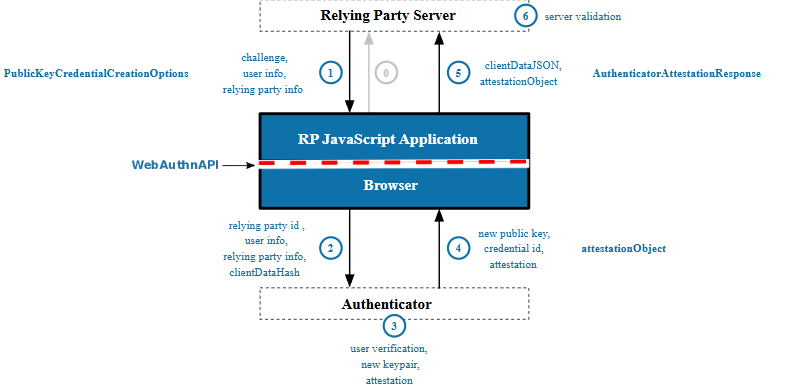
The real win here is the domain binding. Since the passkey is cryptographically tied to the specific domain, it's virtually immune to phishing. If you accidentally land on a spoofed site, your browser simply won't offer the passkey because the domain doesn't match.
Comparing the two setups:
- Secret Handling: Passwords are shared secrets sent during login; Passkeys send only a cryptographic signature.
- Uniqueness: Passwords are often reused across platforms; Passkeys are unique per site and device-bound.
- Phishing Resistance: Passwords can be typed into a fake form; Passkeys are bound to the domain, making them phish-proof by design.
- Server Breach Impact: A leaked password database is a disaster; a leaked public key database is useless to an attacker.
- User Friction: Passwords require memory or a manager; Passkeys use local biometrics or a PIN.
Deep Dive: WebAuthn and FIDO2
For those who want a more technical deep dive, this all runs on the WebAuthn API and FIDO2 standards. It's a standardized way for the browser to communicate with the authenticator (your phone or a YubiKey).
If you're looking for a practical tutorial on how to implement this in your own app, you'll want to look into the WebAuthn spec. It's a bit of a climb to set up from scratch, but the security payoff is massive. Basically, you're moving the "proof of identity" from something the user knows to something the user has (their device) and is (their biometric).
I'm currently auditing my most critical accounts to see who supports FIDO2/WebAuthn. It's a much cleaner AI workflow for identity management than juggling 2FA codes and rotating passwords every 90 days.
All Replies (9)
Love the breakdown. Does the asymmetric model fit specific 36 Stratagems better than shared secrets?
Struggling with the recovery side for my project. How do you handle lost synced devices?
I'm terrified of getting locked out, so I keep a physical security key in my safe.
Frustrating that the comment is hidden. Is anyone else seeing this moderation glitch in other threads?
Finally get it! Which specific part of the passkey flow was the biggest hurdle for you?
Too technical for me. Do passwords still work after setting up a passkey, or are they gone?
I'm curious if WebAuthn is actually viable for a small solo project or just for enterprise systems.
Recovery is a total nightmare. How are you handling account loss without using insecure email links?
Frustrating that recovery is still a screen door. Which services actually handle passkey resets properly?