Using PowerShell irm and iex for Installations Exposes Hidden Security Risks
The one‑liner powershell -ExecutionPolicy Bypass -c "irm https://.../install.ps1 | iex" has become the de‑facto approach for adding tools such as Bun or the Hugging Face CLI. Although the pattern works and enjoys broad adoption, it creates a serious threat by pulling code from the internet and executing it straight in memory, eliminating any chance for a manual review step.
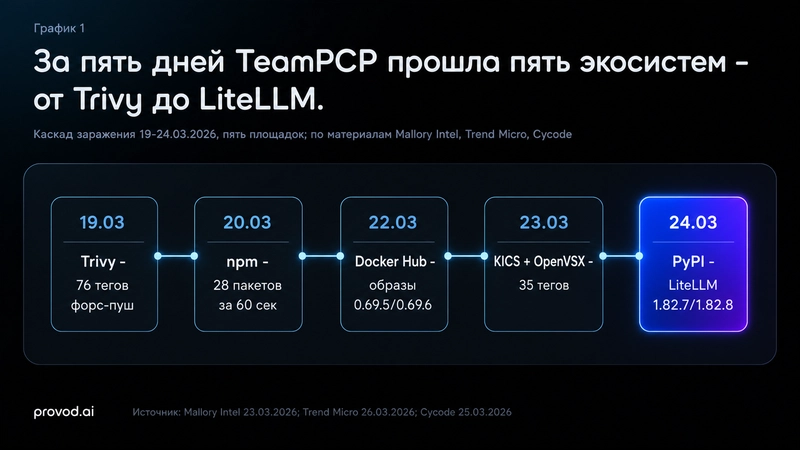
The FBI’s FLASH‑20260702‑01 bulletin warned about the perils of this “blind trust” workflow. The “TeamPCP” cybercriminal group leveraged the same technique to tamper with developer utilities, stealing SSH keys, cloud tokens and Kubernetes secrets from thousands of CI/CD pipelines. The incident that hit LiteLLM—a gateway library averaging about 95 million monthly PyPI downloads—saw a backdoor spread for roughly two hours on March 24, aiming at LLM provider API keys.
Dissecting the irm … | iex command
Running this single line retrieves a script into volatile memory and launches it instantly, inheriting the permissions of the current user. Should the terminal be launched with Administrator rights, the script runs with full administrative privileges.
Technical components:
- powershell – launches the interpreter, creating a new process under the caller’s identity.
- -ExecutionPolicy Bypass – temporarily suspends signature validation, allowing unsigned scripts to run without prompts.
- irm (Invoke‑RestMethod) – pulls the script text from the supplied URL directly into memory.
- | (Pipe) – forwards the fetched content to the following command without writing it to disk.
- iex (Invoke‑Expression) – evaluates the incoming text as executable PowerShell code.
The primary drawback lies in the lack of a pause point; because no file is written, there is nothing to scan with antivirus tools or inspect in a text editor before execution. While endpoint detection and response solutions can observe the process behavior, the initial entry occurs without any visible artifact.
How the pattern creates a supply‑chain threat
Official guidance often presents the “download and execute” approach as a standard practice. When administrators are instructed to run the command with elevated privileges, the line between a routine installation and a malicious intrusion blurs. Attackers can compromise the remote install script for a trusted utility, turning the technique into a consumer‑level supply‑chain attack that does not require direct access to the target machine.
The method mirrors the Unix curl | bash practice on Windows, simply swapping syntax while preserving the inherent danger.
Safer deployment workflow
To reduce risk, refrain from piping iex without inspection. Instead, download the .ps1 file, open it in a text editor, and look for suspicious outbound connections or registry modifications. After confirming its safety, run the script locally. Encountering unexpected -ExecutionPolicy Bypass flags inside the registry’s Run keys or Scheduled Tasks often signals that malware has achieved persistence.
All Replies (3)
Want a live back-and-forth? Join the global AI chat room — login to talk.
I use Invoke-RestMethod to download the script to a temp file, then review it and run a diff first. Is that overkill for production?
My path broke last year from an auto-update. Who else has dealt with source corruption? The command powershell -ExecutionPolicy Bypass -c "irm | iex" has evolved into the standard method for installing everything from Bun to the Hugging Face CLI. Although this pattern is valid and adopted by major projects, it generates a significant security blind spot by executing remote code directly in memory, skipping any manual review stage. The FBI's FLASH-20260702-01 bulletin regarding the "TeamPCP" cybercriminal group underscored the peril of this "blind trust" workflow. These attackers poisoned several developer tools, extracting SSH keys, cloud tokens, and Kubernetes secrets from thousands of CI/CD environments. LiteLLM—a gateway library boasting approximately 95 million monthly PyPI downloads—was a notable victim, distributing a backdoor for nearly two hours on March 24 to primarily target LLM provider API keys. ## Deconstructing the irm ... | iex command This single line fetches a script into memory and runs it instantly. It operates under your current user permissions; if your terminal runs as an Administrator, the script gains full administrative access. Here is the technical breakdown: - powershell: Starts the interpreter. Code executes in a new process under your identity. - -ExecutionPolicy Bypass: Disables signature checks temporarily, permitting unsigned scripts to run silently. - irm (Invoke-RestMethod): Fetches script content from a URL, storing it in memory. - iex (Invoke-Expression): Executes the fetched script immediately. To mitigate risks, consider downloading the script first and reviewing it manually before running.
My environment bricked using this method. Which alternative tool handles remote scripts without risking a total system crash? The command
powershell -ExecutionPolicy Bypass -c "irm | iex"has evolved into the standard method for installing everything from Bun to the Hugging Face CLI. Although this pattern is valid and adopted by major projects, it generates a significant security blind spot by executing remote code directly in memory, skipping any manual review stage.