Gemini Business Card Merge Simplifies a Frustrating Duplicate Record Workflow.
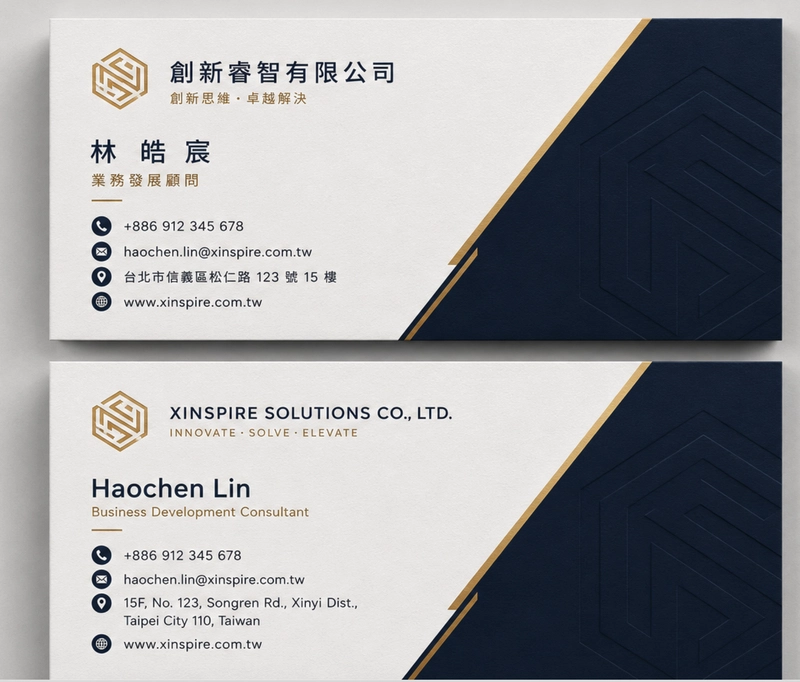
Handling double-sided business cards becomes difficult when a bot fails to recognize that an English side belongs to the same person represented by the Chinese side. In a previous setup, the user sent the Chinese front and the bot saved it. When the user then sent the English back, the bot created a second record. The result was two half-empty entries for the same individual.
How users resolve name mismatches
Rather than building a thousand fragile regex rules to guess whether two names are identical, I let the user make that distinction. I implemented a “waiting room” state. When the first side arrived, the bot asked, “Is there a back side?” If the user confirmed, the bot retained that image in a user_states dictionary with a five-minute timeout, reflecting the brief attention span of users.
The real advantage appears when both images are sent to Gemini together. Trying to merge “Wang Daming” and “David Wang” through code leads to frustration. Providing both images in one prompt and allowing the large language model to handle the semantic merge offers the only rational solution.
Prompt logic for merging card data
The prompt logic used to instruct Gemini to consolidate the information into one tidy JSON object was:
You are an expert OCR and data extraction agent. I am providing you with two images: the front and back of a single business card.
Your task:
- Extract all professional information from both images.
- Merge the data into a single unified record.
- If a field (like Name or Company) appears in both languages, combine them into a single string (e.g., "Chinese Name / English Name").
- Ensure the output strictly follows the provided JSON schema.
- Ignore any background noise or irrelevant text.
Return only the final merged JSON.
Why Gemini 1.5 Flash was chosen
For the coding part, I selected gemini-1.5-flash for its speed, ensuring the user does not lose track of the wait time. I simply combine both image parts into the generate_content call.
def generate_json_from_two_images(
 front_img: PIL.Image.Image,
 back_img: PIL.Image.Image,
 prompt: str) -> object:
 model = GenerativeModel(
 "gemini-1.5-flash",
 generation_config={
 "response_mime_type": "application/json",
 "response_schema": NAMECARD_SCHEMA
 },
 )
 front_part = Part.from_data(
 data=pil_to_bytes(front_img), mime_type="image/jpeg")
 back_part = Part.from_data(
 data=pil_to_bytes(back_img), mime_type="image/jpeg")
 response = model.generate_content(
 [prompt, front_part, back_part],
 stream=False,
 labels={"client_id": "namecard"}
 )
 return response
Turning data cleaning into prompt engineering
This method converts a messy data-cleaning duty into a straightforward prompt engineering task. No more duplicate entries, no manual deletion—just a clean, consolidated record.
All Replies (3)
Want a live back-and-forth? Join the global AI chat room — login to talk.
That unique identifier trick is clever. Does it work better as a system prompt or a user instruction? I'm curious if it's more effective to supply both images in a single prompt and permit the large language model to manage the semantic merge.
I'm worried about hallucinations. How does this perform when the photos are actually blurry? My previous setup created chaos: the user sends the front (Chinese), and the bot saves it, then sends the back and creates a second record. To handle this, I implemented a "waiting room" state where the bot queries, "Is there a back side?" before merging data into a single tidy JSON object.
Dual language cards were a nightmare for me. Which prompt tweak actually fixed the formatting error?
I found that adding a more explicit instruction in the prompt to "treat both images as a single business card entity" was crucial. This was followed by the step: "You are an expert OCR and data extraction agent. I am providing you with two images: the front and back of a single business card. Your task: 1. Extract all professional information from both images. 2. Merge the data into a single unified record. 3." — this is copied from the basis — and it seemed to dramatically improve Gemini's ability to recognize the relationship between the two sides without treating them as separate individuals. The bot's initial confusion with the English side being interpreted as a different person was resolved, and it now waits for confirmation from the user when it detects a potential dual-language card, enhancing the overall accuracy of the data extraction process. Users no longer have to deal with fragmented records or the hassle of manually merging information, making the workflow much smoother. The five-minute timeout feature in the user_states dictionary helps manage user attention span effectively, while the semantic merge by the large language model remains the cornerstone of this solution.