Jio Gemini Advanced subscribers face third party model lockout
Subscribers on the Google AI Pro tier bundled through Jio are hitting a frustrating wall regarding third-party model integrations. Users who rely on monthly recharges to keep their advanced plan active are reporting sudden notifications stating that third-party model access is restricted on their accounts. This creates an awkward grey area between standard retail subscriptions purchased directly through Google and carrier-billed bundles, leaving many wondering if recurring prepaid cycles trigger trial-account limitations rather than treating the tier as a fully paid commercial subscription.
Carrier partnerships often introduce complex billing states that cloud account privileges. When telecom operators bundle high-tier artificial intelligence services into recurring recharge packs, the underlying API hooks and platform flags do not always mirror direct-to-consumer credit card checkouts.
The Core Billing Clash Between Direct and Carrier Subscriptions
Google manages advanced tiers through distinct flag systems that dictate whether an account can access external model endpoints, API keys, and developer playgrounds. Direct subscribers paying standard monthly fees enjoy immediate recognition of their paid status across all integrated features. However, operator-provisioned bundles rely on intermediate token validation.
- Recharge Dependency: Users must maintain active monthly recharges on Jio networks to preserve their tier eligibility, turning a continuous subscription model into a manual prepaid maintenance loop.
- Flag Discrepancy: Carrier backend systems may provision these accounts with flags that resemble promotional or trial allocations rather than standard enterprise or consumer paid tiers.
- Feature Restrictions: When platform security or API policies shift, accounts flagged as trials or partner-subsidized tiers are often the first to lose access to secondary or third-party models.
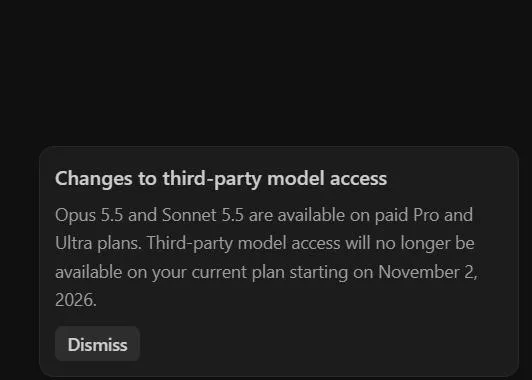
This structural difference explains why standard users breeze through external integrations while carrier-backed accounts trigger restriction warnings. The platform sees a recurring prepaid voucher instead of a direct recurring credit mandate, misinterpreting the billing mechanism.
Diagnosing Account Status and API Access Flags
When trying to determine whether an account will retain full capabilities, checking the underlying billing profile and API console status is essential. If you manage your subscription through a telecom partner, the Google Cloud console or AI Studio interface often exposes specific error codes when attempting to call external endpoints.
- Navigate to the account billing settings page to verify if the subscription displays as a direct retail purchase or a partner-managed promotion.
- Check the API quota and model availability dashboard to see if third-party models are explicitly greyed out or returning permission denied errors.
- Review the active notification center inside the primary user dashboard for any alerts regarding trial expiration or carrier verification steps.
- Compare the account behavior against a standard directly billed Google AI Pro account to isolate whether the restriction is tied exclusively to the Jio billing identifier.
If the system treats the carrier recharge as a temporary promotional grant, standard workarounds like refreshing OAuth tokens or re-linking accounts usually fail because the restriction is baked into the initial provisioning SKU supplied by the operator.
What to Do Next When Carrier Flags Block Access
Resolving this kind of access mismatch requires navigating both telecom customer support and platform-level account validation. Standard technical troubleshooting will not override an incorrect provisioning SKU applied at the carrier integration layer.
- Contact Carrier Support: Escalate the issue through Jio support channels specifically asking for confirmation on whether the AI Pro bundle provisions a full commercial license or a partner trial state.
- Submit Platform Tickets: Open a support inquiry with Google AI support detailing that the account is sustained via active monthly carrier recharges, requesting a manual override of the third-party access flag if the billing status is verified.
- Evaluate Direct Migration: If third-party model access is mandatory for your daily workflow, consider letting the carrier bundle lapse and purchasing the standard subscription directly to bypass intermediate provisioning errors entirely.
Understanding these carrier billing quirks prevents wasted hours troubleshooting API keys that are intentionally restricted by backend provisioning rules. Keeping a close eye on how partner bundles handle feature parity ensures you can pivot before critical workflows break due to carrier-specific subscription limitations.
All Replies (0)
Want a live back-and-forth? Join the global AI chat room — login to talk.
No replies yet — be the first!