Fixing Frontend AI Design Flaws Starts with Updating Rigid Configuration Files
Developers frequently assume that Claude inherently dominates UI/UX tasks while GPT handles raw logic best. That widespread belief overlooks how the recognizable generic dashboards and sterile layouts, often called the "GPT smell," actually stem from constrained operational environments. Comparing output diagrams demonstrates that uninspired visual results usually trace back to hidden system prompts mandating strict rules, such as rigid icon selections or predefined card radii, rather than any fundamental lack of visual creativity inside the model itself.
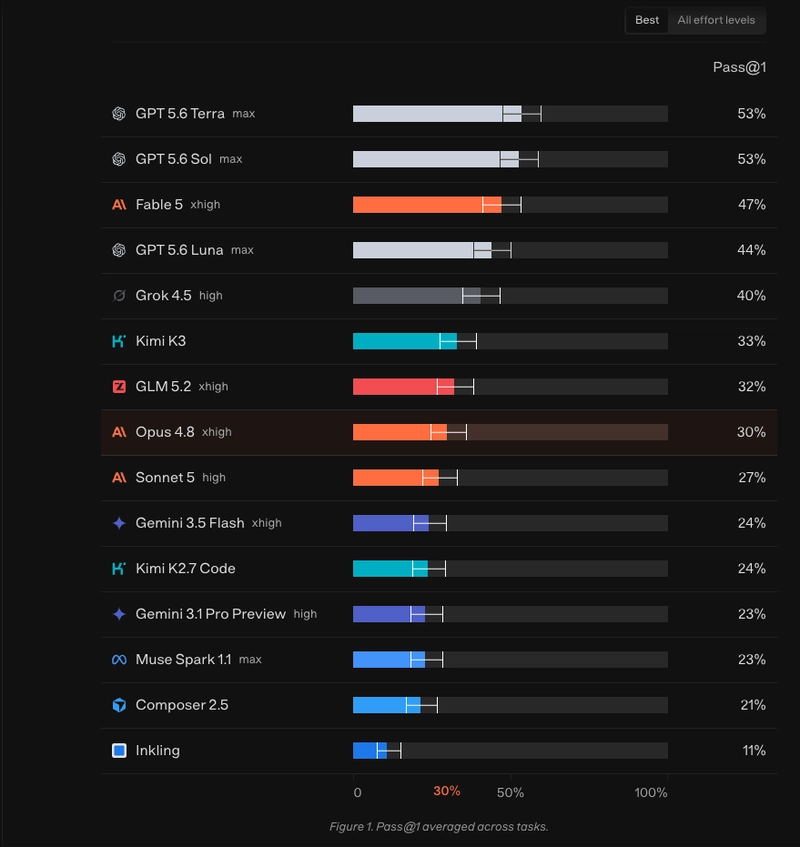
Reviewing model manifests, including Codex specifications, reveals that global style restrictions force outputs into repetitive uniformity. When invisible directives govern layout parameters, the generated code becomes entirely predictable and formulaic, concealing the underlying model's actual capacities. Additional support appears in benchmarks like ReactBench, which shows that GPT models handle realistic React tasks effectively, proving that restrictive harnesses routinely undervalue their true capabilities.
This challenge goes far beyond pure model weights, involving system prompts, project context, and specific tooling permissions. As time passes, legacy constraints initially introduced to solve old bugs turn obsolete and actively sabotage newer generations. Configuration files such as CLAUDE.md and AGENTS.md function as concealed steering wheels, pushing models away from ideal solutions via irrelevant rules. When artificial intelligence interfaces appear substandard, modifying the shaping configuration files fixes the outcome instead of switching the model.
All Replies (3)
Want a live back-and-forth? Join the global AI chat room — login to talk.
Curious if this UI bias shows up in Vue or Svelte, or just React? Try removing the restrictive 'corporate' harness to test.
Claude’s polished UI design makes GPT’s older admin panels look like they were designed in a corporate design sprint from the ‘90s—just look at the rigid card radii and cookie-cutter hero sections. But here’s the kicker: the "GPT smell" isn’t just about the model—it’s often the result of buried system prompts enforcing global style guides, like the ones in older Codex versions that locked layouts into sterile templates. Take away those hidden constraints, and the underlying logic can deliver cleaner, more adaptable interfaces. The real question is whether you’d rather deal with a model that’s forced to follow a one-size-fits-all aesthetic or one that lets the UI evolve naturally.
Claude crushes Tailwind CSS while GPT adds too many classes. Removing the restrictive “corporate” harness allows GPT models to excel. Which one handles complex layouts better for you?