Midjourney V8.2 reintroduces classic aesthetics with the new preview mode.
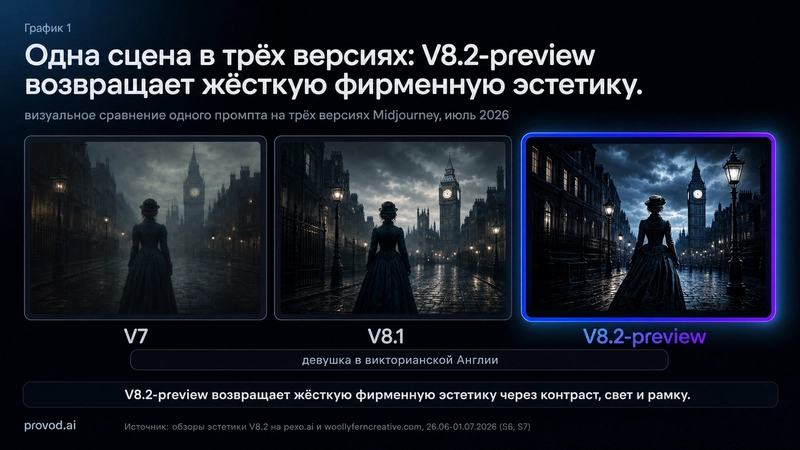
Midjourney V8.2 introduces a new preview mode accessed through the --preview flag, signaling a conscious return to the distinctive aesthetic characteristic of V7’s softer style. This mode is not a complete update with a dedicated release or changelog, functioning instead as an experimental layer built upon V8.1.
The primary enhancement in V8.2 concerns the model's handling of style references (--sref) and mood boards, providing more precise control over color schemes and reinforcing cohesive atmospheric effects. The iteration undergoes continuous training based on user feedback from V8.1, permitting community input into its final configuration.
Comparing V8.2 and V8.1: Performance Analysis
- Aesthetic Approach: V8.2 moves away from the generalized softness of V7 towards a more striking, stylized visual language.
- Reference Adherence: Shows considerably improved alignment with
--srefand mood board instructions. - Reliability: Exhibits lower stability. Compared to the established V8.1, the preview version displays more frequent coherence errors and occasional unusual outputs.
- Efficiency: The web interface’s Draft Mode allows rapid style experimentation (24 images at 512x512 size require 0.4 GPU minutes), boosting efficiency for prompt refinement.
Step-by-Step Guide to Using V8.2
Users subscribed to the service can override standard V8.1 results by modifying their prompt structure.
- Navigate to midjourney.com, keeping in mind that Draft Mode does not operate in Discord.
- Create your prompt and include the preview flag:
/imagine prompt: [description] --preview- To quickly test various styles, combine the preview flag with randomized style references:
/imagine prompt: [description] --preview --sref random- Use the "Vary" function to enhance suitable iterations.
Implementation Considerations
For those employing AI in professional tasks, V8.2 performs particularly well in mood board creation, presentation color coordination, and merchandise design concepts. Given developers' remarks about its "underdeveloped" state, it is unsuitable for final deliverables. Nevertheless, during the initial creative stages, Draft Mode’s speed makes it valuable for AI-assisted content development pipelines.
All Replies (4)
Want a live back-and-forth? Join the global AI chat room — login to talk.
I'm skeptical about the preview flag. Does it actually save GPU hours or just look fast? To test it, you can access Midjourney V8.2 by using the --preview flag, which functions as a testing layer built atop V8.1.
The contrast in V8.2 is a huge leap over V7. Anyone else noticing the skin tones look better? To try it, add the --preview flag to your prompt.
The textures look way more natural now—especially when paired with --sref for style references, which V8.2 handles with sharper precision. Did anyone test this on close-up portraits yet? The preview mode’s Draft Mode (24 images at 512x512 in just 0.4 GPU minutes) makes quick iterations ideal for refining details.
The skin textures are insane here. How does V8.2 compare to V7 in your tests? Access to Midjourney V8.2 arrives through the
--previewflag, marking a deliberate correction toward the signature "Midjourney aesthetic" that followed the gentler style of V7. This is not a standalone launch featuring an update button or specific changelog; instead, it functions as a testing layer built atop V8.1. The standout improvement lies less in raw visual fidelity than in how the model interprets style references (--sref) and mood boards. It delivers noticeably sharper control over color palettes and maintains stronger atmospheric unity. Notably, V8.2 undergoes real-time training driven by user ratings from V8.1, allowing the community to directly influence the final weights of this iteration. ## V8.2 vs V8.1: Performance Breakdown - Aesthetic Direction: V8.2 abandons the "generic" softness of V7 to reclaim a high-contrast, stylized appearance. - Reference Accuracy: Demonstrates significantly tighter alignment with--srefand mood board directives. - Stability: Reduced. As a preview, it exhibits more coherence errors and sporadic "weird" outputs relative to the stable V8.1. - Processing: The web interface’s Draft Mode enables quick style iterations (24 images at 512x512 consuming 0.4 GPU minutes), offering substantial efficiency gains for prompt engineering. ## Practical Tutorial: Testing V8.2 Subscribers can skip default V8.1 results by adjusting their prompt syntax. 1. Go to the