ChatGPT Android app users on Xiaomi 22101320I are seeing chats vanish
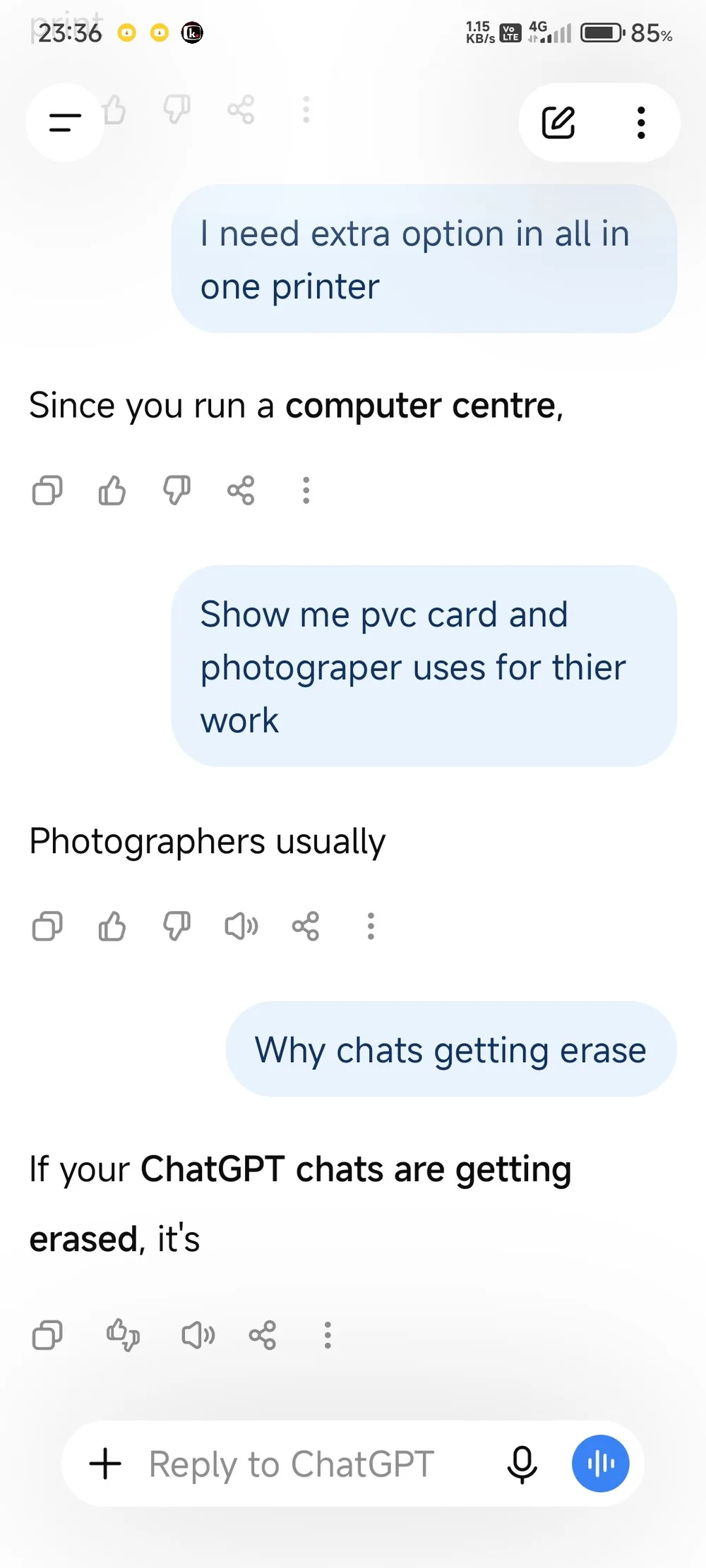
Android 14 users on the Xiaomi 22101320I are reporting a frustrating sync bug where the ChatGPT Free app spontaneously deletes or hides active conversations. This isn't just a failure to load history; the app actively cuts off replies mid-sentence before the entire conversation thread disappears from the interface. If your chat history is flickering or disappearing on a Xiaomi device, the issue likely stems from a synchronization failure between the local cache and the cloud server.
Why are conversations disappearing mid-chat?
The core of this issue is a display and sync mismatch. When a reply is cut off and then the conversation vanishes, it indicates the app is failing to maintain the session state. For users on the Xiaomi 22101320I, this suggests a potential conflict between the app's memory management and Android 14's background process handling.
When the app loses the pointer to the conversation ID or fails to fetch the latest message block, it doesn't always show a "connection error." Instead, it may simply render the chat as empty or remove it from the sidebar entirely. This is particularly volatile for those using the Free version of the app, where resource allocation or sync priority might differ from paid tiers.
How to mitigate these sync failures
Since this is a bug within the app's interaction with the hardware and OS, you can try these steps to recover your data or prevent further loss:
- Force a manual sync by logging out and logging back in. This clears the local session token which might be corrupted.
- Check the web version of ChatGPT. If the conversations are still visible at chatgpt.com, the data is safe on the server and the issue is strictly a client-side rendering bug on the Android app.
- Disable aggressive battery optimization for the ChatGPT app in the Xiaomi settings. Android 14 often kills background processes to save power, which can interrupt the sync heartbeat and lead to disappearing threads.
- Clear the app cache via Settings > Apps > Manage Apps > ChatGPT > Clear Data > Clear Cache. This forces the app to re-download the conversation list from the server.
What happens when the recovery fails?
If the conversations are gone from both the app and the web interface, the issue is server-side, and no amount of app reinstalling will fix it. However, the specific behavior on the Xiaomi 22101320I—where replies are cut off before vanishing—strongly points to a local UI crash.
The failure sequence usually looks like this:
- The model generates a response.
- The app encounters a rendering error or a timeout.
- The UI fails to display the remaining text (the "cut off" phase).
- The session crashes, and the conversation is removed from the active view.
To avoid losing critical information, avoid relying solely on the Android app for long-form prompts until a patch is released for this specific device model. Copying important responses to a external note app immediately after they are generated is the only foolproof way to ensure you don't lose work to a sync glitch.
Do the replies finish if you keep the screen on? I suspect the background sync killer is just wiping the cache.