Roland Melody Flip is a DAW plugin and not another one-click
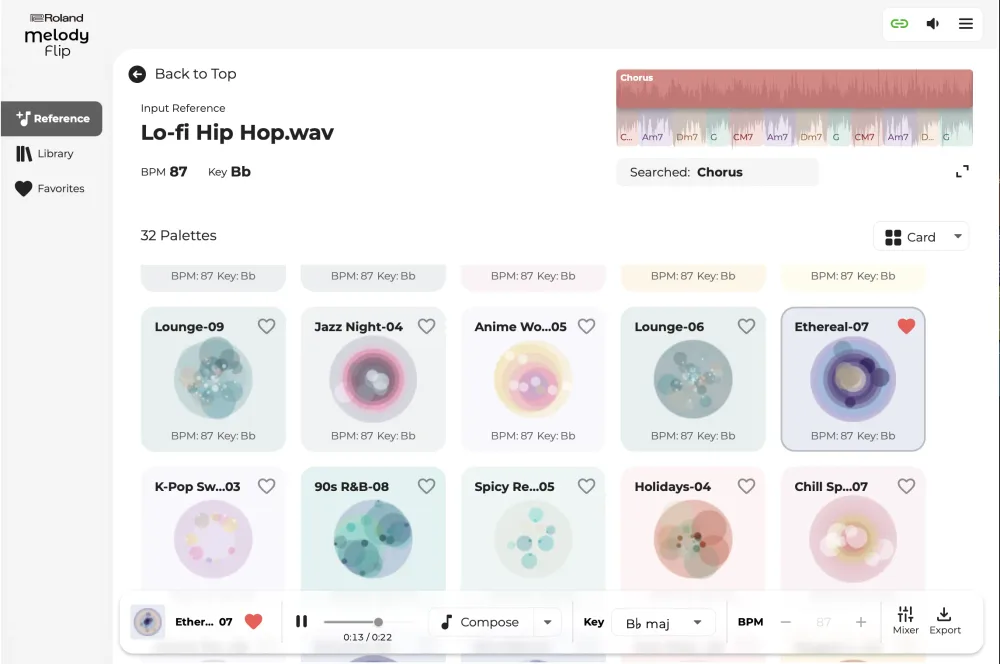
The core of the system relies on about 250 "Palettes." These aren't just random seeds; they are themed collections of musical ideas categorized by genre. If you are stuck on a bridge or need a specific vibe for a verse, you pick a palette and let the AI suggest directions.
How to use Melody Flip for AI workflow
Since this lives inside your DAW, the workflow is much more granular than something like Suno. You have two primary ways to generate ideas:
1. Generation from scratch: You can tell the tool to generate specific elements—melodies, chord progressions, basslines, or drum patterns—either individually or in combination. Because it's producing MIDI, you can drag those notes into your piano roll and swap the synth patch to whatever you actually want to use.
2. Reference-based generation: You can feed the plugin a reference track. Instead of just copying the song, it analyzes the melodic ideas and builds new variations based on that DNA.
Real-world pros and cons
The biggest advantage here is the lack of "AI sludge." When you use a full-song generator, you're stuck with whatever weird artifacts or compressed audio quality the model produces. With Melody Flip, you get the raw musical data. If the AI generates a chord progression that is 90% there but has one wrong note, you just move that note in your DAW. You can't do that with a flattened audio file from Udio.
However, there are some trade-offs. You aren't getting a polished arrangement with vocals and a mastered mix. You are getting the skeleton of a song. For a beginner, this might feel like "too much work" compared to a text-to-song tool, but for anyone doing a deep dive into music production, this is the only way AI is actually useful.
Comparing the AI music landscape
- Suno/Udio: High polish, zero control, output is audio.
- Melody Flip: Raw ideas, total control, output is MIDI/Plugin data.
- Input method: Text prompt vs. Palette selection/Reference tracks.
- End goal: A finished song vs. a songwriting starting point.
This is a much better path for professional deployment in a studio. It treats the LLM-like generative process as a source of inspiration rather than the final product. I'm curious to see if they integrate this with their hardware synths eventually, as having a generative MIDI stream hitting a Roland Jupiter or Juno would be a massive productivity gain for sketching out tracks.