gh stack lets me stop fighting with my lead over PR size

I've tried managing stacked branches manually before, but it's a disaster of constant rebasing and force-pushing. That changed when I started using gh stack. It basically automates the "syrup" between layers—if I change something in a base branch, the updates propagate up the stack without me having to manually fix every single dependent branch. It makes the AI workflow much smoother because I can break a feature into five tiny, readable PRs that still eventually merge into one cohesive update.
A practical tutorial for setting up your first stack
To get this running, you need the GitHub CLI installed and authenticated. Since stacked PRs are still in public preview, some of the UI edges are still a bit rough, but the CLI tool is solid.

1. Install the extension first:
gh extension install github/gh-stack2. Start your first layer (this creates the branch and checks it out):
gh stack init feature-base-layer
git add . && git commit -m "Implement core logic"
3. Add subsequent layers that branch off your current work:
gh stack add feature-extension-one
git add . && git commit -m "Add extended functionality"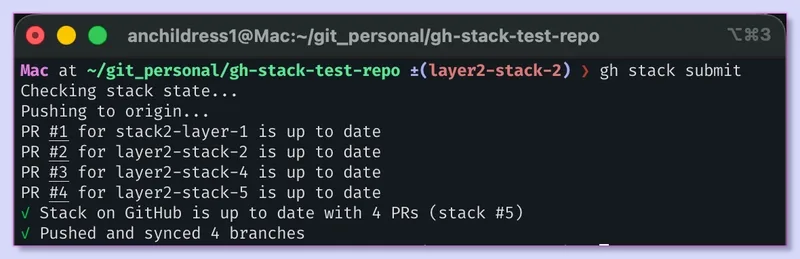
4. Push everything and open the linked PRs in one go:
gh stack submitA quick tip on the commands: gh stack add accepts slashes, so refactor/ui-cleanup works perfectly. If you forget to provide a name, the CLI will just prompt you for one. Also, keep in mind the difference between submit and sync. I've accidentally used sync ten times thinking I was publishing my work, only to realize nothing was on GitHub because sync only refreshes existing PRs—it doesn't create them. You need submit to actually open the pull requests.
Why this actually works for deployment
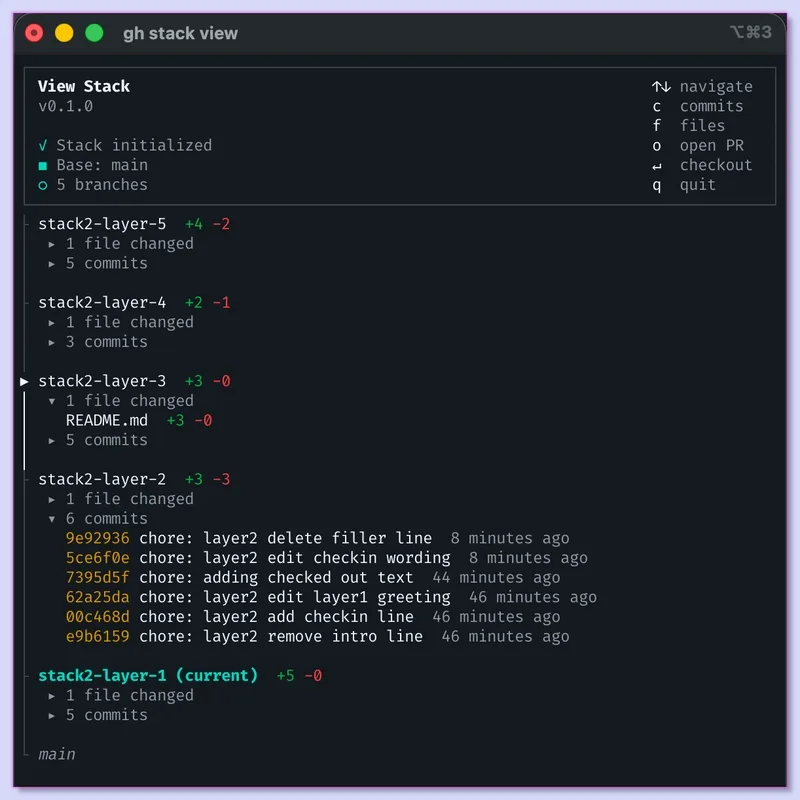
The biggest win here is the review cycle. Instead of a 1,000-line diff that scares off any human reviewer (or confuses an AI reviewer), I'm submitting 200-line chunks. It's much harder for a lead to dismiss a change as "not required" when it's isolated in a small, logical step.
Even if I'm three or four layers deep and start losing track of which branch I'm actually standing on, the tool handles the heavy lifting of the git tree. It's a massive quality-of-life improvement for anyone doing heavy dev work who wants to maintain a clean commit history without spending half their day in a rebase loop.