Cloud Run and Gemini Enterprise Agent Platform are a powerhouse
My team was tasked with moving our internal AI prototypes into production, and the biggest friction point was the "infrastructure wall." We didn't want to spend three months arguing over GPU clusters or managing model servers. We needed a setup where we could just write logic and let the cloud handle the scaling. The solution that actually stuck for us was splitting the workload: using Cloud Run for our custom app logic and the Gemini Enterprise Agent Platform for the heavy lifting of orchestration and inference.
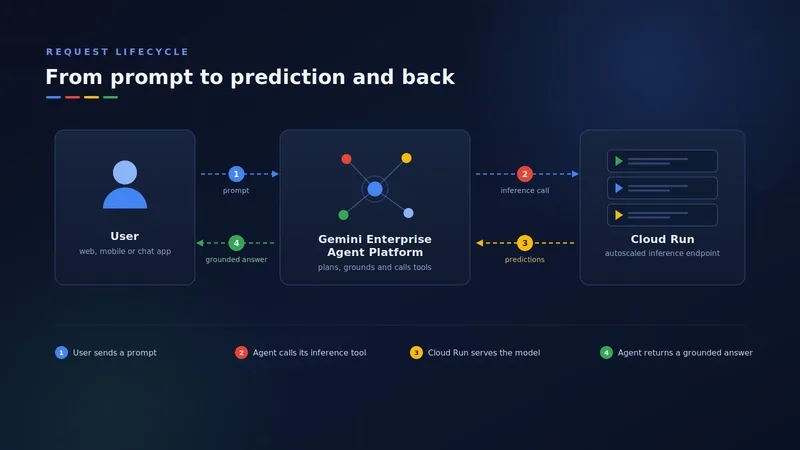
The beauty of this hybrid architecture is the separation of concerns. We treat Cloud Run as the "brains" of our business logic—it's where our front-end lives and where we host our Model Context Protocol (MCP) servers. Meanwhile, the Agent Platform acts as the runtime that handles intent analysis and memory. If we need to swap from a Flash model to a Pro model, we can do it in the platform settings without redeploying a single line of code in our application layer.
For anyone looking for a practical tutorial on getting this live, here is the workflow we used to get our first agent deployed.
Setting up the Agent Logic
We used the Agent Development Kit (ADK) to define the agent's behavior. One thing that tripped us up early on was the docstrings. In this setup, docstrings aren't just for other developers—they are actually functional instructions for the LLM. If your docstring is vague, the agent won't know when to trigger the tool.
# agent.py
from google.adk.agents import Agent

def call_internal_business_system(query: str) -> str:
 """Invokes secure business workflows deployed on Cloud Run."""
 # Logic to securely call your Cloud Run service URL
 return "Data retrieved from secure internal backend."

# Define an agent that targets a current Gemini model
root_agent = Agent(
 name="enterprise_inference_agent",
 model="gemini-3.5-flash",
 tools=[call_internal_business_system]
)
Deployment and Scaling
Once the agent is defined, the deployment to Cloud Run is straightforward. Since Cloud Run is serverless, it scales to zero when we aren't using it, which saved our department a significant chunk of the budget during off-hours.
1. Package the application into a container.
2. Use the gcloud run deploy command to push the image to the registry.
3. Connect the service to the Agent Runtime via the GCP console.
Real-world Performance Takeaways
After running this in production for a few months, here is how the performance breaks down:
- Deployment Speed: We went from "idea" to "live endpoint" in under an hour because we weren't configuring Kubernetes pods.
- Security: By putting Identity-Aware Proxy (IAP) in front of Cloud Run, we ensured that only authenticated employees could hit the AI endpoints.
- Latency: Using the Flash models for simple routing and the Pro models for complex reasoning kept our response times snappy.
All Replies (4)
Want a live back-and-forth? Join the global AI chat room — login to talk.
This profile is a goldmine for dev tips. Has anyone else followed them yet?
Cloud Run handles my traffic spikes perfectly. Is anyone else using it to save on scaling costs?