How to Get Zero-Shot ML Predictions on Tabular Data with TabPFN
I've spent a lot of time benchmarking LLMs and AI tools for real-world data tasks, and TabPFN caught my attention because it tackles one of the most tedious parts of working with tabular data: the preprocessing and hyperparameter grind. Before diving into how it works, here's what stood out to me when I first tested it.
What Makes TabPFN Different
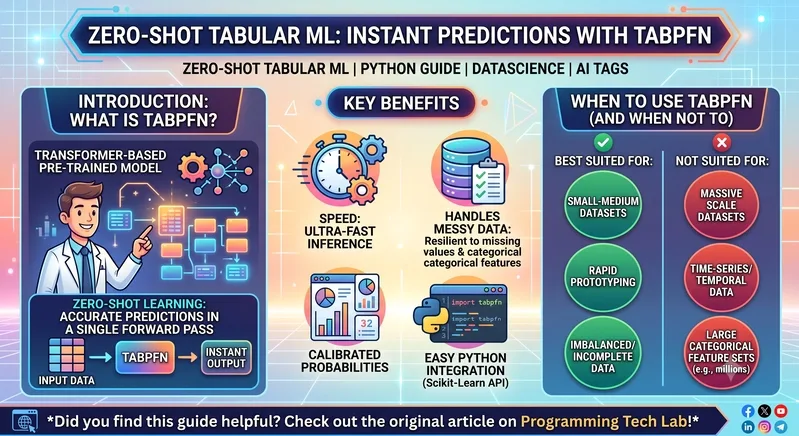
Traditional tabular modeling means building a pipeline from scratch — imputing missing values, one-hot encoding categoricals, scaling features, then running a grid search over XGBoost or LightGBM hyperparameters. It can eat up hours before you even see a result. TabPFN, built by Prior Labs, sidesteps all of that. It's a pre-trained Transformer designed specifically for tabular data that performs zero-shot inference, meaning you pass your data through and get predictions in a single forward pass. No training loop, no feature engineering, no manual tuning.
The key benefits I noticed:
- Zero-shot predictions work out of the box — no fit time in the traditional sense
- Handles messy data gracefully, including missing values and categorical columns without extensive preprocessing
- Calibrated probabilities for classification, which matters when you care about confidence scores
- Fast inference on small to medium datasets compared to running a full hyperparameter search
Hands-On Implementation
Here's the practical side. TabPFN plugs into Scikit-Learn's API, so it fits neatly into an existing workflow:
import pandas as pd
from sklearn.model_selection import train_test_split
from sklearn.metrics import accuracy_score, roc_auc_score
from tabpfn import TabPFNClassifier

# 1. Load your tabular dataset
# df = pd.read_csv("your_data.csv")
# X = df.drop(columns=["target"])
# y = df["target"]

# 2. Split into train and test sets
X_train, X_test, y_train, y_test = train_test_split(
 X, y, test_size=0.2, random_state=42
)

# 3. Initialize and fit the TabPFN classifier
classifier = TabPFNClassifier(device="cpu") # Use "cuda" if GPU is available
classifier.fit(X_train, y_train)

# 4. Generate predictions and probability scores
y_pred = classifier.predict(X_test)
y_probs = classifier.predict_proba(X_test)

# 5. Evaluate performance
print(f"Accuracy: {accuracy_score(y_test, y_pred):.4f}")
print(f"ROC-AUC Score: {roc_auc_score(y_test, y_probs[:, 1]):.4f}")
The fit() call is nearly instantaneous — it's not training in the conventional sense, just passing your data through the pre-trained network. That alone saves significant time during prototyping.
Where It Shines and Where It Falls Short
I'd reach for TabPFN when working with small to medium tabular datasets — think a few thousand rows with a mix of clean and messy features. It's excellent for getting a strong baseline quickly before investing effort into a gradient-boosted pipeline. I also found it handles imbalanced classes and incomplete feature sets better than expected, without needing custom imputation logic.
On the flip side, it doesn't scale well. Once your dataset crosses 100,000+ rows, XGBoost or CatBoost become more memory-efficient and often more accurate. TabPFN also lacks native temporal awareness, so it's not the right call for time-series forecasting with strict chronological dependencies.
My Take
If you're tired of spending half a day on preprocessing and model selection for a tabular dataset with a few thousand rows, TabPFN is worth trying. It won't replace a well-tuned XGBoost pipeline at scale, but for rapid prototyping and getting calibrated predictions fast, it's a genuinely useful addition to the toolbox.
All Replies (4)
I'm curious if dropping 50% nulls actually hurts TabPFN's internal handling or helps the accuracy?
TabPFN is a lifesaver for small datasets. Does it hold up when the row count hits 10k?
Skipping hyperparameter tuning is a dream. How does it handle columns with 50% missing data?
TabPFN looks wild for prototyping. How does it actually stack up against XGBoost on a medium-sized dataset?