How to Claim the ChatGPT Plus Free Trial
OpenAI is actually playing nice for once and handing out a free month of ChatGPT Plus to a random selection of free-tier users. It's a classic "try the luxury life before we charge you $20" move, but since we all love free stuff, it's worth checking if you're one of the lucky few who didn't get ignored by the algorithm.
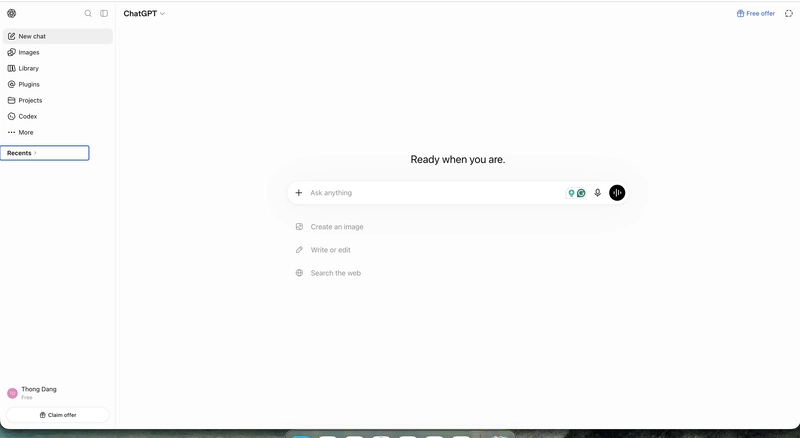
The "Am I Special?" Checklist
Don't get your hopes up too high because this isn't a universal gift; it's a targeted offer. If you don't see the magic button, you're just not on the list. Here is the actual process for those who are:
1. Log into your account. If you're lucky, you'll see a "Free offer" or "Claim offer" notification staring you in the face.
2. Click that offer and select the ChatGPT Plus plan.
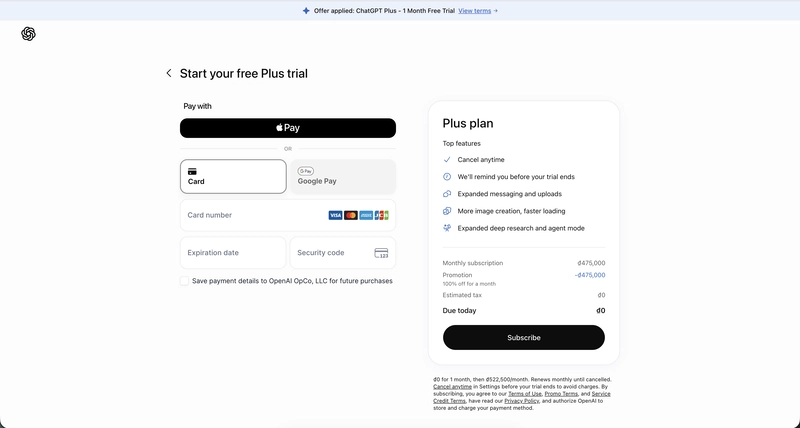
3. Toss in your payment details. Yes, they still want your credit card info because they're betting on you forgetting to cancel.
4. Confirm the subscription. Your total today should be $0 (or whatever your local currency equivalent is).
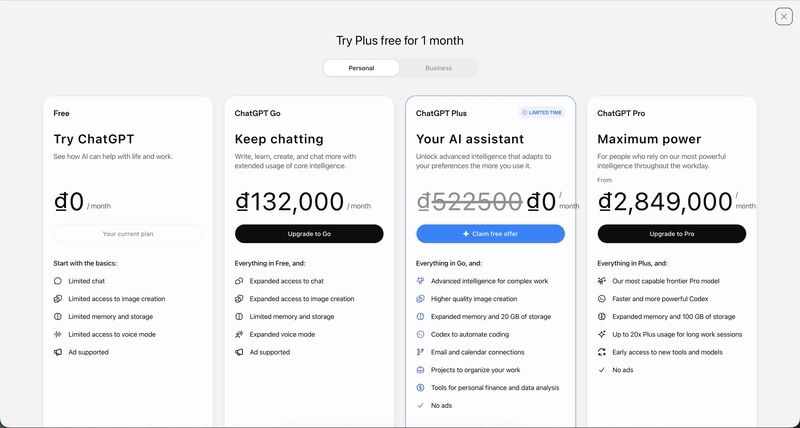
The Catch (Because There's Always a Catch)
Since I'm a prompt engineering nerd, I usually use Plus to push the limits of the LLM agent capabilities and complex AI workflows that the free tier chokes on. If you get this trial, use it to actually test the advanced models rather than just asking it to write a poem about your cat.
The real "danger" here is the auto-renewal. OpenAI is basically setting a digital alarm clock for 30 days from now to snatch $20 from your bank account. If you're the type of person who signs up for a trial and then completely forgets it exists until the bank statement arrives, set a calendar reminder immediately.
Making the Most of the Trial
If you've managed to snag this, don't waste it. This is your chance to do a deep dive into the features that actually matter. Instead of basic chatting, try building a complex prompt system or testing out a hands-on guide for data analysis.
Since I love sharing a practical tutorial approach, here is a prompt I use to squeeze every drop of value out of the Plus models when I'm testing new capabilities. If you have the Plus trial, run this to see how the model handles high-level reasoning compared to the free version:
Act as a Senior Systems Architect. I am going to provide a complex business problem.
Your goal is to:
1. Deconstruct the problem into atomic requirements.
2. Propose three distinct architectural solutions (Low-cost, Scalable, and Bleeding-edge).
3. Provide a risk-assessment matrix for each solution.
4. Write the initial deployment roadmap in a step-by-step format.

Constraint: Do not use generic corporate jargon. Be brutally honest about the technical debt each solution will incur.
This prompt forces the model to move past the "AI fluff" and actually provide structural analysis. If the trial is active, you'll notice the reasoning is significantly tighter. Enjoy the free ride while it lasts.
All Replies (3)
Coding is way smoother with the faster responses. Did anyone else get the trial for a full month?
I need to know if the trial works on the mobile app or just the desktop browser?
Hope it works for you. Has anyone tried the voice mode for language learning yet?