KDE Plasma AI Quota HUD: My Arch Linux Setup
Managing quotas across Claude Code, Codex, Gemini, and DeepSeek on Arch Linux is a logistical nightmare. When you're deep into a complex task with massive context and an hour of iteration, the last thing you want is to hit a rate limit mid-git rebase. To solve this, I built a HUD for the KDE panel that tracks remaining room and reset times for each agent via four circular indicators.
The "Token-Week" Problem
The industry has created a bizarre new unit of measurement: the token-hour or token-week. Every provider does it differently:
- Claude: Uses rolling hour/day windows.
- Codex: Reports specific plan windows.
- Gemini: Requires local request estimation.
- DeepSeek: Operates on a monetary balance.

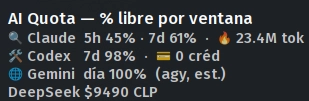
I've essentially turned my panel into a dashboard of "donuts." A full ring means the agent is ready; an empty one means it's time to switch models. Hovering provides the exact reset time, so I don't have to leave my terminal to check if I've exhausted my limits.
Technical Pivot: Data over Position
My initial deployment failed because I relied on the position of data in the API response. For Codex, I assumed the first window returned was the 5-hour limit and the second was the weekly limit.
When Codex changed their schema and stopped reporting the short window, my logic broke. The widget started labeling a 7-day window as "5h" because it was the first item in the list. To fix this for a more robust AI workflow, I implemented two changes:
1. Duration-based Identification: The system now identifies windows by their actual length. Short durations are flagged as sessions; long durations are flagged as weekly limits.
2. State Validation: I decoupled "failed queries" from "missing data." If a query fails, the HUD preserves the last cached value. If a query succeeds but a window is missing, the HUD removes that window from the state entirely.
This prevents the "ghost value" bug where a depleted quota appears active just because the API call timed out. For anyone building a custom LLM agent monitor, avoid positional indexing at all costs—API schemas shift too often.
All Replies (4)
Opening five browser tabs just to track limits is a nightmare. Is there a better way?
This HUD looks slick. Does it support custom API keys or just the defaults?
Hate hitting that quota mid-refactor. Did you lose a full hour of flow too?
Running a local LLM is a lifesaver. Which model are you using as your backup?