Claude Code: Context Engineering Audit
Context bloat is the silent killer of LLM agent performance. I decided to audit my current Claude Code setup against Anthropic's latest context engineering guidelines to see if my "sophisticated" automation was actually just adding noise.
The goal was simple: stop front-loading every session with a wall of text and start treating context like scoped variables in a function.
The Context Engineering Checklist
If you're optimizing a Claude Code workflow, these are the five pillars to measure against:
- Lightweight
CLAUDE.md: It should be for "gotchas" and non-obvious patterns, not a comprehensive repo wiki. - Progressive Disclosure: Pull in skills and references only when the task demands them.
- Model Trust: Strip out redundant guardrails that newer models already handle natively.
- Automatic Memory: Stop manually maintaining preference blocks in markdown; let the system surface them.
- Tool-Centric Design: Move instructions into tool schemas and parameters rather than prose-heavy system prompts.
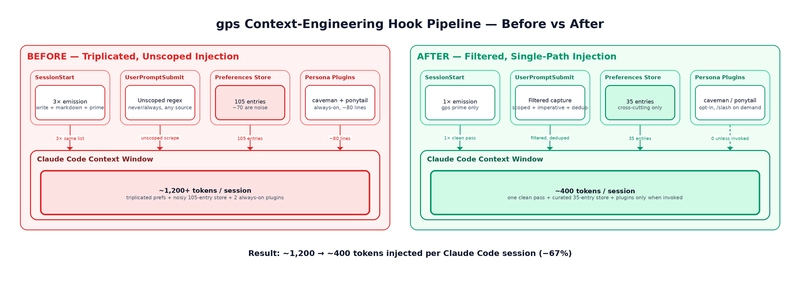
The Bottleneck: Redundant Injection
I traced my SessionStart hooks to see exactly what was hitting the context window. I found a massive overlap in how my local "memory" layer was interacting with the agent.
My .claude/settings.json was triggering a sequence of commands that essentially shouted the same information three times:
gps preferences --write # Bakes a markdown block into CLAUDE.md
gps preferences --markdown # Prints the same list to stdout
gps prime # Emits a session primer that overlaps both
The result? A ~60-line list of preferences was being injected three times—once via the file read and twice via hook output—before I even typed a single prompt. This is a textbook violation of the "lightweight" and "automatic memory" rules.
Real-World Impact
When you over-engineer the system prompt or the CLAUDE.md file, you aren't just wasting tokens; you're increasing the probability of the model getting distracted by irrelevant constraints.
The fix is to move away from "manual dumps" and toward a leaner, tool-driven AI workflow. Instead of telling the model how to behave in a 60-line list, define those constraints within the tools it uses or keep the CLAUDE.md strictly for architectural invariants that the model cannot possibly infer from the code.
For anyone building a custom LLM agent deployment, the lesson is clear: if you can't justify why a piece of information needs to be in the initial context window for 100% of tasks, it doesn't belong in the session start.
All Replies (3)
Frustrating how RAG fails silently. Is this a chunking error or just bad search prioritization?
My speed just spiked! How many documents did you have to trim to see a difference?
Using a .claudignore file to filter out the junk helped a ton.