TCP/IP Networking: A Deep Dive into the Layers
The TCP/IP Protocol Suite
The TCP/IP model is the actual set of communication protocols that power the internet. It’s named after its two heavy hitters:
- IP (Internet Protocol): The routing engine. It handles addressing so that packets actually know where to go.
- TCP (Transmission Control Protocol): The quality control. It sits in the transport layer to ensure data isn't corrupted or lost in transit.
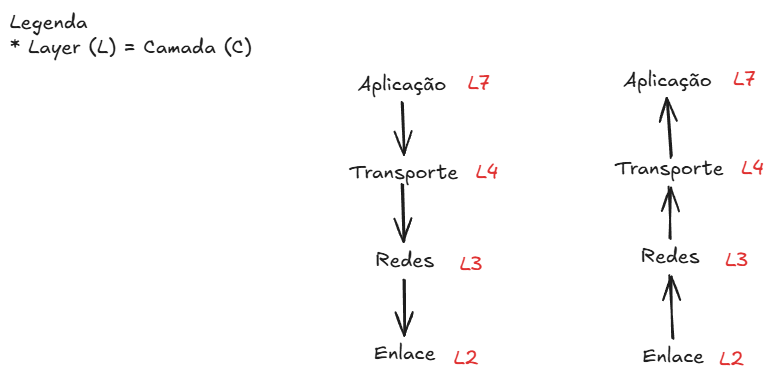
Breaking Down the Layers (L7 to L2)
Data doesn't just "jump" from a client to a server; it descends through a stack. If a lower layer fails, everything above it collapses. Here is how the encapsulation works in a real-world request:
L7: Application Layer
This is where your code lives. When you make an API call or send an email, you're operating here via protocols like HTTP, HTTPS, or SMTP.

L4: Transport Layer
This layer manages the reliability of the connection. TCP handles the "three-way handshake" (SYN, SYN-ACK, ACK) to ensure the server is actually listening before data starts flowing.
L3: Network Layer
This is where IP addresses come into play. The network layer determines the best physical path for the packet to travel across routers to reach the destination IP.
L2: Data Link Layer
The final step before the physical wire/air. It uses MAC addresses to move frames between devices on the same local network segment.
Practical Verification: Seeing the Layers in Action
You don't have to take the theory at face value. You can see these layers failing or succeeding in real-time using standard CLI tools. If you're debugging a connection issue, follow this bottom-up approach:
1. Test L3 (Network): Can you even reach the IP?
ping 8.8.8.82. Test L4 (Transport): Is the specific port open?
nc -zv google.com 443nc (netcat) fails, you have a transport layer issue (likely a firewall blocking the port).3. Test L7 (Application): Is the service returning a valid response?
curl -I https://www.google.comWhat Exactly is a Packet?
Think of a packet as a digital envelope. It doesn't just contain the raw data (the payload); it contains a header. This header acts like a mailing label, containing the source IP, the destination IP, and the sequence number. The sequence number is critical—since packets can take different physical routes across the globe, they often arrive out of order. TCP uses these numbers to reassemble the "letter" in the correct order before handing it up to the application layer.