Scaling MCP Agent Teams: Moving Past the Single-Agent Ceiling
In my current role rolling out AI across our engineering teams, we hit this wall fast. We tried to build one "Super-Dev" agent that could handle everything from Jira ticket analysis to writing the code and running the CI/CD pipeline. The result was a volatile context window and a prompt that looked like a legal contract. The agent would start forgetting the original goal halfway through a complex task because it was too busy managing its own internal "workflow engine."
The fix wasn't a better model; it was scaling out.
The Architecture Shift: Scaling Up vs. Scaling Out
Most of us start by scaling up: better instructions, more context, stronger models. That's the right move for short, sequential tasks. But for complex, decomposable work, you need a team.
The Model Context Protocol (MCP) makes this possible by treating specialized agents as tools. Instead of one agent trying to be a master of all trades, you have a coordinator agent that calls specialized MCP-enabled agents.
- Single Agent: High coherence, low coordination cost, but has a hard capability ceiling.
- Agent Team: Specialization, parallel execution, and independent validation, but pays a "coordination tax" in tokens and latency.
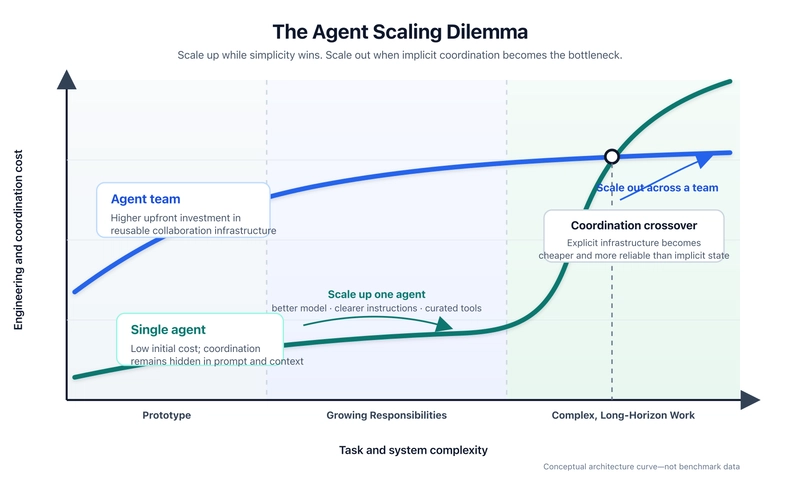
Practical Implementation: The Coordinator Pattern
To move from a single agent to a team, we stopped treating "the agent" as the end product and started treating MCP servers as the capability layer.
Here is a simplified config example of how we structured a specialized "Code Reviewer" agent that the main "Dev" agent calls via an MCP tool.
{
  "mcp_servers": {
    "code_reviewer": {
      "command": "node",
      "args": ["/opt/mcp/code-reviewer-server.js"],
      "env": {
        "REVIEW_STRICTNESS": "high",
        "LINT_RULES": "airbnb-base"
      }
    },
    "jira_manager": {
      "command": "python",
      "args": ["-m", "mcp_jira_server"],
      "env": {
        "JIRA_API_TOKEN": "secret-token-123"
      }
    }
  }
}
In this setup, the primary agent doesn't need to know how to perform a deep security audit; it just knows it has a tool called call_code_reviewer. The specialized agent has its own narrow instructions and a clean context window, which drastically reduces hallucinations.
When to Actually Scale Out
Don't over-engineer this. I've seen teams waste weeks building agent swarms for tasks a single Claude 3.5 Sonnet prompt could handle.
Stick to one agent if the task is:
- Short and mostly sequential.
- Contained within a single context window.
- Served by a small, coherent toolset.
- Easy to validate without a second "pair of eyes."
Move to an MCP agent team when:
- The prompt exceeds 2k-3k words of instructions just to keep the agent on track.
- You need independent validation (e.g., an "Architect" agent must approve a "Coder" agent's plan).
- You're hitting context limits because the agent is juggling too many intermediate tool outputs.
Real-World Friction
The transition isn't seamless. When we moved to this multi-agent workflow, the biggest pushback from the devs was the latency. Waiting for a coordinator to call a specialist, who then calls a tool, and then reports back to the coordinator adds seconds to the response time.
However, the trade-off is reliability. We saw a measurable drop in "looping" (where an agent repeats the same mistake three times) because the specialized agent provides a fresh perspective and a constrained scope.
If you're building an AI workflow, stop trying to make one agent smarter and start making your team more modular. Use a deep dive into your logs to find where the single agent is failing—if it's forgetting instructions or mixing up tool outputs, it's time to scale out.