Context Engineering: A Complete Guide
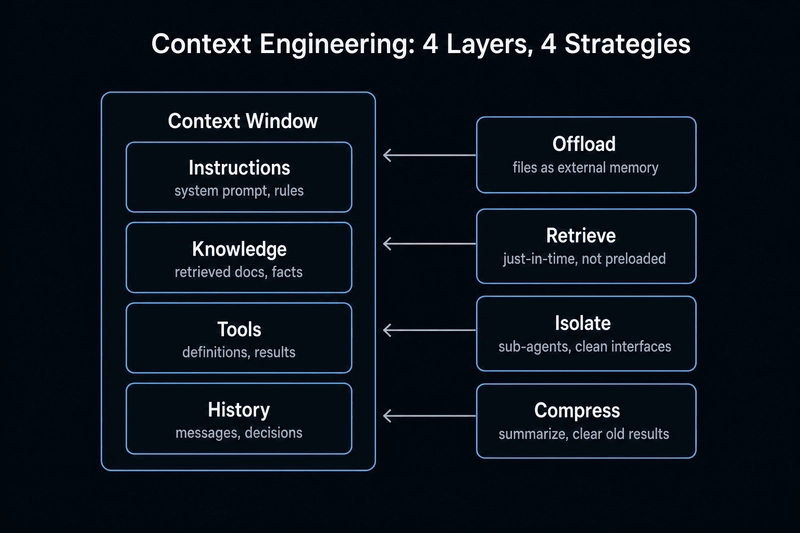
While prompt engineering focuses on phrasing, context engineering focuses on visibility. This is the difference between an agent that actually works in a real-world AI workflow and one that hallucinates the moment the conversation gets long.
The Reality of Context Rot
Expanding context windows hasn't solved the core problem because attention is finite. As tokens increase, the "attention budget" per token thins out. We see this in "context rot," where model accuracy slides significantly as the window fills—even if the model technically supports the length.
Complexity is the real killer. For example, a model might handle 20 tool definitions perfectly but completely collapse once you hit 40+, regardless of how many tokens are left in the window.
Managing the Context Budget
Context is composed of four layers: Instructions, Knowledge, Tools, and History. Each has a failure mode, from bloated rules diluting the prompt to stale conversation history steering the agent off course. Effective deployment requires strict budget allocation across these layers.
To keep agents performant, I've found these strategies most effective:
1. Offloading: Treat the filesystem as free memory. Instead of stuffing a 50k token webpage into the prompt, keep a 500-token summary and the URL. If the agent needs the details, it can re-fetch them. Using a todo.md file for the agent to track its own progress also prevents long-term goal drift.
2. Agentic Retrieval: Traditional RAG retrieves once at the start. Agentic retrieval gives the model pointers (file paths or query templates) and lets the agent pull only what it needs for a specific step. This is a much more sustainable LLM agent pattern.
3. Isolation: Segregate context so the model doesn't get overwhelmed by irrelevant data during a specific sub-task.
4. Compression: Summarizing previous turns in a conversation to keep the history lean without losing the trajectory.
For anyone implementing this, I recommend a structured .agent folder approach to separate persistent instructions from volatile session data. This keeps the "RAM" clean and the execution sharp.