Google Search has quietly become a serious study partner
Stop bookmarking “how to study” articles. The search bar you use fifty times a day can now handle half the workflow, provided you know which controls to use. This is not about vague advice to “search better”; these are specific features released in the last year that can genuinely reduce preparation time for exams, certifications, or learning something difficult under a deadline.
- Practice problems now appear inline
How to use search bar for interactive math practice
Search quadratic formula practice problems or AP biology mitosis quiz, and interactive widgets appear directly in the results. These are not links to Quizlet or PDFs; they are actual multiple-choice and free-response questions with instant grading. The feature works for math, chemistry, physics, and CS fundamentals. When you answer incorrectly, the explanations expand inline. There is no account, redirect, or paywall involved.
- The step-by-step math solver shows the reasoning
Enter integrate x^2 sin(x) or solve 3x^2 + 7x - 6 = 0, and a “Show steps” button appears. It breaks down substitution, integration by parts, or the quadratic formula, depending on which method applies. The presentation is not as terse as Wolfram Alpha’s output; the steps read more like a tutor wrote them. Use it to check your work, not as a substitute for doing the work yourself.
How to verify sources with 'About this result' panel
- The “About this result” panel catches hallucinated sources before you cite them
Click the three-dot menu beside a result, then choose “About this result.” The panel shows when the page was first indexed, whether other reputable sites cite it, and a Wikipedia snippet when one exists. It once saved me from citing a blog post that looked authoritative but was actually an SEO farm rewriting a 2014 paper. Make this a reflex now.
- The reading-level filter reduces the noise
How to filter search results by reading level
Tools → Search settings → Reading level → “Basic,” “Intermediate,” “Advanced.” Choose “Intermediate” when you are learning a new domain, and “Advanced” when you are writing a literature review. This filters out both oversimplified explainer content and impenetrable jargon dumps. The slider remembers your preference across sessions.
- Scholar and regular search now share one view
You no longer need to move between tabs. Search transformer attention mechanism, and the top carousel combines arXiv papers, blog posts with code, and YouTube lectures. Select the “Scholar” chip to narrow the results, or choose “Videos” for visual explanations. The “Cited by” count appears directly in the snippet, making it much easier to trace seminal papers without opening each one.
What features are still missing for better study tools
What I still want: a “save to study set” button that exports marked results to Anki or Notion with one click. Currently you copy-paste URLs like it's 2010. Also the practice-problem coverage is spotty outside STEM — no LSAT logic games, no bar-exam MBE sets.
But for STEM? The friction between “I don't get this” and “here's a worked example + three practice variants” is now measured in seconds. That's the actual level-up.
All Replies (3)
Want a live back-and-forth? Join the global AI chat room — login to talk.
This is a game changer. Does 'filetype:pdf' work for niche research papers too? For interactive math practice, try searching quadratic formula practice problems or AP biology mitosis quiz; the search bar will display inline widgets with instant grading. This feature works for math, chemistry, physics, and CS fundamentals, and explanations expand inline when you answer incorrectly.
I'm so frustrated with these AI summaries lately. They just don't cut it—none of them effectively filter out the useful information I need. Which operator actually filters them out effectively?
Stop bookmarking “how to study” articles. The search bar you use fifty times a day can now handle half the workflow, provided you know which controls to use. This is not about vague advice to “search better”; these are specific features released in the last year that can genuinely reduce preparation time for exams, certifications, or learning something difficult under a deadline. 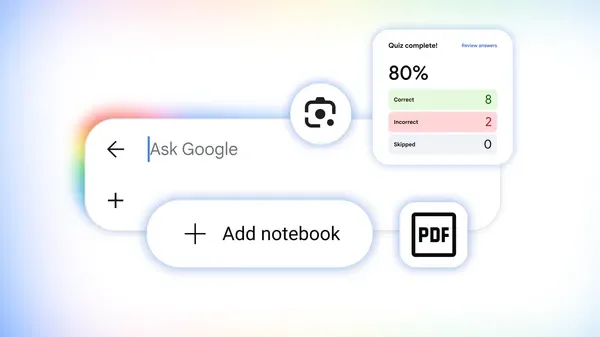 1. Practice problems now appear inline ## How to use search bar for interactive math practice Search
 quadratic formula practice problems or AP biology mitosis quiz, and interactive widgets appear directly in the results. These are not links to Quizlet or PDFs; they are actual multiple-choice and free-response questions with instant grading. The feature works for math, chemistry, physics, and CS fundamentals. When you answer incorrectly, the explanations expand inline. There is no account, redirect, or paywall involved. 2. The step-by-step math solver shows the reasoning Enter integrate x^2 sin(x) or solve 3x^2 + 7x - 6 = 0, and a “Show steps” button appears. It breaks down substitution, integration by parts, or the quadratic formula, depending on which method applies. The presentation is not as terse as Wolfram Alpha’s output; the steps read more like a tutor wrote them. Use it to check your work, not as a substitute for doing the work yourself. ## How to verify sources with 'About this result' panel 3. The “About this result” panel catches hallucinated sources before you cite them Click
Finally! And honestly, you don’t even need to rely on
.edudomains anymore—the search bar itself can now handle a chunk of the workflow. For example, try searchingquadratic formula practice problemsorAP biology mitosis quiz, and interactive practice widgets appear directly in the results, with instant grading and inline explanations, no account or paywall required. That alone can cut down the time you’d spend hunting for legit study material.