Qwen Image
简介
核心亮点
- 原生支持中文,语义理解精准,无需复杂翻译
- Apache-2.0 协议,对商业部署极其友好
- 出图质量高,擅长处理中文文化相关场景
- 可作为低成本、高性能的图像生成底层方案
使用方法
# 安装 Hugging Face transformers
pip install transformers torch# 使用 transformers 加载模型
from transformers import AutoModel, AutoTokenizer
model = AutoModel.from_pretrained("Qwen/Qwen-Image")
tokenizer = AutoTokenizer.from_pretrained("Qwen/Qwen-Image")Hugging Face 下载
我们推荐使用命令行或者 Hugging Face Hub SDK 来进行模型的下载。
操作指引:在下载前,请先通过如下命令安装 huggingface_hub:
pip install -U huggingface_hub命令行下载
下载完整模型库
huggingface-cli download Qwen/Qwen-Image下载单个文件到指定本地文件夹(以下载 config.json 到当前路径下 ./dir 目录为例)
huggingface-cli download Qwen/Qwen-Image config.json --local-dir ./dirSDK 下载
# 模型下载
from huggingface_hub import snapshot_download
model_dir = snapshot_download('Qwen/Qwen-Image')
Git 下载
请确保 lfs 已经被正确安装
git lfs install
git clone https://huggingface.co/Qwen/Qwen-Image
如果您希望跳过 lfs 大文件下载,可以使用如下命令
GIT_LFS_SKIP_SMUDGE=1 git clone https://huggingface.co/Qwen/Qwen-Image模型文件托管在 Hugging Face Hub,使用 HF CLI / SDK / Git 直接下载,不经过本站。
PyTorch / Transformers 使用
安装 Transformers
pip install -U transformers torch模型加载和推理
from transformers import AutoModelForCausalLM, AutoTokenizer

model = AutoModelForCausalLM.from_pretrained('Qwen/Qwen-Image')
tokenizer = AutoTokenizer.from_pretrained('Qwen/Qwen-Image')
模型下载
我们推荐使用命令行或者 ModelScope SDK 来进行模型的下载。
操作指引:在下载前,请先通过如下命令安装 ModelScope:
pip install modelscope命令行下载
下载完整模型库
modelscope download --model Qwen/Qwen-Image下载单个文件到指定本地文件夹(以下载 README.md 到当前路径下 dir 目录为例)
modelscope download --model Qwen/Qwen-Image README.md --local_dir ./dirSDK 下载
# 模型下载
from modelscope import snapshot_download
model_dir = snapshot_download('Qwen/Qwen-Image')
Git 下载
请确保 lfs 已经被正确安装
git lfs install
git clone https://www.modelscope.cn/Qwen/Qwen-Image.git
如果您希望跳过 lfs 大文件下载,可以使用如下命令
GIT_LFS_SKIP_SMUDGE=1 git clone https://www.modelscope.cn/Qwen/Qwen-Image.gitModelScope 模型页直接下载模型文件;无需将模型文件放在本站服务器。
Notebook 快速开发
下载并安装 ModelScope library
pip install "modelscope[audio,cv,nlp,multi-modal,science]" -f https://modelscope.oss-cn-beijing.aliyuncs.com/releases/repo.html模型加载和推理
from modelscope.pipelines import pipeline
from modelscope.utils.constant import Tasks

p = pipeline('text-generation', 'Qwen/Qwen-Image')
完整文档
---
license: apache-2.0
language:
- en
- zh
library_name: diffusers
pipeline_tag: text-to-image
---
<p align="center">
<img src="https://qianwen-res.oss-cn-beijing.aliyuncs.com/Qwen-Image/qwen_image_logo.png" width="400"/>
<p>
<p align="center">
💜 <a href="https://chat.qwen.ai/"><b>Qwen Chat</b></a>   |   🤗 <a href="https://huggingface.co/Qwen/Qwen-Image">Hugging Face</a>   |   🤖 <a href="https://modelscope.cn/models/Qwen/Qwen-Image">ModelScope</a>   |    📑 <a href="https://qianwen-res.oss-cn-beijing.aliyuncs.com/Qwen-Image/Qwen_Image.pdf">Tech Report</a>    |    📑 <a href="https://qwenlm.github.io/blog/qwen-image/">Blog</a>   
<br>
🖥️ <a href="https://huggingface.co/spaces/Qwen/qwen-image">Demo</a>   |   💬 <a href="https://github.com/QwenLM/Qwen-Image/blob/main/assets/wechat.png">WeChat (微信)</a>   |   🫨 <a href="https://discord.gg/CV4E9rpNSD">Discord</a>  
</p>
<p align="center">
<img src="https://qianwen-res.oss-cn-beijing.aliyuncs.com/Qwen-Image/merge3.jpg" width="1600"/>
<p>
Introduction
We are thrilled to release Qwen-Image, an image generation foundation model in the Qwen series that achieves significant advances in complex text rendering and precise image editing. Experiments show strong general capabilities in both image generation and editing, with exceptional performance in text rendering, especially for Chinese.
News
- 2025.08.04: We released the Technical Report of Qwen-Image!
- 2025.08.04: We released Qwen-Image weights! Check at huggingface and Modelscope!
- 2025.08.04: We released Qwen-Image! Check our blog for more details!
Quick Start
Install the latest version of diffusers
pip install git+https://github.com/huggingface/diffusersThe following contains a code snippet illustrating how to use the model to generate images based on text prompts:
from diffusers import DiffusionPipeline
import torch
model_name = "Qwen/Qwen-Image"
Load the pipeline
if torch.cuda.is_available():
    torch_dtype = torch.bfloat16
    device = "cuda"
else:
    torch_dtype = torch.float32
    device = "cpu"
pipe = DiffusionPipeline.from_pretrained(model_name, torch_dtype=torch_dtype)
pipe = pipe.to(device)
positive_magic = {
    "en": ", Ultra HD, 4K, cinematic composition.", # for english prompt
    "zh": ", 超清,4K,电影级构图." # for chinese prompt
}
Generate image
prompt = '''A coffee shop entrance features a chalkboard sign reading "Qwen Coffee 😊 $2 per cup," with a neon light beside it displaying "通义千问". Next to it hangs a poster showing a beautiful Chinese woman, and beneath the poster is written "π≈3.1415926-53589793-23846264-33832795-02384197". Ultra HD, 4K, cinematic composition'''
negative_prompt = " " # using an empty string if you do not have specific concept to remove
Generate with different aspect ratios
aspect_ratios = {
    "1:1": (1328, 1328),
    "16:9": (1664, 928),
    "9:16": (928, 1664),
    "4:3": (1472, 1140),
    "3:4": (1140, 1472),
    "3:2": (1584, 1056),
    "2:3": (1056, 1584),
}
width, height = aspect_ratios["16:9"]
image = pipe(
    prompt=prompt + positive_magic["en"],
    negative_prompt=negative_prompt,
    width=width,
    height=height,
    num_inference_steps=50,
    true_cfg_scale=4.0,
    generator=torch.Generator(device="cuda").manual_seed(42)
).images[0]
image.save("example.png")
Show Cases
One of its standout capabilities is high-fidelity text rendering across diverse images. Whether it’s alphabetic languages like English or logographic scripts like Chinese, Qwen-Image preserves typographic details, layout coherence, and contextual harmony with stunning accuracy. Text isn’t just overlaid—it’s seamlessly integrated into the visual fabric.
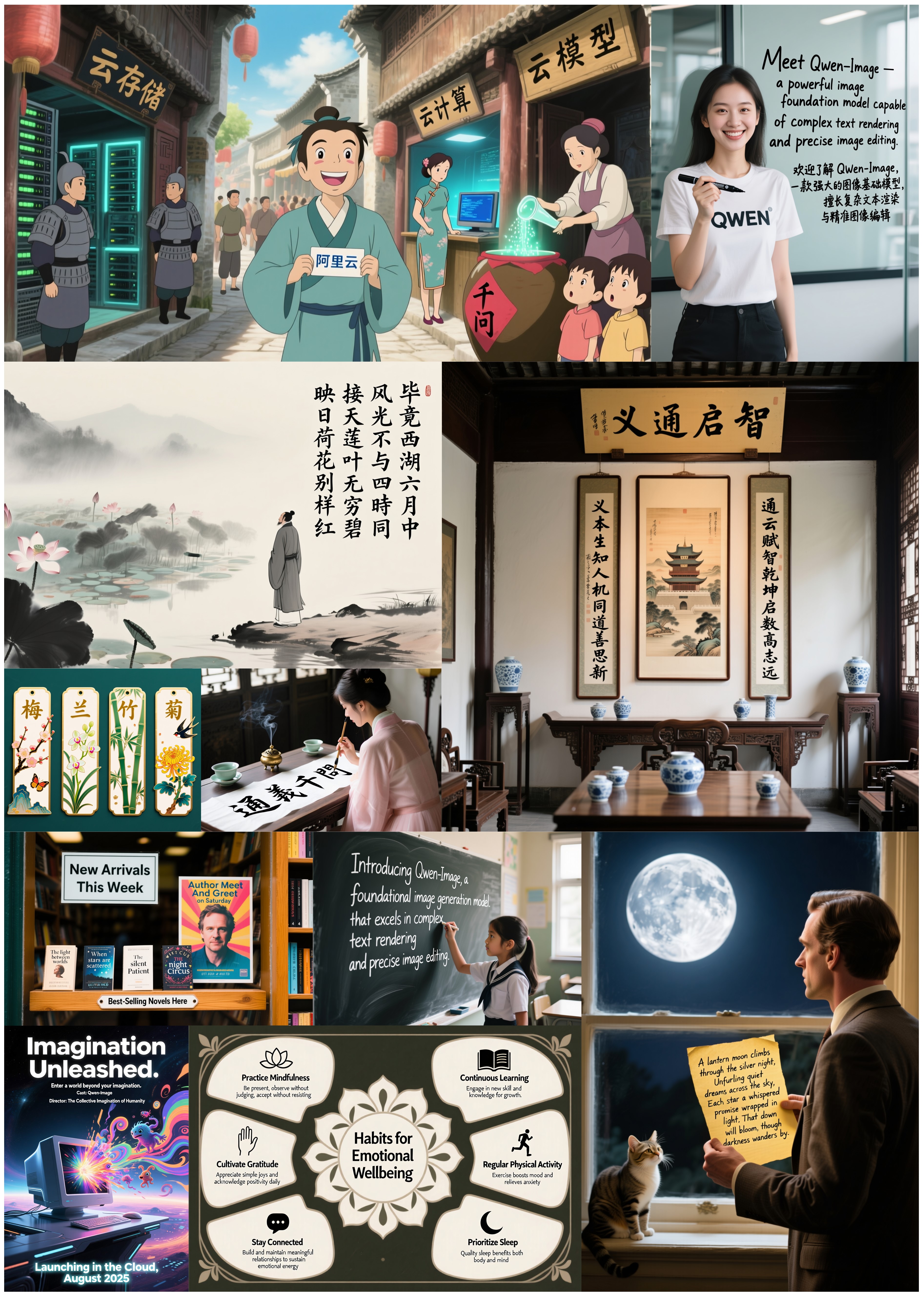
Beyond text, Qwen-Image excels at general image generation with support for a wide range of artistic styles. From photorealistic scenes to impressionist paintings, from anime aesthetics to minimalist design, the model adapts fluidly to creative prompts, making it a versatile tool for artists, designers, and storytellers.

When it comes to image editing, Qwen-Image goes far beyond simple adjustments. It enables advanced operations such as style transfer, object insertion or removal, detail enhancement, text editing within images, and even human pose manipulation—all with intuitive input and coherent output. This level of control brings professional-grade editing within reach of everyday users.

But Qwen-Image doesn’t just create or edit—it understands. It supports a suite of image understanding tasks, including object detection, semantic segmentation, depth and edge (Canny) estimation, novel view synthesis, and super-resolution. These capabilities, while technically distinct, can all be seen as specialized forms of intelligent image editing, powered by deep visual comprehension.

Together, these features make Qwen-Image not just a tool for generating pretty pictures, but a comprehensive foundation model for intelligent visual creation and manipulation—where language, layout, and imagery converge.
License Agreement
Qwen-Image is licensed under Apache 2.0.
Citation
We kindly encourage citation of our work if you find it useful.
@misc{wu2025qwenimagetechnicalreport,
      title={Qwen-Image Technical Report},
      author={Chenfei Wu and Jiahao Li and Jingren Zhou and Junyang Lin and Kaiyuan Gao and Kun Yan and Sheng-ming Yin and Shuai Bai and Xiao Xu and Yilei Chen and Yuxiang Chen and Zecheng Tang and Zekai Zhang and Zhengyi Wang and An Yang and Bowen Yu and Chen Cheng and Dayiheng Liu and Deqing Li and Hang Zhang and Hao Meng and Hu Wei and Jingyuan Ni and Kai Chen and Kuan Cao and Liang Peng and Lin Qu and Minggang Wu and Peng Wang and Shuting Yu and Tingkun Wen and Wensen Feng and Xiaoxiao Xu and Yi Wang and Yichang Zhang and Yongqiang Zhu and Yujia Wu and Yuxuan Cai and Zenan Liu},
      year={2025},
      eprint={2508.02324},
      archivePrefix={arXiv},
      primaryClass={cs.CV},
      url={https://arxiv.org/abs/2508.02324},
}