Stop wasting time re-explaining your project history to Claude Code, Codex, and Cursor
I've noticed that while tools like Claude Code have their own memory, that data is siloed per user and machine. If I finish a task in Codex on Saturday and switch to Claude Code on Monday, the new session is blind to the previous one's progress. I used to spend the first ten minutes of every session catching the AI up—and usually forgot to mention one critical detail, which inevitably led to the model hallucinating or overwriting work.
Why rules files like AGENTS.md eventually fail
Using a .md file for conventions is fine, but it can't handle "current state." I've hit three specific walls with this approach:
- Stale decisions: You change a design choice, but the rules file still lists the old one. The AI reads the file and starts reverting your recent changes.
- Redundant investigation: A new session spends twenty minutes re-discovering a bug that the previous session already solved, simply because the finding lived in a dead chat log.
- Collision blindness: Two different sessions edit the same file without knowing the other's intent, and you don't find out until the PR review.
Comparing the common context strategies
I've tried a few different ways to manage this. Here is how they actually stack up:
- Rules files (AGENTS.md, CLAUDE.md): Great for stable conventions and portable since they are plain text in Git. The problem is they are manual; there's no history of why a decision changed.
- Tool-native memory: Convenient for a single tool, but totally useless for teammates or when switching between Cursor and Claude Code.
- Specs/Decision records: Good for rationale, but agents rarely consult them unless you explicitly tell them to in the prompt.
- Task trackers: These track what to do, not the evidence or decisions found while doing it.
- Memory MCP servers: Often too scoped to a specific machine or user rather than the project itself.
- Shared project brain: This is the only one that keeps decisions, corrections, and evidence in a file committed with the code.
How the klypix-mcp implementation works
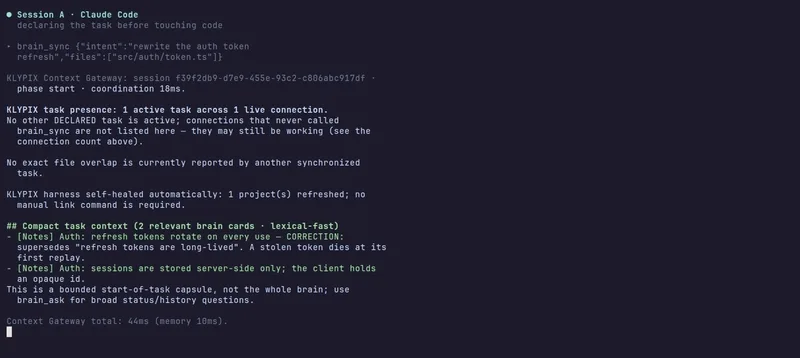
To solve this, I'm using klypix-mcp (Apache-2.0), which manages a brain.klypix file directly in the repo. Instead of me typing out a summary, the session handles the handoff through these specific MCP calls:
1. brain_sync: The agent sends its intent and the files it plans to touch, then receives only the relevant context.
2. brain_ask: Used to retrieve previous decisions and the history of any corrections.
3. brain_challenge: This surfaces conflicting rules or prior decisions that might contradict the current plan.
4. brain_note: The agent records new findings or explicit corrections.
The logic here is that a correction supersedes a stale decision while preserving the history. If a decision cites a specific piece of code and that code changes, the next Claude Code session flags the card for re-verification.
Since the MCP server runs as a local process and the brain is just a file in the repo, nothing is uploaded to a cloud unless I decide to share it. For manual overrides, there is a Windows desktop app that lets me edit the cards by hand, which the next AI session then reads as the source of truth.
https://github.com/dahshanlabs/klypix-mcp
I want to try this tonight. Does this actually work with LangGraph or does it need a custom state manager?