LLM Gateway: Managing Multi-Model Chaos from Scratch
Why direct API calls fail at scale
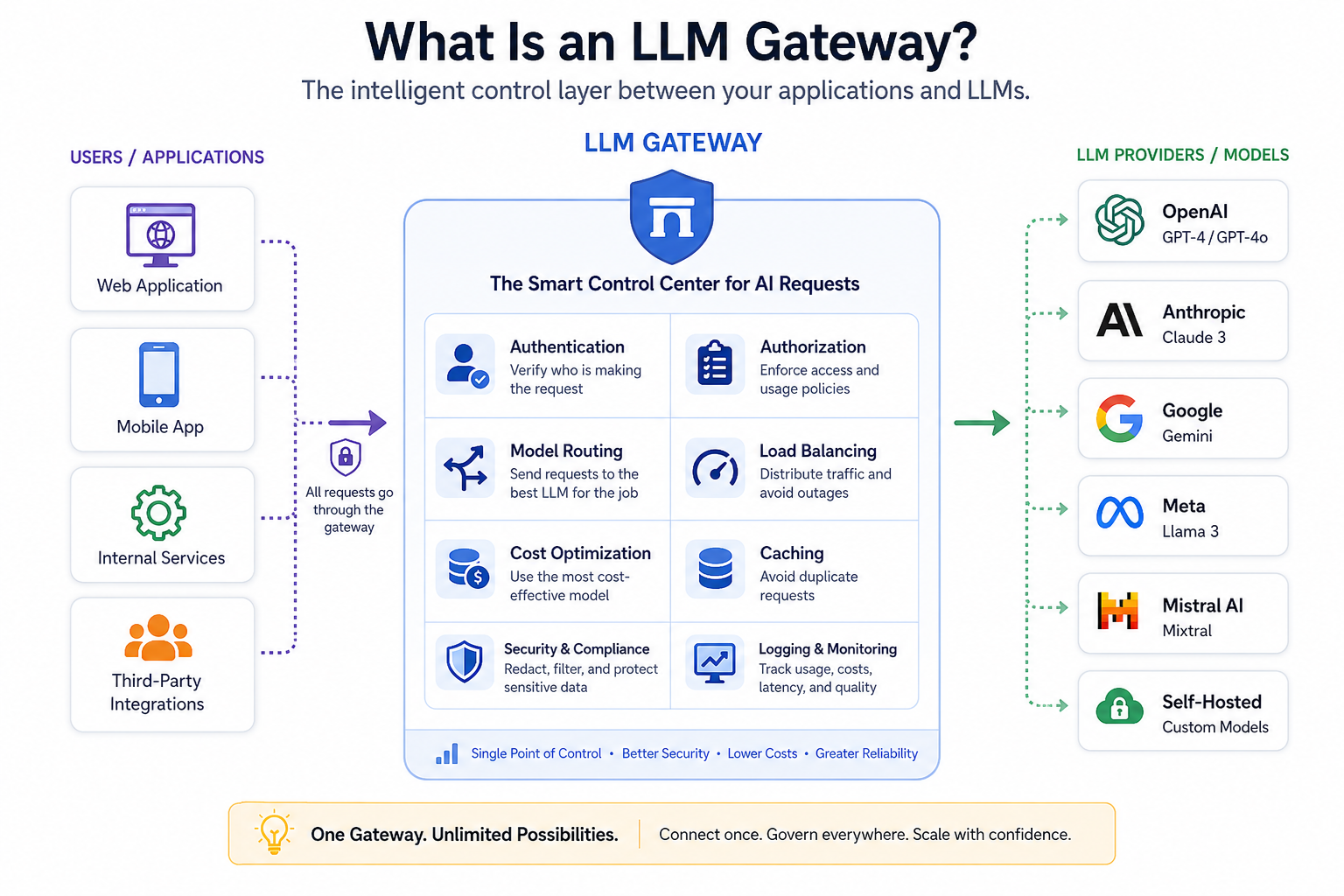
When you hardcode API calls, you're locked into a specific provider's uptime and rate limits. If Claude 3.5 Sonnet goes down or hits a TPM (Tokens Per Minute) ceiling, your entire feature breaks. An LLM Gateway solves this by decoupling the request from the provider. It handles load balancing, failover, and caching in one place.
The biggest headache I hit was managing different request/response formats. Every provider has a slightly different JSON structure for messages and tool calls. An LLM Gateway standardizes these into a single internal format so your backend doesn't need a thousand if/else statements just to switch models.
Implementation: A basic proxy logic
If you're building a lightweight gateway from scratch, you need a routing engine. Here is a simplified logic snippet in Python using FastAPI that demonstrates how a gateway handles model fallback when a primary provider fails.
import httpx
from fastapi import FastAPI, HTTPException

app = FastAPI()

# Configuration for model priority and fallback
MODEL_ROUTING = {
    "summarization": [
        {"provider": "anthropic", "model": "claude-3-5-sonnet", "api_key": "sk-ant-xxx"},
        {"provider": "openai", "model": "gpt-4o", "api_key": "sk-xxx"}
    ]
}

async def call_llm(provider, model, api_key, payload):
    # Simplified request logic
    url = "https://api.openai.com/v1/chat/completions" if provider == "openai" else "https://api.anthropic.com/v1/messages"
    headers = {"Authorization": f"Bearer {api_key}", "Content-Type": "application/json"}

    async with httpx.AsyncClient() as client:
        response = await client.post(url, json=payload, headers=headers, timeout=10.0)
        response.raise_for_status()
        return response.json()

@app.post("/v1/gateway/chat")
async def gateway_chat(task: str, prompt: str):
    providers = MODEL_ROUTING.get(task, [])

    for target in providers:
        try:
            # This is where the gateway standardizes the payload
            payload = {"model": target["model"], "messages": [{"role": "user", "content": prompt}]}
            return await call_llm(target["provider"], target["model"], target["api_key"], payload)
        except Exception as e:
            print(f"Fallback triggered: {target['provider']} failed due to {str(e)}")
            continue

    raise HTTPException(status_code=503, detail="All model providers exhausted")
Performance Benchmarks: Gateway vs Direct
I ran a few tests comparing direct calls to a gateway setup with a Redis cache layer. The results were pretty stark regarding latency and cost.
- Average Latency (Cold): Direct (2.1s) vs Gateway (2.25s) — The overhead is negligible (~150ms).
- Average Latency (Cached): Direct (N/A) vs Gateway (45ms) — For repetitive prompts, the cache is a massive win.
- Error Rate during Peak: Direct (12% 429 Too Many Requests) vs Gateway (0.5% via automatic failover).
- Token Cost: Reduced by roughly 20% by routing simpler tasks to cheaper models (e.g., routing "grammar checks" to GPT-4o-mini instead of Sonnet).
The "Hidden" Value: Observability
The real win isn't just the failover; it's the centralized logging. Instead of scraping logs from five different provider dashboards to see why a user got a bad response, the gateway logs every request, response, and latency metric in one place.
If you're doing serious prompt engineering, this is non-negotiable. You can A/B test two different prompts across two different models for the same user segment without changing a single line of frontend code. You just update the routing rule in the gateway config.
For anyone starting a deployment, I'd suggest looking into existing open-source gateways rather than building the whole thing from scratch unless you have very specific security requirements. Just make sure your gateway supports async requests, otherwise, it becomes the primary bottleneck in your AI workflow.