React Lifecycle: A Complete Guide to Class Components and Hooks
The Render Phase vs. Commit Phase
React splits its work into two distinct stages. If you confuse them, your app will suffer from performance lags or unpredictable behavior.
The Render Phase
This is where React calculates what the UI should look like. It must be pure.
- Do: Read props, read state, return JSX, calculate derived values.
- Don't: Make API calls, trigger timers, or manually manipulate the DOM.
- Why: React can call render-phase functions multiple times or discard them entirely before committing.
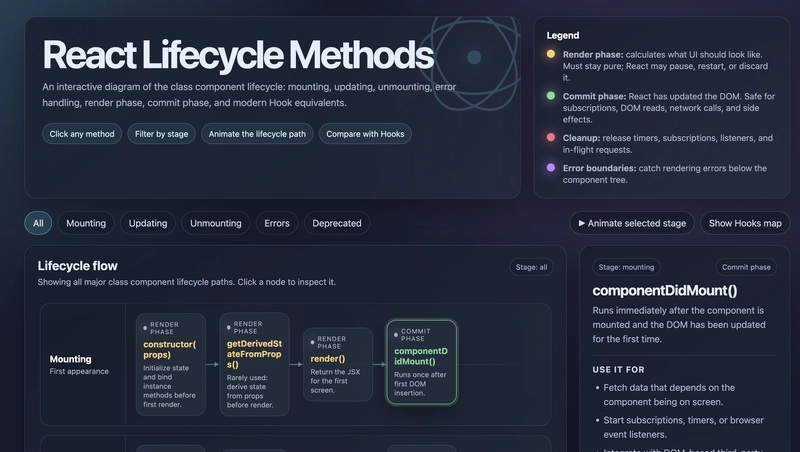
The Commit Phase
This is where React actually applies changes to the DOM. This is the safe zone for side effects.
- Do: Fetch data, set up subscriptions, integrate with non-React libraries, or log analytics.
Lifecycle Execution Flow
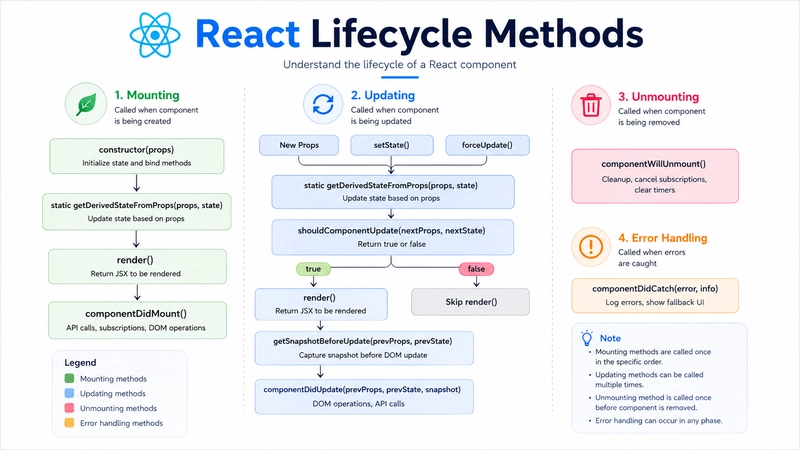
For those maintaining legacy codebases or preparing for technical interviews, you need to know the exact sequence of execution.
Mounting Sequence:constructor() → static getDerivedStateFromProps() → render() → componentDidMount()
Updating Sequence:static getDerivedStateFromProps() → shouldComponentUpdate() → render() → getSnapshotBeforeUpdate() → componentDidUpdate()
Unmounting Sequence:componentWillUnmount() → Component is removed from DOM.
Practical Implementation and Hook Equivalents
In a modern AI workflow, you'll likely use function components, but the underlying lifecycle logic remains identical. Here is how the class methods map to useEffect.
1. Mounting and componentDidMount
The
componentDidMount method runs once after the first render. In hooks, this is handled by an empty dependency array.// Class Component
componentDidMount() {
this.fetchData();
}
// Hook Equivalent
useEffect(() => {
fetchData();
}, []); // Empty array ensures this runs only once2. Updating and componentDidUpdate
componentDidUpdate is where you react to prop or state changes.// Class Component
componentDidUpdate(prevProps, prevState) {
if (prevProps.userId !== this.props.userId) {
this.fetchUserData(this.props.userId);
}
}
// Hook Equivalent
useEffect(() => {
fetchUserData(userId);
}, [userId]); // Only runs when userId changes3. Unmounting and componentWillUnmount
Crucial for preventing memory leaks, such as uncleared intervals or open WebSocket connections.
// Class Component
componentWillUnmount() {
  clearInterval(this.timer);
}

// Hook Equivalent
useEffect(() => {
  const timer = setInterval(() => console.log('Tick'), 1000);

  return () => clearInterval(timer); // The cleanup function
}, []);
Error Boundaries: The Class Component Exception
One critical detail: you cannot write an Error Boundary as a function component. You must use a class component because componentDidCatch and static getDerivedStateFromError have no Hook equivalents yet.
Here is a production-ready config for a basic Error Boundary:
import React from 'react';

class ErrorBoundary extends React.Component {
  constructor(props) {
    super(props);
    this.state = { hasError: false };
  }

  static getDerivedStateFromError(error) {
    // Update state so the next render shows the fallback UI.
    return { hasError: true };
  }

  componentDidCatch(error, errorInfo) {
    // You can log the error to an error reporting service here
    console.error("Caught error:", error, errorInfo);
  }

  render() {
    if (this.state.hasError) {
      return <h1>Something went wrong. Please refresh.</h1>;
    }

    return this.props.children;
  }
}

export default ErrorBoundary;
Performance Optimization with shouldComponentUpdate
To prevent unnecessary re-renders in large lists or complex dashboards, shouldComponentUpdate allows you to bail out of the render process.
shouldComponentUpdate(nextProps, nextState) {
  // Only re-render if the ID actually changed
  return nextProps.id !== this.props.id;
}
In function components, this is achieved using React.memo() or the useMemo hook to wrap expensive calculations.
All Replies (3)
useEffect cleanup functions. If you don't clear your intervals or listeners there, you'll get memory leaks regardless of the phase.