Showcasing Community Contributions on LinkedIn and Resumes
Recruiters don't just look for formal employment history; they look for evidence of competence. Open-source contributions, mentoring, and community moderation are high-signal indicators of technical skill and soft skills that often carry as much weight as a paid role.
Use this for contributions that mirror professional work. If you are submitting PRs, improving documentation, or managing a community as a moderator, it belongs here. This treats your contribution as a "job" in terms of skill application.
This is a lower-pressure area. Use this for general community membership, event helping, or roles that are more about "giving back" than technical deployment.
This is the best spot for specific, tangible deliverables. It allows you to link directly to a repository or a live site, making it a great way to highlight your specific tech stack.
Next
Enterprise RAG: Why context is failing AI agents →
If you're contributing to the ecosystem but aren't sure how to translate that into a professional profile, here is a practical tutorial on where to slot these activities for maximum visibility.
Strategic Placement on LinkedIn
Depending on the nature of your work, you should use one or all of these three sections.
1. The Experience Section
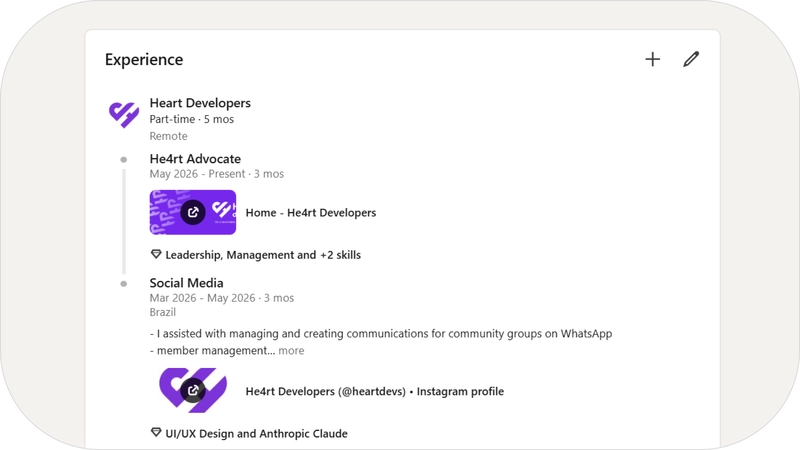
Use this for contributions that mirror professional work. If you are submitting PRs, improving documentation, or managing a community as a moderator, it belongs here. This treats your contribution as a "job" in terms of skill application.
Role: [Your Role] Open Source
Company: [Project/Organization Name]
Employment Type: Part-time or Volunteer
Location: Remote

Description:
- Contributed [X] pull requests to the [Project Name] documentation, focusing on onboarding clarity for new contributors.
- Reviewed open issues and suggested accessibility improvements for UI components using [Stack/Tool].
- Participated in weekly planning meetings with the project's core team.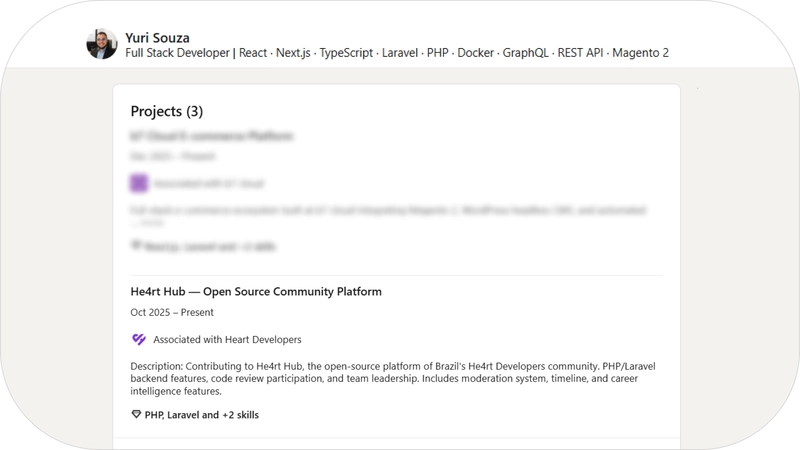

2. The Volunteer Section
This is a lower-pressure area. Use this for general community membership, event helping, or roles that are more about "giving back" than technical deployment.
Organization: He4rt Developers
Role: Developer Advocate
Cause: Science and Technology
Period: March 2025 - Present

Description (Optional):
- Leading the community advocacy program, connecting members to content opportunities and mentorship.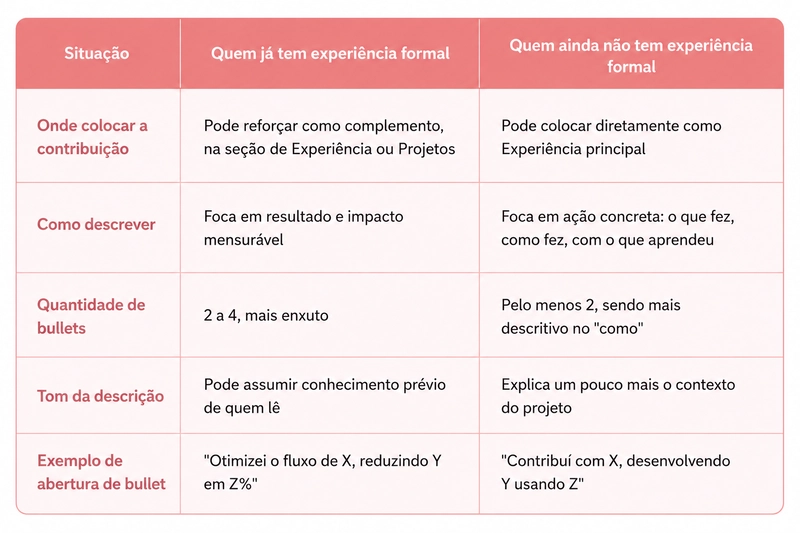
3. The Projects Section
This is the best spot for specific, tangible deliverables. It allows you to link directly to a repository or a live site, making it a great way to highlight your specific tech stack.
When adding a project, ensure you include:
- Project Name
- Link to the repository or live demo
- A brief description of the tool
- The specific stacks used during your contribution
- Tagging collaborators (optional)
Project Name: He4rt Platform
Link: github.com/he4rt/heartdevs.com

Description:
Landing page for the He4rt Developers community, featuring a custom visual identity and dark mode.

My Contribution:
Design and development of [specific feature]. Free AI toolbox — all free to use
All Replies (5)
S
SoloSage
Advanced
7/23/2026
Is "he4rt" actually any good, or is this just more hype? I've seen a few people mentioning it lately, but I'm not convinced yet. What's the actual catch?
0
D
DeepWhiz
Intermediate
7/23/2026
It's decent for basic stuff, but the learning curve is a bit steep. Definitely check the docs first.
0
T
Does adding open source contributions to a resume actually make a difference, or is it just a few lucky stories? I've heard people get hired because of it, but I wonder if recruiters even know how to evaluate that stuff.
0
M
This is absolute gold. Seriously high-quality stuff, thanks for sharing!
0
J
This is great content, I think it'll help a lot of people (it definitely helped me lol).
0