Qwen3 VL 4B Instruct
Overview
Highlights
- Efficient 4B parameter size for low-latency multimodal inference.
- Strong high-resolution image understanding and document parsing capabilities.
- Permissive Apache-2.0 license for seamless commercial deployment.
- Optimized for visual grounding and precise instruction following.
Usage
# Install Hugging Face transformers
pip install transformers torch# Load model with transformers
from transformers import AutoModel, AutoTokenizer
model = AutoModel.from_pretrained("Qwen/Qwen3-VL-4B-Instruct")
tokenizer = AutoTokenizer.from_pretrained("Qwen/Qwen3-VL-4B-Instruct")Hugging Face Download
We recommend downloading the model via the Hugging Face CLI or Hub SDK.
Guidance:Before downloading, install huggingface_hub with:
pip install -U huggingface_hubCLI Download
Download the full repository
huggingface-cli download Qwen/Qwen3-VL-4B-InstructDownload a single file to a local folder (e.g. config.json into ./dir)
huggingface-cli download Qwen/Qwen3-VL-4B-Instruct config.json --local-dir ./dirSee the official docs for more CLI options
SDK Download
# 模型下载
from huggingface_hub import snapshot_download
model_dir = snapshot_download('Qwen/Qwen3-VL-4B-Instruct')
Git Download
Make sure git-lfs is installed first
git lfs install
git clone https://huggingface.co/Qwen/Qwen3-VL-4B-Instruct
To skip LFS large-file downloads, use:
GIT_LFS_SKIP_SMUDGE=1 git clone https://huggingface.co/Qwen/Qwen3-VL-4B-InstructModel files are hosted on the Hugging Face Hub — download directly via HF CLI / SDK / Git, not through this site.
PyTorch / Transformers Usage
Install Transformers
pip install -U transformers torchLoad the model and run inference
from transformers import AutoModelForCausalLM, AutoTokenizer

model = AutoModelForCausalLM.from_pretrained('Qwen/Qwen3-VL-4B-Instruct')
tokenizer = AutoTokenizer.from_pretrained('Qwen/Qwen3-VL-4B-Instruct')
Model Download
We recommend downloading the model via the ModelScope CLI or SDK.
Guidance:Before downloading, install ModelScope with:
pip install modelscopeCLI Download
Download the full repository
modelscope download --model Qwen/Qwen3-VL-4B-InstructDownload a single file to a local folder (e.g. README.md into ./dir)
modelscope download --model Qwen/Qwen3-VL-4B-Instruct README.md --local_dir ./dirSee the docs for more CLI options
SDK Download
# 模型下载
from modelscope import snapshot_download
model_dir = snapshot_download('Qwen/Qwen3-VL-4B-Instruct')
Git Download
Make sure git-lfs is installed first
git lfs install
git clone https://www.modelscope.cn/Qwen/Qwen3-VL-4B-Instruct.git
To skip LFS large-file downloads, use:
GIT_LFS_SKIP_SMUDGE=1 git clone https://www.modelscope.cn/Qwen/Qwen3-VL-4B-Instruct.gitModelScope 模型页直接下载模型文件;无需将模型文件放在本站服务器。
Notebook Quickstart
Install the ModelScope library
pip install "modelscope[audio,cv,nlp,multi-modal,science]" -f https://modelscope.oss-cn-beijing.aliyuncs.com/releases/repo.htmlLoad the model and run inference
from modelscope.pipelines import pipeline
from modelscope.utils.constant import Tasks

p = pipeline('text-generation', 'Qwen/Qwen3-VL-4B-Instruct')
Full Documentation
---
license: apache-2.0
pipeline_tag: image-text-to-text
library_name: transformers
---
<a href="https://chat.qwenlm.ai/" target="_blank" style="margin: 2px;">
<img alt="Chat" src="https://img.shields.io/badge/%F0%9F%92%9C%EF%B8%8F%20Qwen%20Chat%20-536af5" style="display: inline-block; vertical-align: middle;"/>
</a>
Qwen3-VL-4B-Instruct
Meet Qwen3-VL — the most powerful vision-language model in the Qwen series to date.
This generation delivers comprehensive upgrades across the board: superior text understanding & generation, deeper visual perception & reasoning, extended context length, enhanced spatial and video dynamics comprehension, and stronger agent interaction capabilities.
Available in Dense and MoE architectures that scale from edge to cloud, with Instruct and reasoning‑enhanced Thinking editions for flexible, on‑demand deployment.
#### Key Enhancements:
- Visual Agent: Operates PC/mobile GUIs—recognizes elements, understands functions, invokes tools, completes tasks.
- Visual Coding Boost: Generates Draw.io/HTML/CSS/JS from images/videos.
- Advanced Spatial Perception: Judges object positions, viewpoints, and occlusions; provides stronger 2D grounding and enables 3D grounding for spatial reasoning and embodied AI.
- Long Context & Video Understanding: Native 256K context, expandable to 1M; handles books and hours-long video with full recall and second-level indexing.
- Enhanced Multimodal Reasoning: Excels in STEM/Math—causal analysis and logical, evidence-based answers.
- Upgraded Visual Recognition: Broader, higher-quality pretraining is able to “recognize everything”—celebrities, anime, products, landmarks, flora/fauna, etc.
- Expanded OCR: Supports 32 languages (up from 19); robust in low light, blur, and tilt; better with rare/ancient characters and jargon; improved long-document structure parsing.
- Text Understanding on par with pure LLMs: Seamless text–vision fusion for lossless, unified comprehension.
#### Model Architecture Updates:
<p align="center">
<img src="https://qianwen-res.oss-accelerate.aliyuncs.com/Qwen3-VL/qwen3vl_arc.jpg" width="80%"/>
<p>
1. Interleaved-MRoPE: Full‑frequency allocation over time, width, and height via robust positional embeddings, enhancing long‑horizon video reasoning.
2. DeepStack: Fuses multi‑level ViT features to capture fine‑grained details and sharpen image–text alignment.
3. Text–Timestamp Alignment: Moves beyond T‑RoPE to precise, timestamp‑grounded event localization for stronger video temporal modeling.
This is the weight repository for Qwen3-VL-4B-Instruct.
---
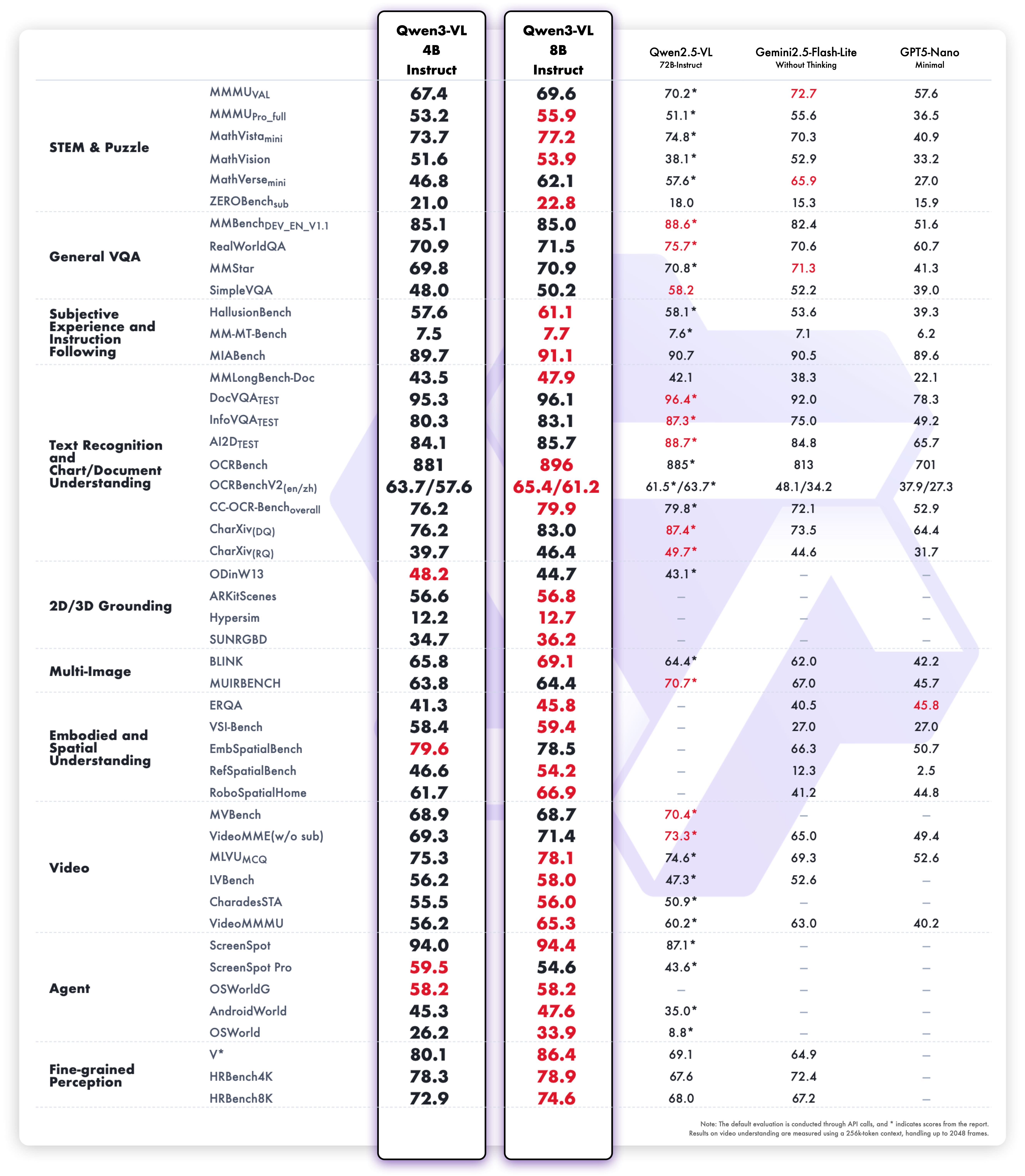
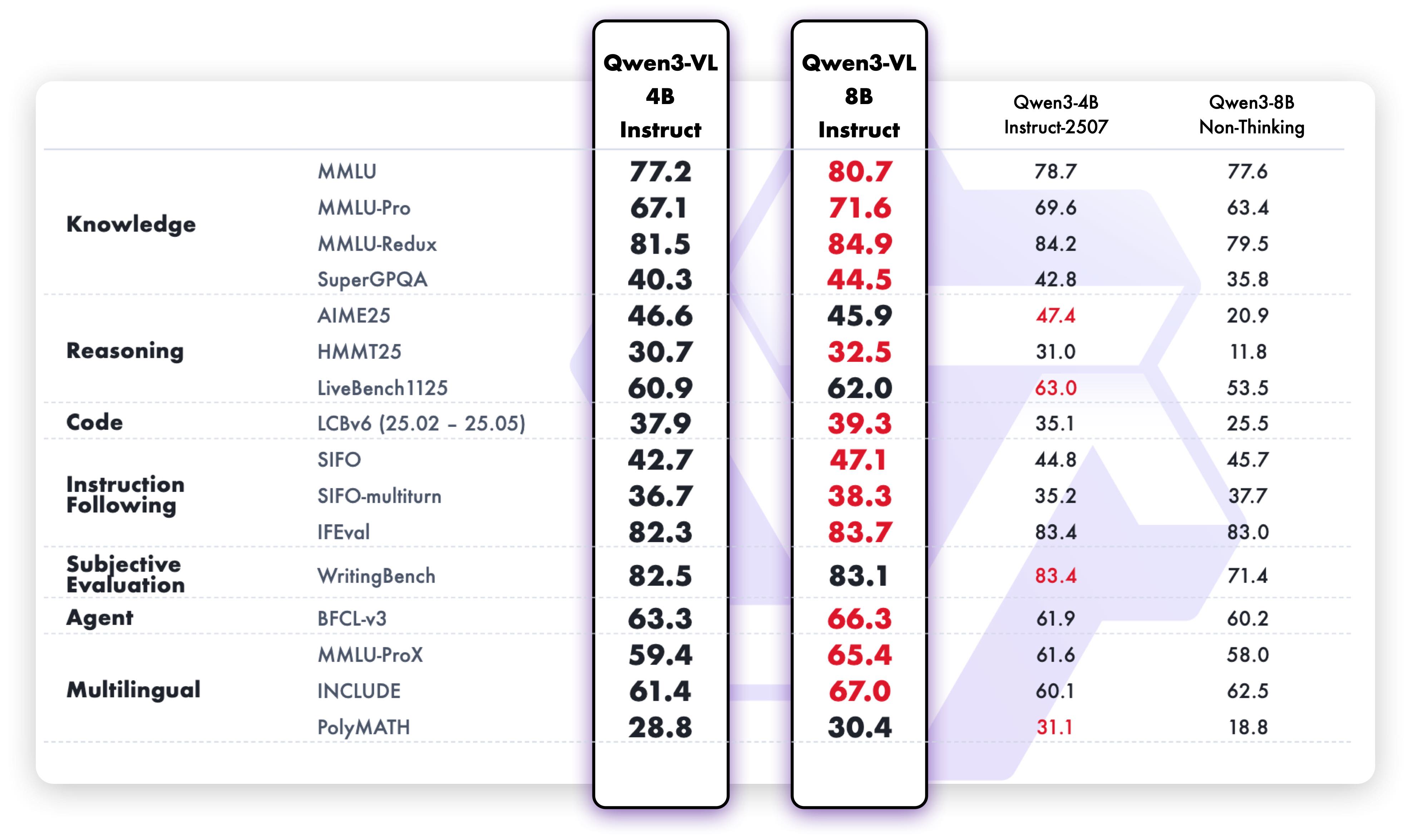
Model Performance
Multimodal performance
Pure text performance
Quickstart
Below, we provide simple examples to show how to use Qwen3-VL with 🤖 ModelScope and 🤗 Transformers.
The code of Qwen3-VL has been in the latest Hugging Face transformers and we advise you to build from source with command:
pip install git+https://github.com/huggingface/transformers
pip install transformers==4.57.0 # currently, V4.57.0 is not released
Using 🤗 Transformers to Chat
Here we show a code snippet to show how to use the chat model with transformers:
from transformers import Qwen3VLForConditionalGeneration, AutoProcessor
default: Load the model on the available device(s)
model = Qwen3VLForConditionalGeneration.from_pretrained(
    "Qwen/Qwen3-VL-4B-Instruct", dtype="auto", device_map="auto"
)
We recommend enabling flash_attention_2 for better acceleration and memory saving, especially in multi-image and video scenarios.
model = Qwen3VLForConditionalGeneration.from_pretrained(
    "Qwen/Qwen3-VL-4B-Instruct",
    dtype=torch.bfloat16,
    attn_implementation="flash_attention_2",
    device_map="auto",
)
processor = AutoProcessor.from_pretrained("Qwen/Qwen3-VL-4B-Instruct")
messages = [
    {
        "role": "user",
        "content": [
            {
                "type": "image",
                "image": "https://qianwen-res.oss-cn-beijing.aliyuncs.com/Qwen-VL/assets/demo.jpeg",
            },
            {"type": "text", "text": "Describe this image."},
        ],
    }
]
Preparation for inference
inputs = processor.apply_chat_template(
    messages,
    tokenize=True,
    add_generation_prompt=True,
    return_dict=True,
    return_tensors="pt"
)
inputs = inputs.to(model.device)
Inference: Generation of the output
generated_ids = model.generate(**inputs, max_new_tokens=128)
generated_ids_trimmed = [
    out_ids[len(in_ids) :] for in_ids, out_ids in zip(inputs.input_ids, generated_ids)
]
output_text = processor.batch_decode(
    generated_ids_trimmed, skip_special_tokens=True, clean_up_tokenization_spaces=False
)
print(output_text)
Generation Hyperparameters
#### VLexport greedy='false'
export top_p=0.8
export top_k=20
export temperature=0.7
export repetition_penalty=1.0
export presence_penalty=1.5
export out_seq_length=16384#### Text
export greedy='false'
export top_p=1.0
export top_k=40
export repetition_penalty=1.0
export presence_penalty=2.0
export temperature=1.0
export out_seq_length=32768
Citation
If you find our work helpful, feel free to give us a cite.
@misc{qwen3technicalreport,
      title={Qwen3 Technical Report},
      author={Qwen Team},
      year={2025},
      eprint={2505.09388},
      archivePrefix={arXiv},
      primaryClass={cs.CL},
      url={https://arxiv.org/abs/2505.09388},
}
@article{Qwen2.5-VL,
  title={Qwen2.5-VL Technical Report},
  author={Bai, Shuai and Chen, Keqin and Liu, Xuejing and Wang, Jialin and Ge, Wenbin and Song, Sibo and Dang, Kai and Wang, Peng and Wang, Shijie and Tang, Jun and Zhong, Humen and Zhu, Yuanzhi and Yang, Mingkun and Li, Zhaohai and Wan, Jianqiang and Wang, Pengfei and Ding, Wei and Fu, Zheren and Xu, Yiheng and Ye, Jiabo and Zhang, Xi and Xie, Tianbao and Cheng, Zesen and Zhang, Hang and Yang, Zhibo and Xu, Haiyang and Lin, Junyang},
  journal={arXiv preprint arXiv:2502.13923},
  year={2025}
}
@article{Qwen2VL,
  title={Qwen2-VL: Enhancing Vision-Language Model's Perception of the World at Any Resolution},
  author={Wang, Peng and Bai, Shuai and Tan, Sinan and Wang, Shijie and Fan, Zhihao and Bai, Jinze and Chen, Keqin and Liu, Xuejing and Wang, Jialin and Ge, Wenbin and Fan, Yang and Dang, Kai and Du, Mengfei and Ren, Xuancheng and Men, Rui and Liu, Dayiheng and Zhou, Chang and Zhou, Jingren and Lin, Junyang},
  journal={arXiv preprint arXiv:2409.12191},
  year={2024}
}
@article{Qwen-VL,
  title={Qwen-VL: A Versatile Vision-Language Model for Understanding, Localization, Text Reading, and Beyond},
  author={Bai, Jinze and Bai, Shuai and Yang, Shusheng and Wang, Shijie and Tan, Sinan and Wang, Peng and Lin, Junyang and Zhou, Chang and Zhou, Jingren},
  journal={arXiv preprint arXiv:2308.12966},
  year={2023}
}